
The cost register
The cost register is not one more thing to key in. Each line is read from its source document at the moment you open it:
| Origin | What enters the register |
|---|---|
| Asset record | The acquisition details: price, installation, transport, customs. For a taken-over asset with no details, its original value in the register. |
| Work order | The parts and labour of a completed order, on its end date. |
| Maintenance contract | Each instalment, shared equally among the covered assets, grouped by asset and by year. |
| Insurance policy | Each annual premium started, shared equally among the covered assets; the last one of a short period, pro rata to the days. |
| Claim | A repair paid outside a work order, and the compensation that offsets a repair (as a deduction). |
| Loan or leasing | The interest and fees of the loan that finances the asset. |
| Manual entry | What has no document anywhere else (see below). |
A line drawn from a document is corrected in its document: the link in the Origin column opens it. That way nothing counts twice: the invoiced contract is not keyed in again next to it.
- The tabs filter by group: Acquisition, Repairs, Servicing, Insurance, Financial, Penalties, Fines, Other.
- The filters: Year, Cost type, Origin, Cost center.
- The cards give the year's costs, the year's operating expenses, what is included in the gross value and the financial expenses.
- The table footer totals the selection, broken down by accounting treatment.
The Treatment column says how each cost is accounted for: Gross value, Expense, Financial expense, Non-deductible expense (a fine) or Income (a compensation).
Adding a cost
For a fine, a penalty, a road tax, a repair paid without a work order:
- Click Add a cost.
- Choose the Asset and the Cost type. Each type states its treatment: a fine is a non-deductible expense, interest a financial expense.
- Enter the Label.
- Choose the Supporting document: No ERP document (the Document reference, further down, is enough), a Validated purchase invoice, or a Cash expense.
- Enter the Date (never in the future) and the Amount (positive), then click Add.
- A purchase invoice justifies the cost up to its amount left to justify: its total excl. VAT, minus the assets and costs it already carries. An invoice generated by a maintenance contract is not offered: its instalments are already shared out.
- A cash expense imposes its amount and date, and justifies only one cost. An expense that pays a purchase invoice is not offered: attach the invoice instead.
Financing an asset
An asset bought on credit: open its record, tab Costs, box Financing, and choose the Loan financing the asset among the bank loans in Finance › Loans. Its interest (per financial year, on the instalments due, pro rata to the days) and its fees then enter the cost register, shared equally among the assets it finances.
An asset that came in through leasing needs nothing here: it is financed by its original leasing contract.
Total cost of ownership
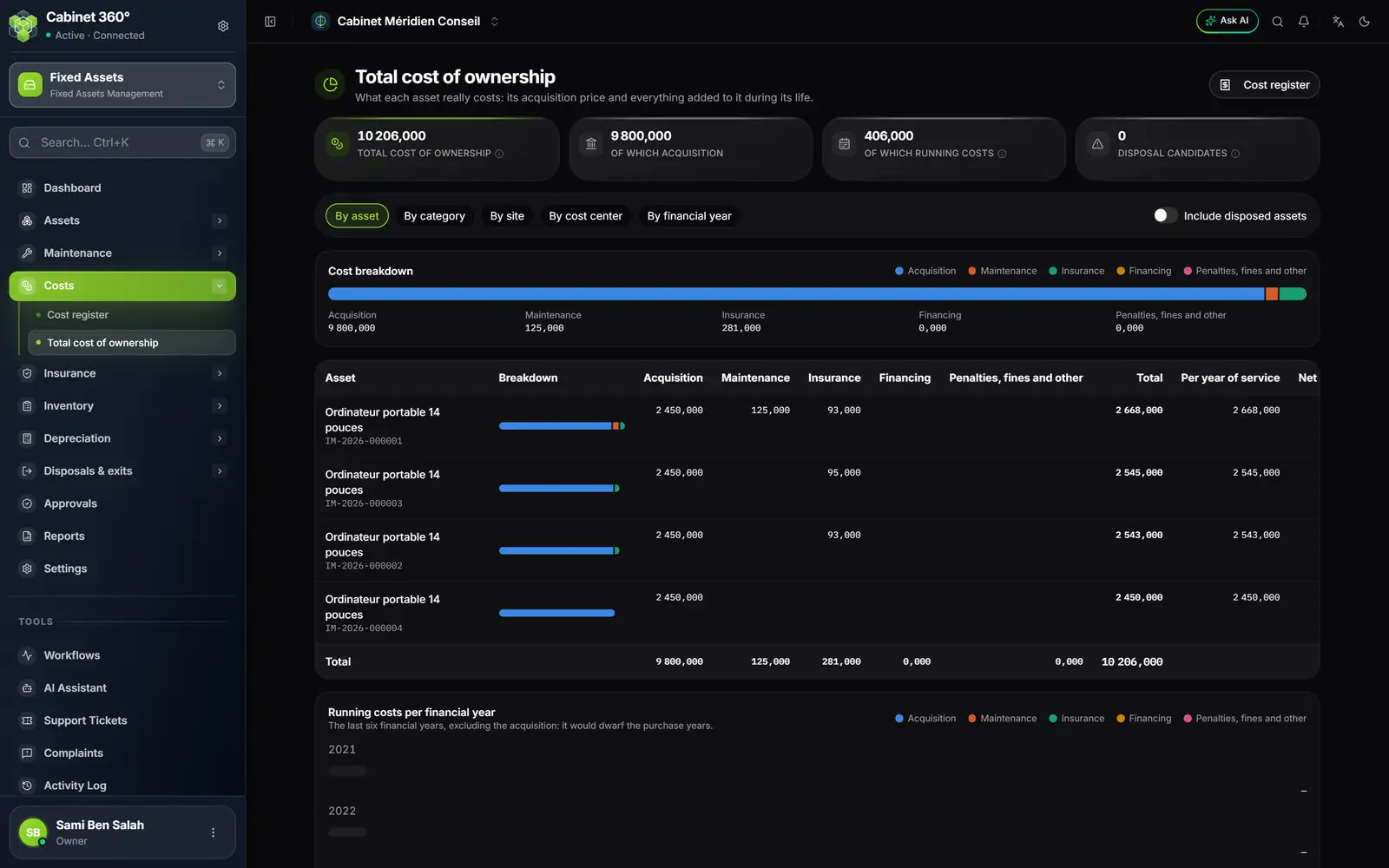
- 1. Total cost of ownership of the selected assets, acquisition included.
- 2. Of which running costs: everything except acquisition.
- 3. Disposal candidates: the assets that cost more to keep than they are worth.
- 4. Group by asset, category, site, cost center or financial year.
- 5. Include disposed assets for the full history.
- 6. The cost composition in five coloured parts.
- 7. Per year of service: the total divided by the years since commissioning.
The total cost of ownership adds up the cost register in five parts: Acquisition, Maintenance, Insurance, Financing and Penalties, fines and other. No figure is keyed in here.
- Per year of service divides the total by the years elapsed since commissioning. An asset in service for less than a year counts as one year.
- Running costs per financial year, at the bottom of the page, shows the last six financial years without acquisition, which would dwarf the purchase years.
- By default, only the assets held are counted; Include disposed assets adds the others.