
Work orders
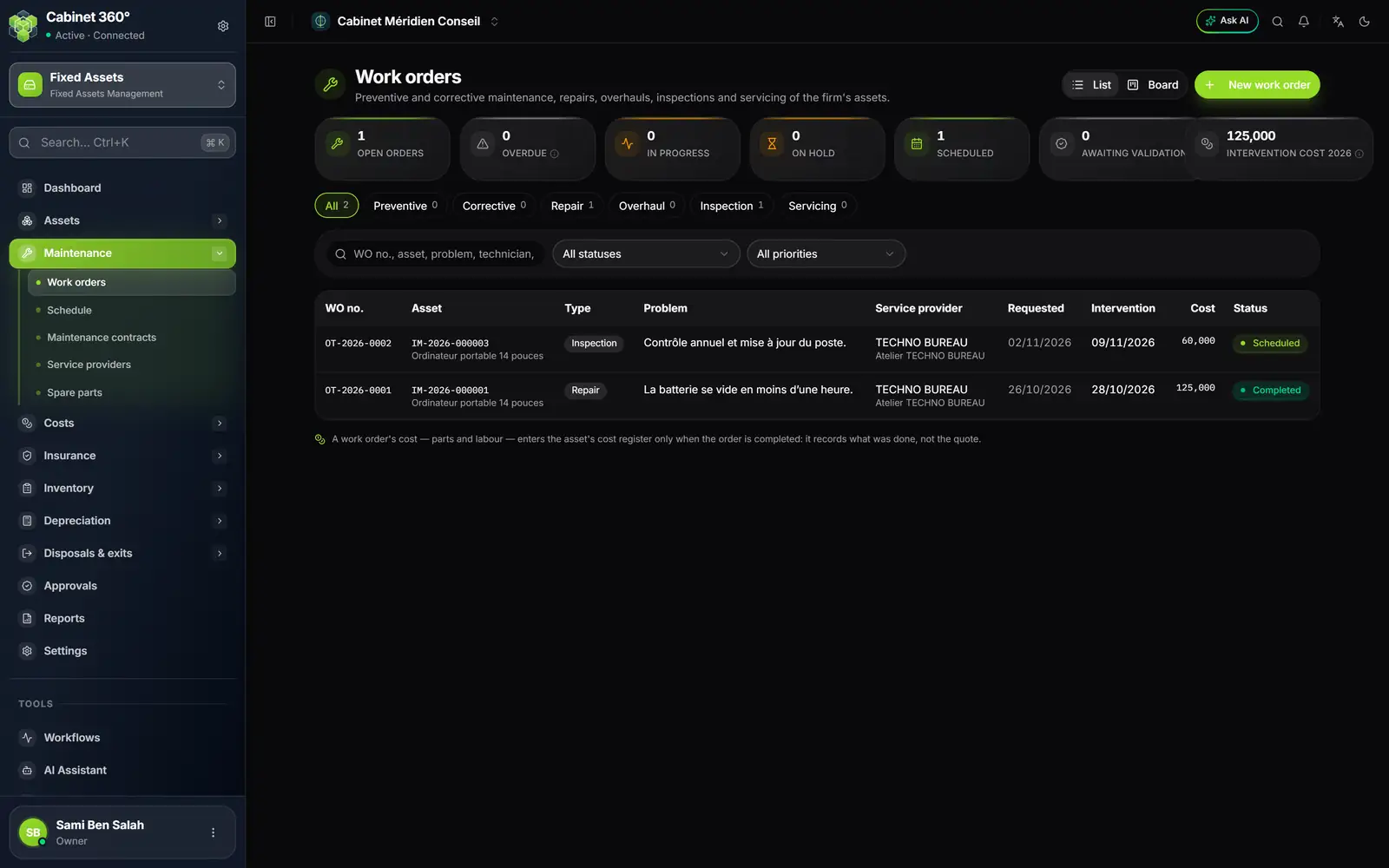
- 1. New work order: an asset, a problem, an intervener.
- 2. List or Board: the board arranges orders in columns, by status.
- 3. Overdue: requested or scheduled, never started, intervention date passed.
- 4. Awaiting validation: the orders a validation workflow is holding.
- 5. The intervention types, with their number.
- 6. The cost: parts and labour.
- 7. The cost enters the register only at the end of the order: what was done, not the quote.
Creating an order
- Click New work order (or from the asset record, tab Maintenance).
- Choose the Asset, the Intervention type (Preventive, Corrective, Repair, Overhaul, Inspection or Servicing) and the Priority (Normal, High, Urgent). Describe the Problem observed and, if you have it, the Diagnosis.
- Choose who intervenes: a Maintenance contract that covers the asset (the order then goes to its provider), a Service provider among your suppliers, or In-house — the firm's services. Add the Technician if you know them.
- If the intervention repairs a claim, choose the asset's Claim.
- Add the Wanted intervention date, the Estimated cost, the Spare parts (reference, description, quantity, unit price excl. VAT) and the Labour.
- Click Create the order. It is born Requested, numbered OT-YYYY-NNNN, and its page opens.
An order's workflow
| Action | What it does |
|---|---|
| Schedule | Confirms the planned date (it may be in the future) and the technician. The asset keeps its status. |
| Start | The start day, today at the latest. The asset becomes Under maintenance. |
| Put on hold | The intervention pauses; you say what the order is waiting for (a part, an approval). The asset stays under maintenance. |
| Resume | Restarts the order on hold. |
| Complete | The end day, neither before the start nor in the future. The cost enters the cost register and the asset gets back its previous status. |
| Cancel the order | From any open status, with a reason. No cost enters the register; a started order gives the asset back its previous status. |
An order is overdue when it is requested or scheduled and its intervention date has passed. Only an order still Requested can be deleted (a keying mistake). A scheduled order, or one opened on the wrong asset, is cancelled: the asset of an order does not change.
An order's cost
An order's cost is the sum of its parts (each line rounded to the millime before being added) and its labour. It enters the asset's cost register only at the end of the order, on its end date: labour is filed under « labour » for a repair, under « servicing » for servicing. The provider's invoice often arrives later: the cost of a completed order remains correctable with Edit, and every correction enters the log.
Intervention slip prints an A4 PDF: the asset, the intervention, the parts and labour, and three signatures: requester, technician and receipt of the asset.
The schedule
A calendar of the month: interventions (planned, in progress, on hold, completed), the ends of maintenance contracts and insurance policies, and inventory days, each in its colour. The right-hand column announces the next 30 days. The arrows change the month, Today comes back to it.
Maintenance contracts
A maintenance contract is an IntegraSys supplier contract, entered first in Operations › Contracts › Contract generation: the supplier, the dates, the amount per instalment, the frequency and the generated purchase invoices live there. The module adds what concerns the assets.
- Click Attach a contract.
- Choose the Supplier contract, then the Covered assets.
- Enter the Response time in days, the Renewal (Tacit renewal, Express renewal or No renewal), the Service level (SLA), the Terms and the Penalties.
- Click Attach. The maintenance contract receives its number CE-YYYY-NNN.
- Its annual cost excl. VAT: the amount of the current instalment × the number of instalments per year; for an « Other » frequency, the instalments of the calendar year.
- In the cost register, each instalment is shared equally among the covered assets that were in the asset base during its period.
- Its expiry: alerts at 90, 60, 30, 15 and 7 days before the end. The contract is To renew from 90 days before expiry to 30 days after.
- An order placed under this contract goes to its provider, and the contract must cover the asset. The contract's response time is used to measure the provider.
An asset covered by an open order under this contract cannot be removed from the contract. Detach gives the contract back to Operations without deleting it, as long as no work order mentions it.
Service providers
A service provider is an IntegraSys supplier: the module has no second file. A supplier becomes a provider as soon as a maintenance contract or a work order is entrusted to it. For each one, the page measures its Contracts, its Interventions, its Average response time (from request to intervention), its On-time rate and its 12-month cost.
Spare parts
All the parts fitted by completed orders, grouped by reference (failing that, by description): how many, on which assets, at what cost, and the last order. This page and the service providers page are read-only.