
The eight settings tabs
The page has eight tabs. The first four are set before the first asset; the others when you need them.
| Tab | What it sets | When |
|---|---|---|
| Dossier and threshold | The firm's accounting file, the capitalisation threshold, the insurance ceiling threshold, taking over the register | First of all |
| Categories | The file's fixed-asset families and their sub-categories | Before the first asset |
| Organisation | Each collaborator's workstation, the units (departments, services…) | Before the first assignment |
| Transfer reasons | The list of reasons a transfer request offers | Ready from the start |
| Accounting link | The accounts and the journal of the module's entries | Before the first entry |
| Validation workflows | Who approves which operation, above which amount | See chapter 15 |
| Site permissions | Restricting a user to their own sites | If the firm has several sites |
| Alerts | Who is notified, of what, and whether by e-mail | See chapter 16 |
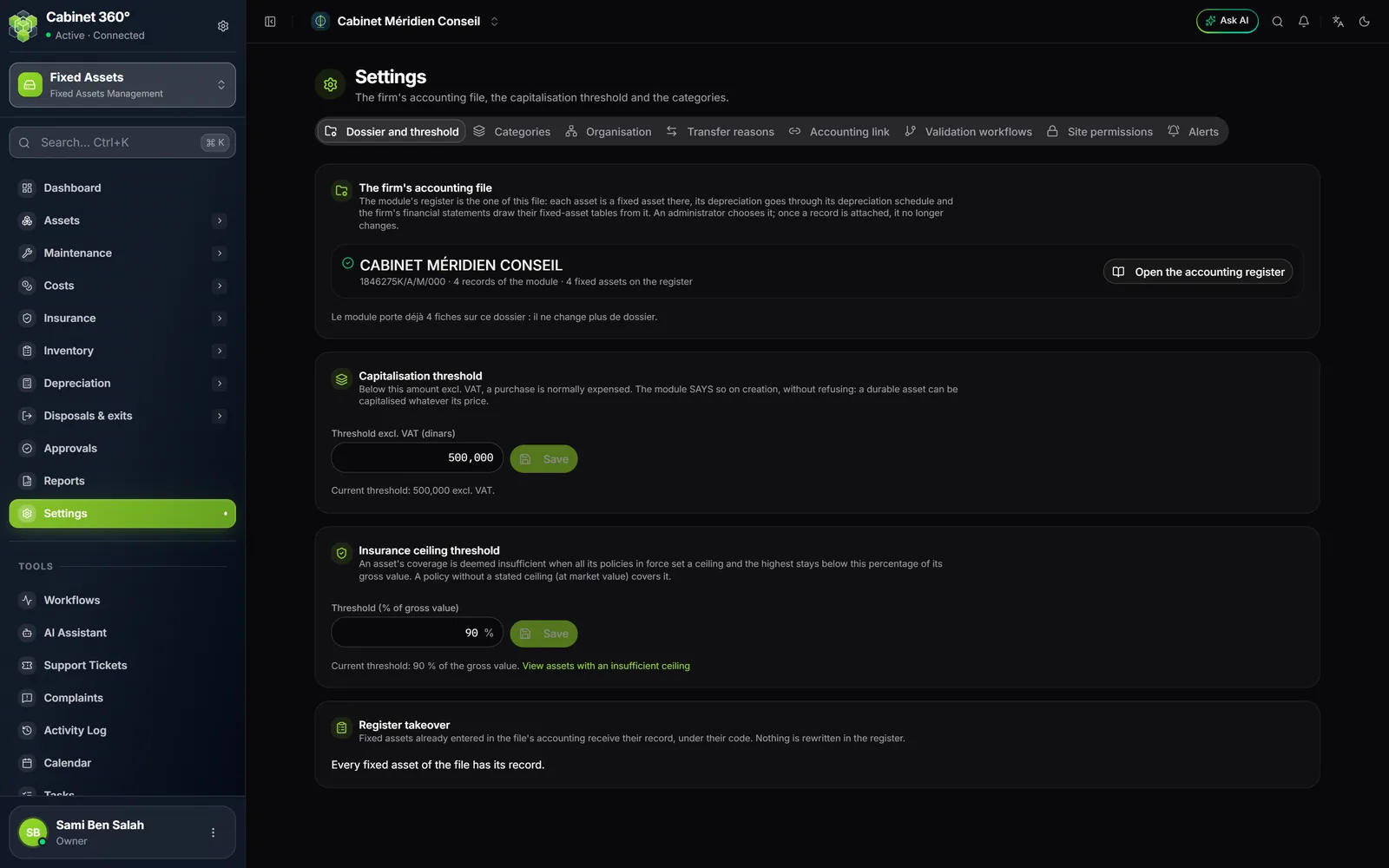
The firm's accounting file
The module's register is the register of an accounting file: the one in which the firm keeps its own accounts. That file is created like a client's, in Accounting › Accounting clients. Then:
- Open Settings, tab Dossier and threshold.
- Open the Choose the firm's file list. It offers first the file whose client carries your company's tax ID (failing that, its company name): it is marked suggested, never chosen for you.
- Pick the file, click Use this file, then confirm.
As long as no file is chosen, every screen of the module shows « The firm's accounting file has not been chosen yet » and a Choose the firm's file button. It is not a fault: it is the first setting still missing.
The file also needs at least one financial year in its accounting. Without one, depreciation shows « — » everywhere, never zero.
The two thresholds
The capitalisation threshold. Below this amount excluding VAT, a purchase normally stays an expense. By default: 500,000 DT excl. VAT. The module warns you when an asset falls below it, but it never refuses: a lasting asset can be capitalised whatever its price. Field Threshold excl. VAT (dinars); left empty, no warning.
The insurance ceiling threshold. An asset has an Insufficient limit when all its policies in force set a limit and the highest stays below this percentage of its gross value. By default: 90 %, adjustable from 1 to 100 %. It is used by the Coverage page (chapter 10).
Categories: the file's families
The module's asset categories are the fixed-asset families of the firm's accounting file. Each carries a depreciation rate, a method (straight-line or declining balance) and two accounts: the asset account and the accumulated depreciation account. The module keeps no copy of them: they are set in the file's accounting.
- Default categories places, in a file that has none, the families of the IntegraSys reference list. The button never creates a duplicate: a family already there is skipped.
- Manage categories opens the families page in the file's accounting, to change a rate or an account.
The rate scale proposed by IntegraSys
The reference list can be read in Settings › Accounting reference, tab Fixed-asset families. Today it proposes (family names as they appear on screen):
| Code | Family | Heading | Rate |
|---|---|---|---|
LOG | Logiciels (software) | Intangible | 33,33 % |
WEB | Site WEB (website) | Intangible | 33,33 % |
MAT-INF | Matériel informatique (IT equipment) | Tangible | 33,33 % |
EQUI-BUR | Équipements de Bureau (office equipment) | Tangible | 20 % |
MAT-TRANS | Matériel de transport (vehicles) | Tangible | 20 % |
MAT-IND | Matériel industriel (industrial equipment) | Tangible | 10 % |
INST-GLE | Installations Générales (general fittings) | Tangible | 10 % |
CONS | Constructions (buildings) | Tangible | 5 % |
IMM-STAT | Immobilisations à Statut Juridique Particulier (assets with a special legal status) | Tangible | 0 % |
Sub-categories and mobility
A sub-category details a category (for example « Laptops » and « Screens » under IT equipment). It changes nothing in the accounting entries. It has a Label, an Order, an Active box and the On assignment setting: what an assignment suggests doing with the asset.
| Mobility | What the asset does when it is assigned |
|---|---|
| Mobile — follows its assignee | It goes to the collaborator's workstation, or to the unit's location. |
| Vehicle — keeps its parking spot | It stays at its location. |
| Fixed — does not move | It stays at its location. |
Left on According to the category, mobility follows the family: buildings and general fittings are fixed, vehicles are vehicles, an intangible asset does not move, and everything else follows its assignee.
Organisation
The Organisation tab keeps two lists, which assignments use to suggest a location (chapter 6).
- Workstations: each collaborator's place of work. Collaborators are the firm's agents; their record has no workplace, so the module keeps it here.
- Organisation units: departments, services, cost centers and projects, each with its Default location. Import the departments creates the units from the agents' departments, without duplicates. A unit named by an assignment cannot be deleted: it is deactivated.
Transfer reasons
A transfer request picks its reason from a list. Six reasons are placed from the start (in French on screen): Réorganisation (reorganisation), Changement de bureau (change of office), Ouverture d'un bureau (opening an office), Intervention chez le prestataire (work at the provider's), Mise en réforme (retirement), Prêt temporaire (temporary loan). Add, rename or deactivate your own: a transfer keeps the label it received, and a deleted reason does not come back.
The accounting link
The module's entries (depreciation, disposals, revaluations, impairments) are posted in the firm's file, on ten accounts and one journal.
| Account | Number looked for in the chart |
|---|---|
| Depreciation charges — intangible assets | 68111, failing that 6811 |
| Depreciation charges — tangible assets | 68112, failing that 6811 |
| Receivables on asset disposals | 452 |
| Net gains on disposals | 736 |
| Net losses on disposals | 636 |
| Impairment provision charges — intangible / tangible | 68161 / 68162, failing that 6816 |
| Impairment provision reversals — intangible / tangible | 78161 / 78162, failing that 7816 |
| Special revaluation reserve | 144 |
An account you do not set is suggested: the module looks for its number in the file's chart of accounts and shows it marked suggested. If it finds nothing, the screen says so, and the operation that needs it is refused, naming the account. The suggested Operations journal is the file's first miscellaneous-operations journal.
Setting the link requires the Edit right.
Site permissions
Useful to a firm with several sites (a head office, a branch). By default, everyone sees all the assets their role opens to them. A permission restricts a user to certain sites, with one level per site:
| Level | What it opens on the site |
|---|---|
| Read | See the site's assets |
| Inventory | See them and count them (campaign scanner) |
| Approval | See them and decide the site's approvals |
| Management | Every action the role allows |
A restricted user sees at the top of the module « Your permissions limit this module to: … ». What concerns the whole asset base they can read but not change: the settings, the link, the workflows, the alerts. The year's depreciation table is closed to them: its totals would reveal what the other sites own.