
Seven operations, seven amounts
A validation workflow covers one operation, and assesses one amount:
| Operation | Assessed amount |
|---|---|
| Work order | The order's estimated cost |
| Claim | The damage estimate |
| Sale offer | The asset's NBV on the offer date |
| Sale to an employee | The asset's NBV on the offer date |
| Retirement | The asset's NBV |
| Revaluation | The revaluation difference |
| Impairment | The impairment recorded |
A workflow has a Threshold (TND) and one to four Approval levels, decided in order. When an operation has several workflows, the one that applies is the active workflow with the highest threshold strictly exceeded; an empty threshold applies to every amount. No workflow applies: the operation is decided without approval.
The workflows set up by default
When the module is opened, IntegraSys sets up these workflows once. A workflow you delete does not come back.
| Operation | Threshold | Levels (names as on screen) |
|---|---|---|
| Work order | Above 2 000,000 DT | Maintenance et services généraux › Direction administrative et financière |
| Claim | Above 10 000,000 DT | Assurance › Direction |
| Sale offer | Whatever the amount | Gestionnaire du patrimoine |
| Sale offer | Above 5 000,000 DT | Gestionnaire du patrimoine › Direction |
| Sale to an employee | Whatever the amount | Gestionnaire du patrimoine › Direction |
| Retirement | Whatever the amount | Commission de réforme › Direction |
| Revaluation | Whatever the amount | Comptabilité du cabinet › Direction |
| Impairment | Whatever the amount | Comptabilité du cabinet › Direction |
These levels name nobody: until you set them, the firm's management (owner, administrator, manager) decides at each level.
Setting a workflow
- Click New workflow, or open an existing one.
- Choose the Operation and the Threshold (TND) (empty: whatever the amount). Leave Active workflow ticked.
- For each level (Add a level, four at most): a Title, the Approvers, and if needed The asset's site manager can also decide.
- Put the levels in order, then save.
Who decides at a level
- The named approvers, plus the asset's site manager if the box is ticked.
- Neither: the firm's management. A level that only targets the site manager, for an asset whose site has none, also falls back on management.
- A named approver who has left the firm no longer decides and is no longer notified: the level's other approvers decide, and if none is left, management. The workflow marks them « (former member) »: edit it to remove or replace them, otherwise saving is refused.
- An approver whose site permissions do not allow approving on the asset's site does not decide.
Deciding a request
The page opens on the requests For me to decide. The filters also show those Awaiting validation, Validated, Refused, Cancelled, My requests and All. Each line gives the number, the operation, the subject, the Assessed amount, the Level (« level 1 of 2 »), the Requester and the Waiting time.
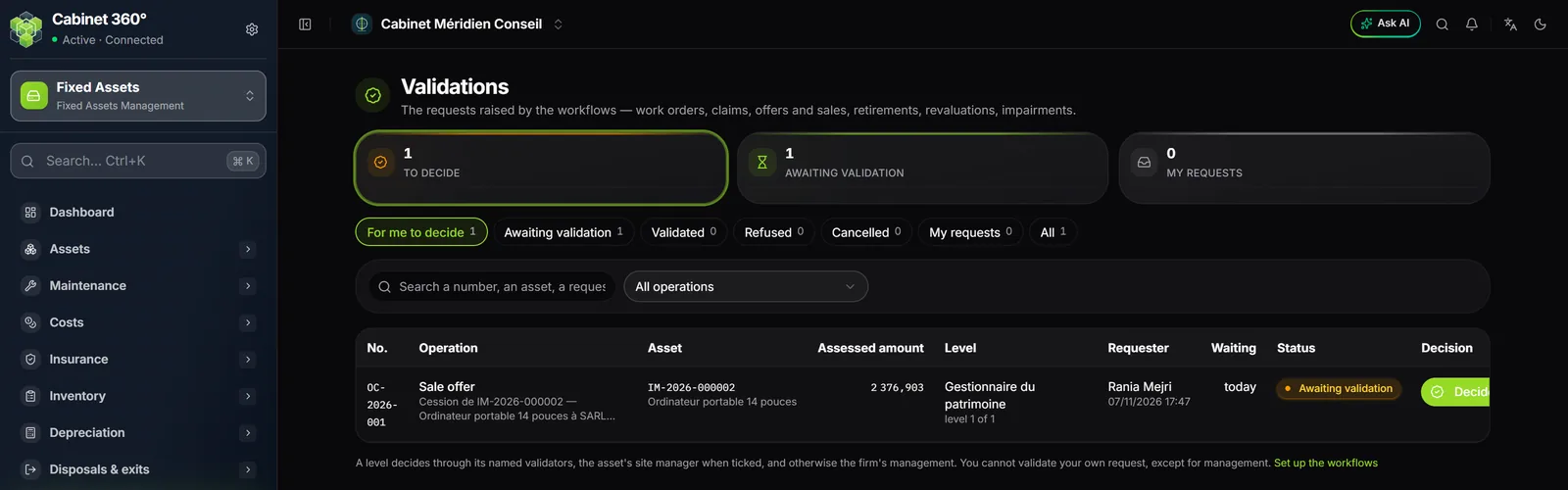
- Click Decide on the line (or open the operation: its record carries its Validation workflow, with the levels passed, current and to come).
- Write a Reason if needed: optional when validating, required when refusing (the requester will read it).
- Click Validate (the request moves to the next level, or is validated at the last one) or Refuse (the workflow stops).
Validated at the last level, the request triggers the operation's effect, in the same action: the revaluation and the impairment post their entry, the offer puts the asset To be disposed of, the retirement can be carried out. Refused, a revaluation, an impairment or an offer becomes editable again and can be submitted again; a refused retirement is closed: a new one must be requested.
A new submission of the same item cancels the request still in progress: never two approvals in parallel. The list stops at the 500 most recent requests and says so.
Who is notified
- On submission, then at each level passed: the approvers of the current level.
- At the final decision: the requester.
Each one receives a notification under the bell, and an e-mail if the « validation » alert enables it (Settings › Alerts) and if they have turned on e-mail notifications in their preferences.
The bell carries a section Asset validations: the ten oldest requests to decide, with their number, operation, subject and level, then a link to all of them. Its counter adds to the notifications counter.
Work orders and claims on hold
A work order whose estimated cost exceeds a threshold, and a claim whose estimate exceeds its own, are submitted as soon as they are entered. Until the decision is taken:
- the order can be neither scheduled nor started;
- the claim can be neither sent to the insurer nor handled.
Their page carries a validation box: the levels, the decisions and the Decide button. An estimate that changes is submitted again on its own; refused, you revise the amount or submit again. Once the order is scheduled, its estimated cost is frozen: the actual cost is what counts.
The lists of orders and claims have an Awaiting validation card that filters them.