
A single engine
The module computes no depreciation itself. It reads the year's depreciation table in the firm's accounting file: once validated, its figures are authoritative; until then, the IntegraSys engine computes on the fly. It is the same engine as for your clients' accounts: an asset shows the same charge on every screen, and the fixed-asset tables of the firm's own tax return come from it.
The three methods
The category proposes the method (straight-line or declining balance) and the rate; the asset record can change them. The units-of-production method is chosen on the asset record.
| Method | A financial year's charge |
|---|---|
| Straight-line | Gross value × rate × days held in the year ÷ days in the year. The first year runs from the acquisition date. |
| Declining balance | (Gross value − depreciation already recorded) × rate × coefficient, pro rata to the days. The engine applies a coefficient of 1,5 for a life of 4 years or less, 2 for 5 or 6 years, 2,5 beyond. |
| Units of production | Gross value × units read during the year ÷ the asset's total capacity (see below). |
In every case, an asset never depreciates beyond its gross value (minus its impairment provision), and depreciation stops on its exit date.
Example. A computer worth 2 450,000 DT acquired on 05/10/2026, straight-line at 33,33 % over a calendar year: 88 days held in 2026, so 2 450,000 × 33,33 % × 88 ÷ 365 = 196,875 DT of depreciation for 2026.
Depreciation plans
The list shows each asset held: its family, its acquisition date, its gross value, its rate and method, the year's charge, the accumulated depreciation, the NBV and the End of depreciation. Filter by state (Being depreciated, Fully depreciated, Not depreciable), by family or by method. Click an asset to open its plan.
A plan's page shows:
- the asset: acquisition, gross value, rate and method, prior depreciation;
- depreciation per financial year: each year's validated table is authoritative, the others are computed;
- the indicative plan: the whole useful life, in full years, without pro rata, as on the accounting's register. It is a guide;
- the revaluation components, if any (chapter 13).
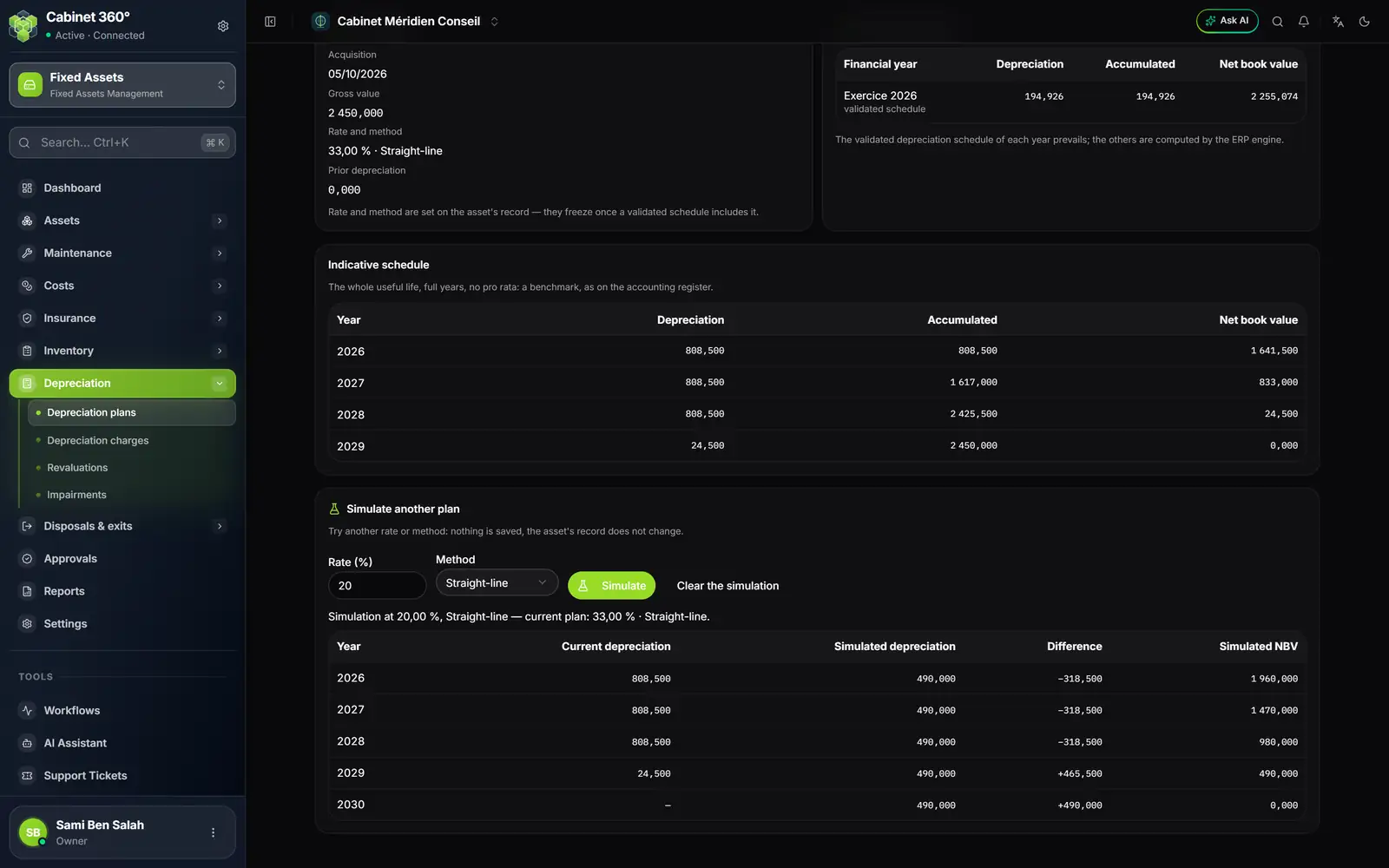
- 1. Rate and method of the asset: they are set on its record.
- 2. Per financial year: 2026, read from the validated table.
- 3. The indicative plan: full years, no pro rata, a guide.
- 4. Simulate: another rate or method, without saving anything.
- 5. The summary of the simulation and the current plan.
- 6. The difference, year by year, between current and simulated depreciation.
Simulating another plan
In Simulate another plan, enter a Rate (%) (from 0 to 100) and a Method, then click Simulate. The table compares, year by year, the Current depreciation, the Simulated depreciation, the Difference and the Simulated NBV. Clear the simulation returns to the plan.
Units of production and meter readings
A copier wears out with the pages it prints, a vehicle with the kilometres it drives. The Units of production method depreciates an asset according to its use.
On the asset record, choose the Method « Units of production », then enter:
- the Unit of production: pages, km, hours…;
- the Total capacity: the number of units the asset will deliver over its life (required: without it nothing is computed);
- the Reading at commissioning: the meter at the start, 0 for a new asset;
- the Expected units per year: only used by the indicative plan.
Then, Depreciation tab of the record (or Enter the meter readings from the plan), click New reading: the Reading date, the cumulative meter Reading and a Comment.
- A year's charge = gross value × units read during the year ÷ total capacity. Consumption counts in the year in which it is read: without a reading in the year, the charge is zero.
- A meter never goes backwards: a reading is never below the initial reading, below the previous reading, or above the next one. One date per day, never in the future, never before the acquisition or after the exit.
- A reading in a year whose table is validated is frozen.
- Beyond the last reading, the indicative plan projects at the expected units per year, and those years are marked « expected ».
The year's depreciation charges
The page drives the depreciation table of the financial year chosen at the top right (by default, the current year). It shows its status, its dates, its figures, its lines by family, the year's disposals, its two entries and the accounting link.
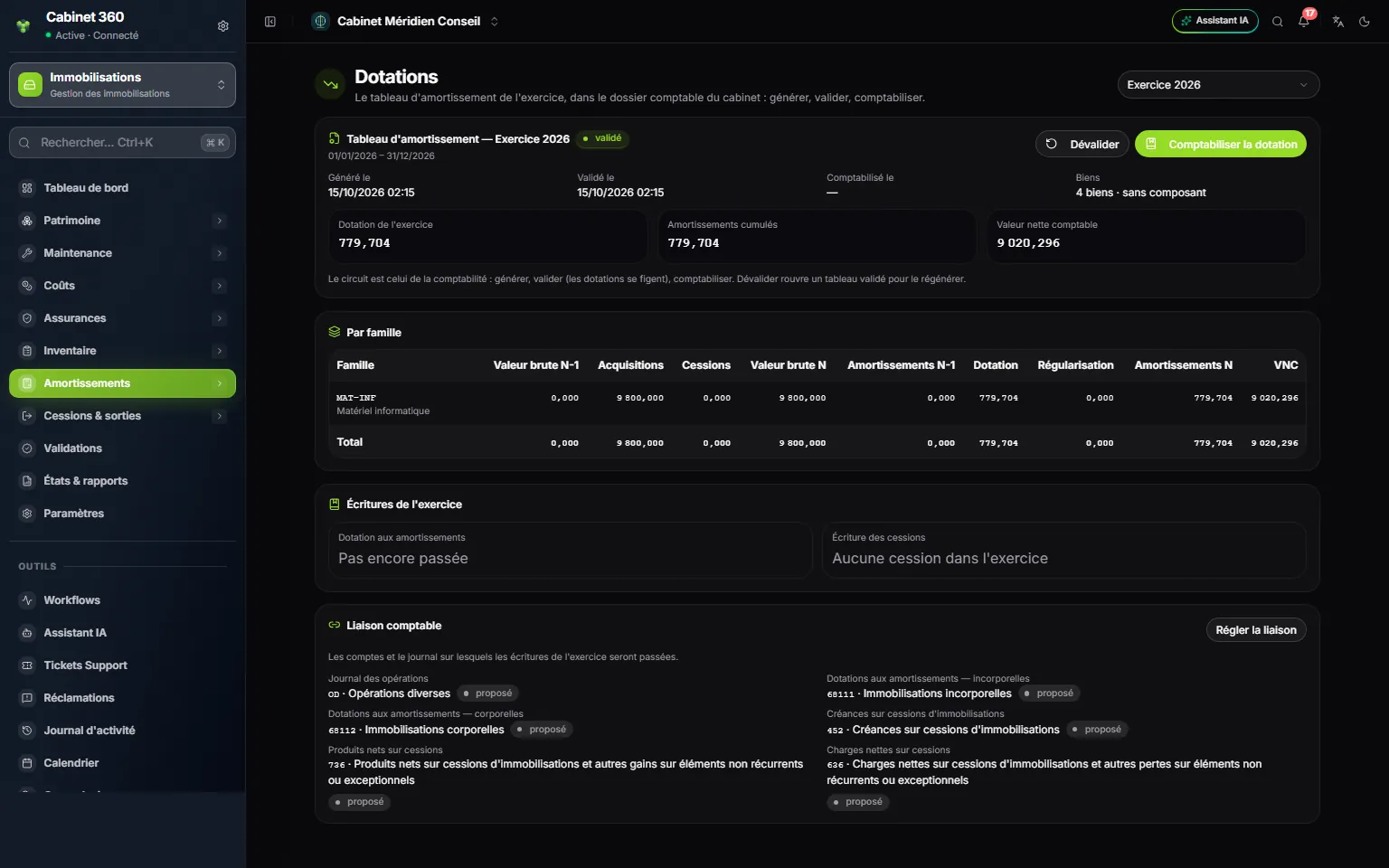
- 1. The financial year of the firm's file.
- 2. The table and its status: here, validated.
- 3. Unvalidate reopens a validated table, as long as it is not posted.
- 4. Post the depreciation posts the entry.
- 5. The figures: depreciation of the year, accumulated depreciation, NBV.
- 6. By family: gross value and depreciation, opening and closing, additions and disposals.
- 7. Entries of the year: the depreciation, and the disposals entry.
- 8. Set up the link: the accounts and the journal of the entries.
The table's workflow
| Action | What it does | Right |
|---|---|---|
| Generate | The engine computes the table, which becomes a draft. Regenerate computes it again. | Create |
| Validate | The charges are frozen. The assets it carries are locked (chapter 5). | Edit |
| Unvalidate | The table goes back to draft, to be regenerated. Impossible once the depreciation is posted. | Edit |
| Post the depreciation | The depreciation entry is posted in the firm's file. | Create |
| Post the disposals | The entry for the year's disposals is posted in turn (chapter 14). | Create |
Posting asks for the Entry date: by default, the year-end. The entry goes into the accounting link's journal, on the link's depreciation-charge accounts (intangible or tangible, depending on the family) and the accumulated-depreciation account of each family. It requires a validated table, no entry already posted, and an open financial year.