
The page
The Cash-flow plan is read, not entered. It is including VAT, in the engagement's currency, and reads from top to bottom:
- Opening cash;
- Receipts, then Total receipts;
- Payments, heading by heading, then Total payments;
- Closing cash: the same, to the millime, as on the balance sheet.
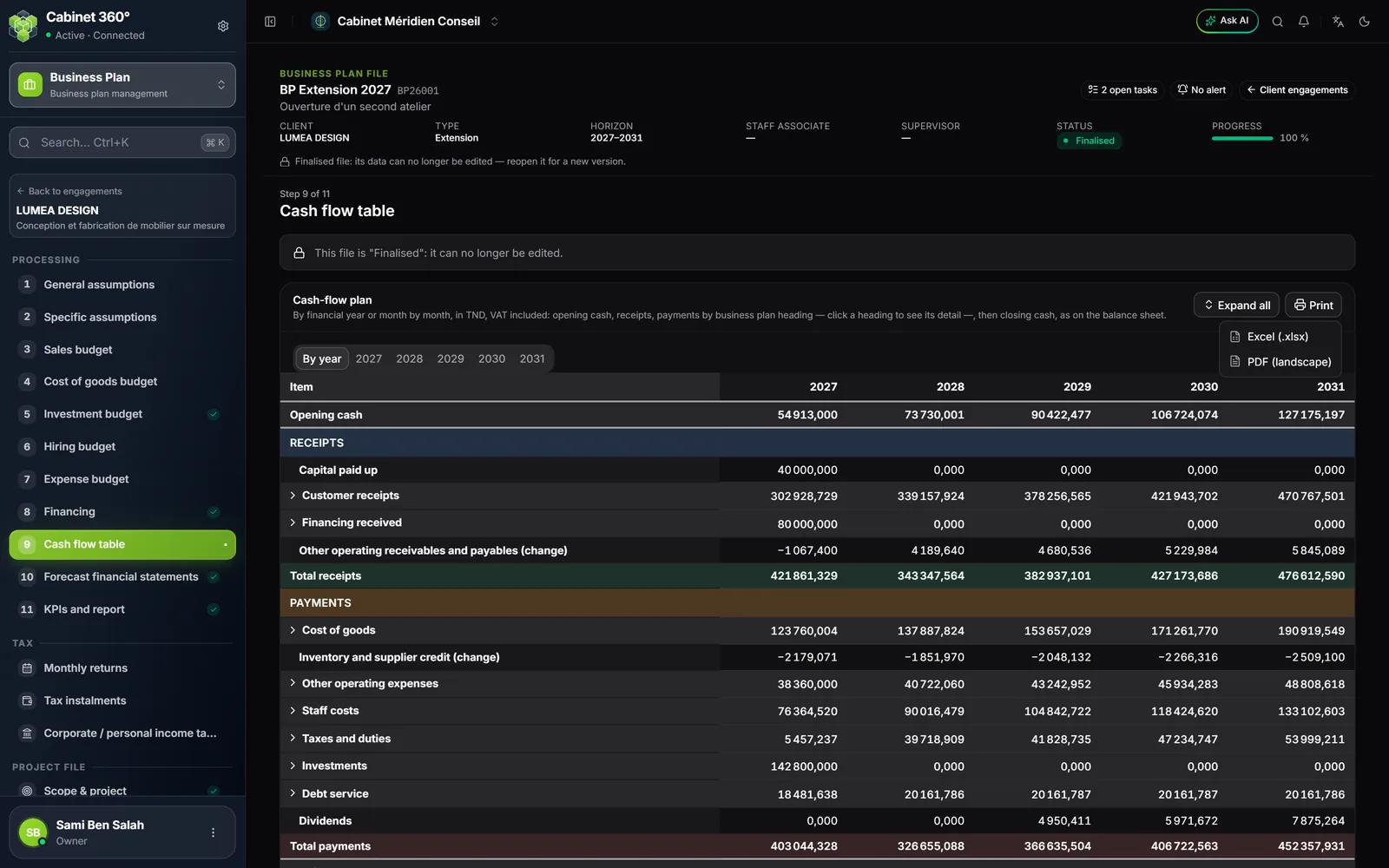
The colours help the reading: the receipts section, the payments section, the total receipts and the total payments each have their own tint; headings and balances have a grey background. A line that is zero over the whole period is hidden.
The headings
| Section | Headings |
|---|---|
| Receipts | Capital paid up · Customer receipts (for the year, at N days, output VAT collected) · Shareholder current account contributions · Financing received (loans and leasing, grants, other) · Other operating receivables and payables (change) |
| Payments | Cost of goods (one line per sale, cost and purchase VAT) · Inventory and supplier credit (change) · Other operating expenses (one line per cost of the budget) · Staff costs (salaries, social charges) · Taxes and duties · Investments (one per asset) · Debt service (interest paid, repayments) · Dividends |
The headings open folded. A click on a heading shows its sub-headings; Expand all and Collapse all open or close them all.
What “Taxes and duties” contains
- the returns of Tax › Monthly returns: Withholding taxes, VAT payable, Vocational training tax (TFP), FOPROLOS, Local authorities tax (TCL) when it is due; each is paid the following month, and December's the year after;
- the taxes entered in the expense budget;
- the Provisional tax instalments;
- the Corporate tax balance for the previous year (or the IRPP balance, for an individual).
What “Other operating expenses” contains
One line per cost of the expense budget, variable then external: the amount is what the supplier receives, excl. VAT + VAT − withholding tax. Added to these are customer acquisition and customer service costs, and fixed-asset maintenance.
What “Staff costs” contains
Net salaries (the IRPP and CSS withheld go to taxes) and the year's social charges, spread over the months in proportion to each month's gross salary.
By financial year or month by month
Tabs choose the view:
- By year: one column per year of the plan;
- one tab per financial year: one column per month “mm/yyyy” (twelve for a full year; the first financial year starts in the month of the start), then Total 2027.
The monthly plan puts each line in the month it falls in: the month's revenue shifted by the customer payment delay, the date of each financing, the month of each instalment, the month an asset is acquired, the tax instalments in June, September and December, the corporate tax balance in March (the IRPP balance in April), dividends in June. What has no month of its own is spread evenly. The sum of the twelve months falls exactly on the year; the cash at the end of December is the financial year's.
The Print menu, next to Expand all, offers:
- Excel (.xlsx): an annual sheet (one column per financial year), then one sheet per financial year; amounts are numbers, a zero amount is 0;
- PDF (landscape): one column per financial year, then, for the monthly detail, two pages per financial year (January to June, July to December and total; a single one for a financial year that starts in July or later); a zero amount is written “—”.
Both include every heading unfolded, the sub-headings indented and the screen's background colours, and leave out zero lines, like the screen.