
Open the dashboard
The dashboard is the front door of the Business Plan space. Its figures count engagements, except three tiles, which count clients, tasks and alerts.
The period and the filters
The period only sets the figures that depend on it: engagements created, engagements finalised, the completion rate and the recent activity. The rest (active, late and to-approve engagements, open tasks and alerts, the team's workload) is today's state, whatever the period.
The filters All team members, All sectors, All types and All statuses narrow the page, except the BP clients tile, which always counts all the module's clients. Reset clears them.
The eight tiles
| Tile | What it counts |
|---|---|
| Active BPs | Engagements in progress, waiting for the client or under review, as of today. Below: how many were created in the period. |
| BP clients | The clients of the BP clients list: “Business plan” service ticked, client not inactive. |
| BPs to deliver | Active engagements whose target date falls within the next 30 days. |
| Late engagements | Active engagements whose target date has passed without their being finalised. |
| Completion rate | Among the engagements whose target date falls in the period (up to today), the share that is finalised. With no deadline in the period, there is no rate. |
| Open tasks | Tasks to do, in progress, waiting for the client or to approve, across all engagements. Below: how many are late. |
| Critical alerts | Open alerts of critical level: negative cash, insufficient DSCR… |
| Financing sought | The amount the active engagements seek from funders, entered in the scope step. Below: the need their financing plans compute. |
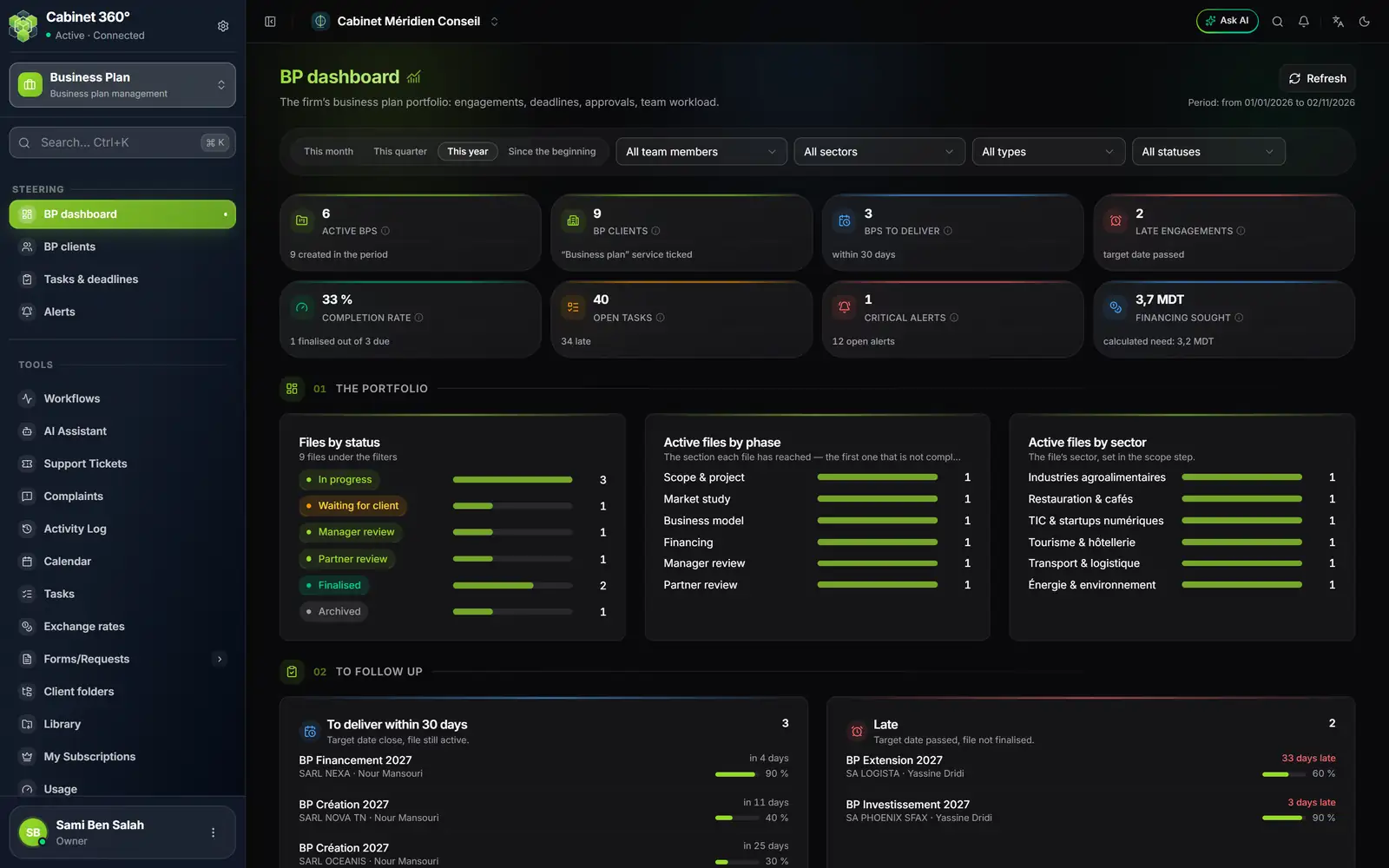
- 1. The period and four filters: team member, sector, engagement type, status.
- 2. Eight tiles: the state of the portfolio and what is urgent.
- 3. The portfolio: engagements by status, by phase and by sector.
- 4. To follow up: engagements to deliver within 30 days, late ones.
- 5. Refresh reads the figures again; the chosen period is written below it.
The portfolio
Three cards sort the engagements:
- Files by status: In progress, Waiting for client, Manager review, Partner review, Finalised, Archived;
- Active files by phase: the section each engagement has reached, that is, the first one that is not complete;
- Active files by sector: each engagement's sector.
To follow up
Four lists name the engagements that need action:
- To deliver within 30 days: target date close, engagement still active, with its progress;
- Late: target date passed, engagement not finalised, with the number of days late;
- To approve: engagements under manager or partner review, with the name of the expected approver;
- Waiting for client: engagements on hold, waiting for the client.
A click on an engagement opens it.
Team and activity
At the bottom of the page, Workload by owner gives, for each person, their active engagements, their open tasks and the late ones. The module does not know anyone's capacity: it counts, it computes no workload rate. Recent activity lists the approval workflow steps, the creations and the deletions of the period.
Plans from the previous module
A firm that entered business plans before the current engagements sees, at the very bottom, the card “plans from the previous module”. Each plan opens there in its previous screen, with Open. The card does not appear for a firm that has none.