
The page
Step 5 has five parts, from top to bottom:
- The totals: Total excl. VAT, VAT, Total incl. VAT, Depreciable base and A1 depreciation (the first year's depreciation, read from the calculation);
- Investment plan: one asset per line, which can be filtered by nature;
- Assets from the accounting: the assets the client already owns, when it has an accounting file;
- Depreciation schedule: the depreciation charges asset by asset, year by year;
- Points to check: what the calculation had to assume, for example a duration taken from the category.
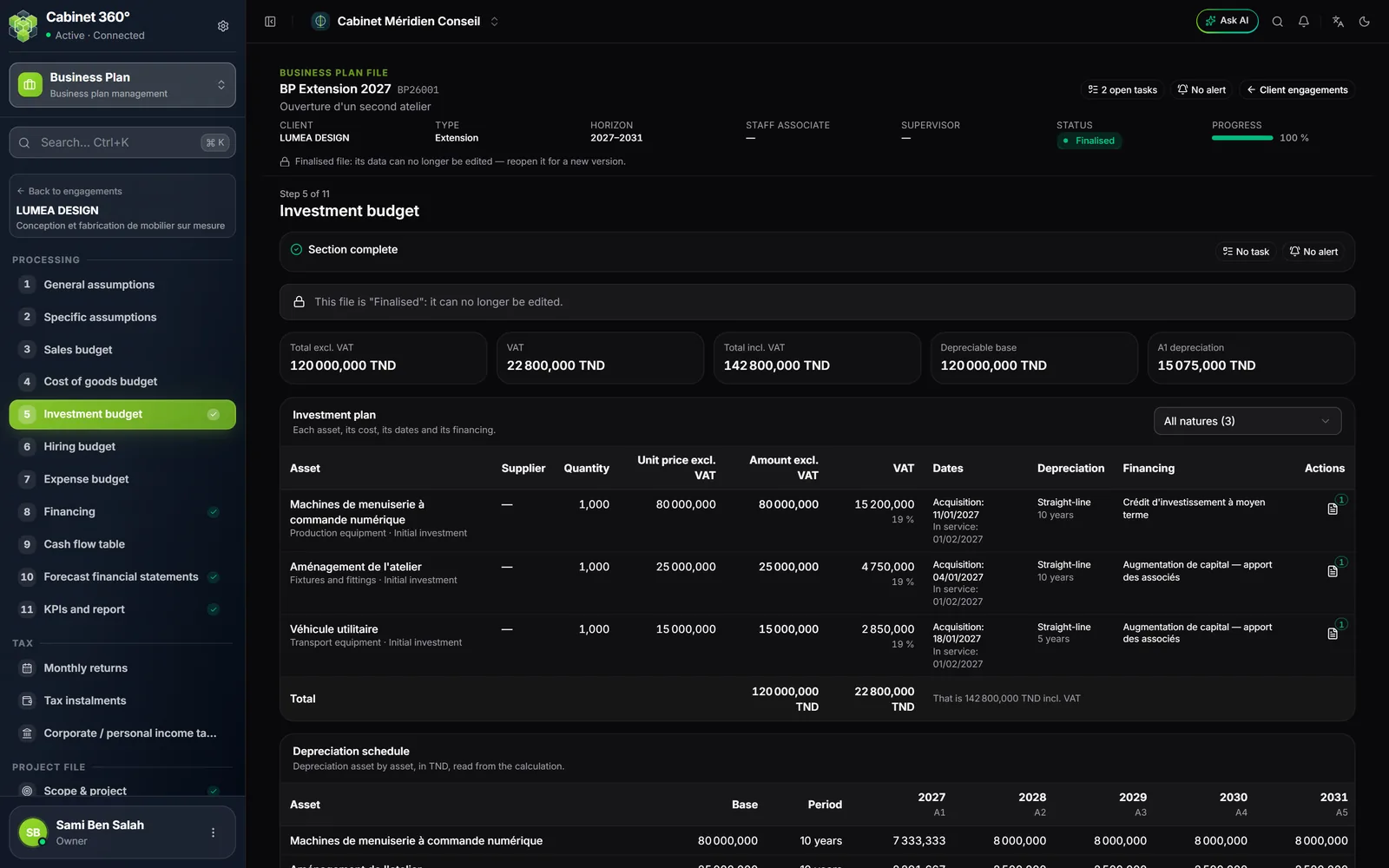
The Depreciable base is excluding VAT. It becomes including VAT when the Recoverable VAT on investments assumption is 0 (an activity that does not recover VAT). A non-depreciable asset, such as land, is not included.
Add an investment
- Click Add an investment. The New investment window opens.
- Block The asset: Asset code, Description, Nature, Category, Asset family, Supplier.
- Block Amounts: Quantity, Unit price excl. VAT, VAT rate. The preview computes the amount excluding VAT, the VAT and the amount including VAT.
- Block Depreciation and financing: Acquisition date, In-service date, Calculation method, Depreciation rate (%), Financed by.
- Click Save.
The record uses the words of the accounting fixed-asset record, and adds what is specific to the plan: nature, category, supplier, quantity × price, VAT, in-service date and financing.
| Field | What you need to know |
|---|---|
| Nature | Initial investment, Future investment, Equipment replacement or Extension. |
| Category | Land, Buildings, Fixtures and fittings, Production equipment, Transport equipment, IT equipment, Office furniture and equipment, Intangible assets, Start-up costs, Other fixed assets. |
| Asset family | The families of the client's accounting file, failing that those of the firm's reference list. The family proposes the rate and the method. |
| Supplier | A supplier from the ERP, or a name entered for a supplier not in the list. |
| VAT rate | The active rates that IntegraSys opens to business plans. The legal Tunisian rates are 0, 7, 13 and 19 %. |
| In-service date | Empty: the acquisition date, failing that the start. The first depreciation charge runs from that month. |
| Calculation method | Straight-line, Declining balance or Not depreciable. |
| Depreciation rate (%) | The rate decides the duration: 15 % depreciates over 100 ÷ 15 = 6,67 years (the depreciation schedule shows the duration rounded up to the next year, “7 years”). Empty: the duration proposed for the category. |
| Financed by | A financing from step 8. With no financing entered, the window invites you to add them. |
The investment plan
Each line gives the fixed asset, the supplier, the quantity, the unit price excluding VAT, the amount excluding VAT, the VAT, the acquisition and in-service dates, the depreciation and the financing. The last line gives the total, with the amount including VAT: that of all the assets, or that of the nature chosen in the filter.
On each line, an icon stores the quotes and pro forma invoices that support the amount. The pencil edits the asset, the bin removes it with its quotes.
Assets from the accounting
When the client has an accounting file in IntegraSys, its fixed assets are shown automatically, read-only: Code, Description, Acquisition, Gross value, Rate and Accumulated at plan start. They are changed in the accounting, never here.
- Their accumulated depreciation at the start of the plan and their depreciation charges go into the calculation and the financial statements.
- They replace the fixed assets entered in the opening position of the financial assumptions.
- An asset disposed of before the end of the plan is not taken over, and the list says so.
- A record corrected in the books redoes the engagement's calculation.
The depreciation schedule
The table gives, for each asset, its base, its duration and its depreciation charge for each year, then the Total depreciation. It follows the ERP's depreciation engine, the same as the accounting: the first year is prorated by month from the in-service date.
Import an Excel file
An investment plan already kept in a workbook is imported in one go.
- Click Import. The Import investments window opens.
- Click Download the template: it is the same annotated Excel template as the accounting depreciation-table import, with the engagement's families.
- Fill it in: family, code, description, acquisition date, method, rate and gross value.
- Choose the file (Excel or CSV), then click Import.
The import is all or nothing: one faulty line rejects the whole file, and the refusal names the line. The template's depreciation columns (prior, charge, accumulated) only concern assets already in the books: they are not taken over.