
What the module does
The Business Plan module builds a project's financial forecast, over 3 to 10 years. Each project is an engagement (a file) attached to one of the firm's clients. One client can carry several engagements: “BP Création 2026”, then “BP Extension 2028”. Each has its own assumptions, statements, team and history; only the key events and the partners, which belong to the client, are shared between them.
In an engagement, you enter what the project plans: the company, sales, purchases, investments, hires, expenses and financing. From these, the calculation derives, year by year:
- the cash flow table, by financial year and month by month;
- the forecast financial statements: income statement, balance sheet, cash flow statement, on the template of the accounting module's financial statements;
- the tax returns the project will give rise to: the month's VAT and taxes, instalments, corporate income tax or personal income tax;
- the ratios judged against their thresholds, three scenarios and the break-even points;
- the final report and its teaser, in French, English or Arabic.
Statements are never typed in: they are computed. Change an assumption, and everything that depends on it is updated when the next page opens.
Two modules, two ways of working
| Business Plan | AI Business Plan | |
|---|---|---|
| Who leads | The firm's staff member, step by step | The AI assistant, by interview or by form |
| What it produces | A complete file: statements, ratios, report, approval workflow | A costed plan and its written texts (summary, market study, SWOT…) |
| Where it lives | Business Plan space | AI Business Plan space |
| Subscription | Business Plan module | AI Business Plan module, separate |
This book first follows the Business Plan module, from the dashboard to the approved report (chapters 2 to 15), then the AI Business Plan (chapters 16 and 17).
Three levels of menu
The menu of the Business Plan space changes with the page you are on. It reads the page's address, and nothing else.
| You are… | The menu shows |
|---|---|
| On the dashboard or a list | Steering: BP dashboard, BP clients, Tasks & deadlines, Alerts |
| On a client's page | The client block (← Back to BP clients), then Client: BP engagements, Key events, then Steering |
| Inside an engagement | The client block (← Back to engagements), then Processing, Tax, Project file, Client and Steering |
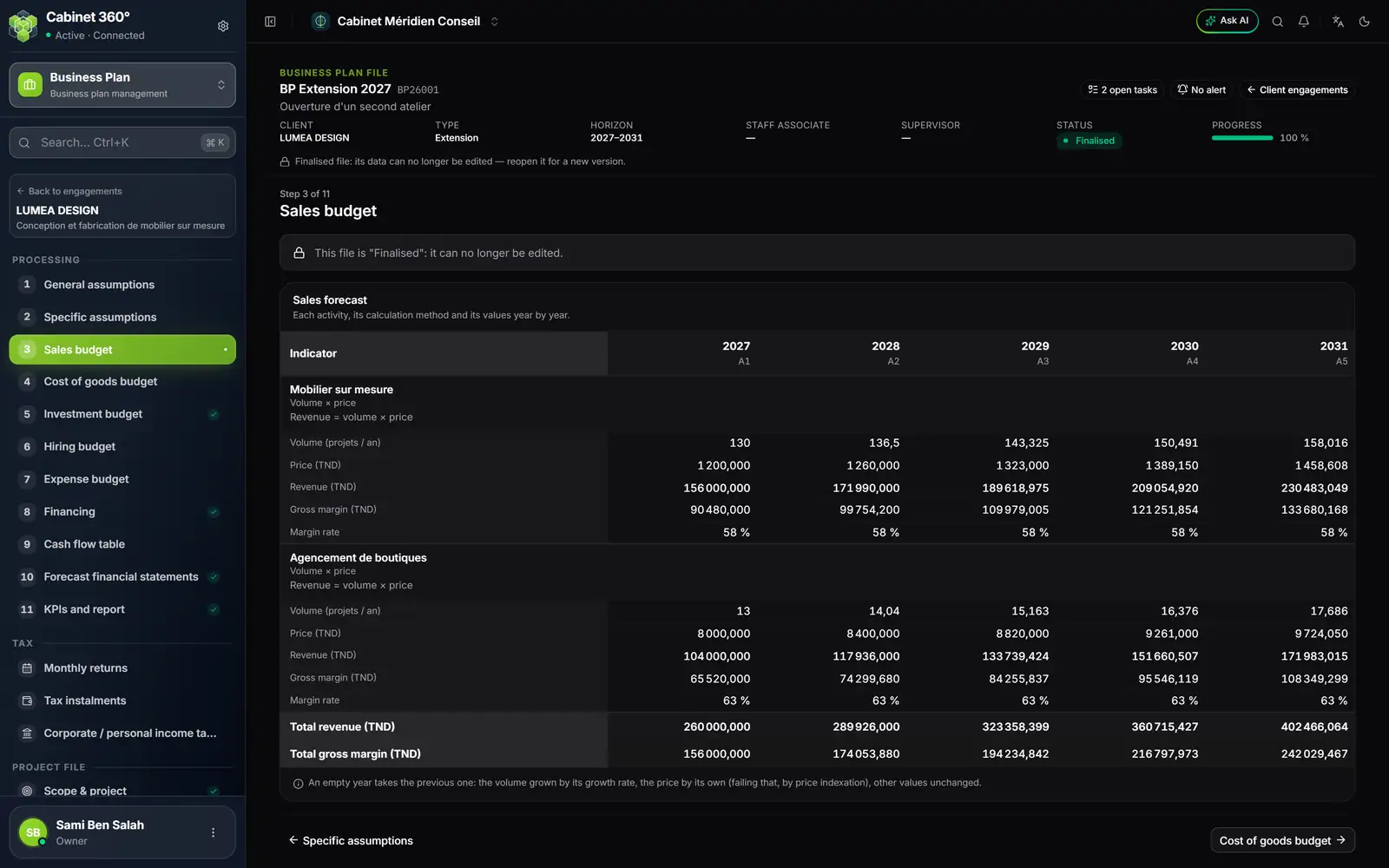
- 1. The client block: its name, its sector, and ← Back to engagements. The menu names the client, never the engagement.
- 2. Processing: the eleven steps of the business plan, numbered. Some carry a check mark when they are complete.
- 3. Tax: the returns the plan gives rise to.
- 4. Project file: scope, promoters, market study, business model, financial assumptions.
- 5. The engagement bar: reference, client, type, horizon, team, status and progress.
- 6. The current step: “Step 3 of 11”, then the page title.
The eleven Processing steps
| No. | Step | What you do there |
|---|---|---|
| 1 | General assumptions | Review the project's company, enter the corporate purpose |
| 2 | Specific assumptions | Period, taxes and duties, corporate tax, tax incentives, social contribution rates, sector assumptions |
| 3 | Sales budget | Read the revenue of each activity, year by year |
| 4 | Cost of goods budget | Read the cost of sales and its VAT |
| 5 | Investment budget | Enter or import the assets to buy |
| 6 | Hiring budget | Enter the hires: the payroll simulator computes the cost |
| 7 | Expense budget | Enter fixed, variable and periodic costs |
| 8 | Financing | Enter capital, loans, leasing, grants; balance the financing plan |
| 9 | Cash flow table | Read receipts and payments, by financial year and by month |
| 10 | Forecast financial statements | Check and read the statements |
| 11 | KPIs and report | Read ratios and scenarios, compose the report, have it approved |
Before you start
- The subscription. The firm has the Business Plan module; for the assistant, the AI Business Plan module as well.
- The rights. Each person's role carries the actions of the Business Plan module: View to read; Create to add an engagement, a line (an investment, a financing, a sale…) or a task, and to import; Edit to enter data and move the approval workflow forward; Delete to remove an engagement, a line or a manual task.
- The client. It exists in Operations, with Business plan ticked in its services, and it is not inactive. A client is never created from the business plan: a second door would give two records for the same partner.
- The team. The firm's agents carry their position level (Settings › Team, tab Agents): a Staff associate or a Supervisor can prepare an engagement; an Engagement lead, a Manager or a Partner can supervise it.
Settings held by IntegraSys
The module has settings: the ratio thresholds, the alert rules, the assumptions and scenarios proposed to each new engagement, the list of documents to collect, the durations of the steps and the sector models. Since 23/10/2026, the IntegraSys platform holds them for all firms. Your firm reads them; it does not change them. A setting your firm had made before that date still applies.
| Setting | Where you see it | When it applies |
|---|---|---|
| Ratio thresholds | Threshold column of the ratios, red colour of a value outside the threshold | The next time each file is opened |
| Alert rules | Alerts page: what is “Observed” and the “Threshold” of each alert | The next time each file is opened |
| Default assumptions | Starting values of the general assumptions; in grey in a cell left empty | Copied when an engagement is created; a change only reaches the cells left empty |
| Default scenarios | Variations of the Cautious and Optimistic scenarios | Engagements created afterwards |
| Documents to collect | File documents, in the scope step | Engagements created afterwards |
| Sector models | Sector assumptions, sales budget | Engagements created afterwards |
The amount format, for its part, is the firm's own: Settings › Firm profile, section Finance and formats (number of decimals, separators). By default, an amount is written 1 234 567,890, on screen, in the report and in printouts. The report carries the firm's name.
An engagement's reference follows the Business plan stub (Settings › Stubs): BP + the year on two digits + a three-digit counter. BP26001, BP26002… then BP27001 the following year.