
Two ways to reach us
The Complaints page is open to every member of the firm. It has two tabs:
- Complaints, open by default: a problem to follow, under a number, until it is dealt with;
- Live chat: a quick question, as a conversation.
File a complaint
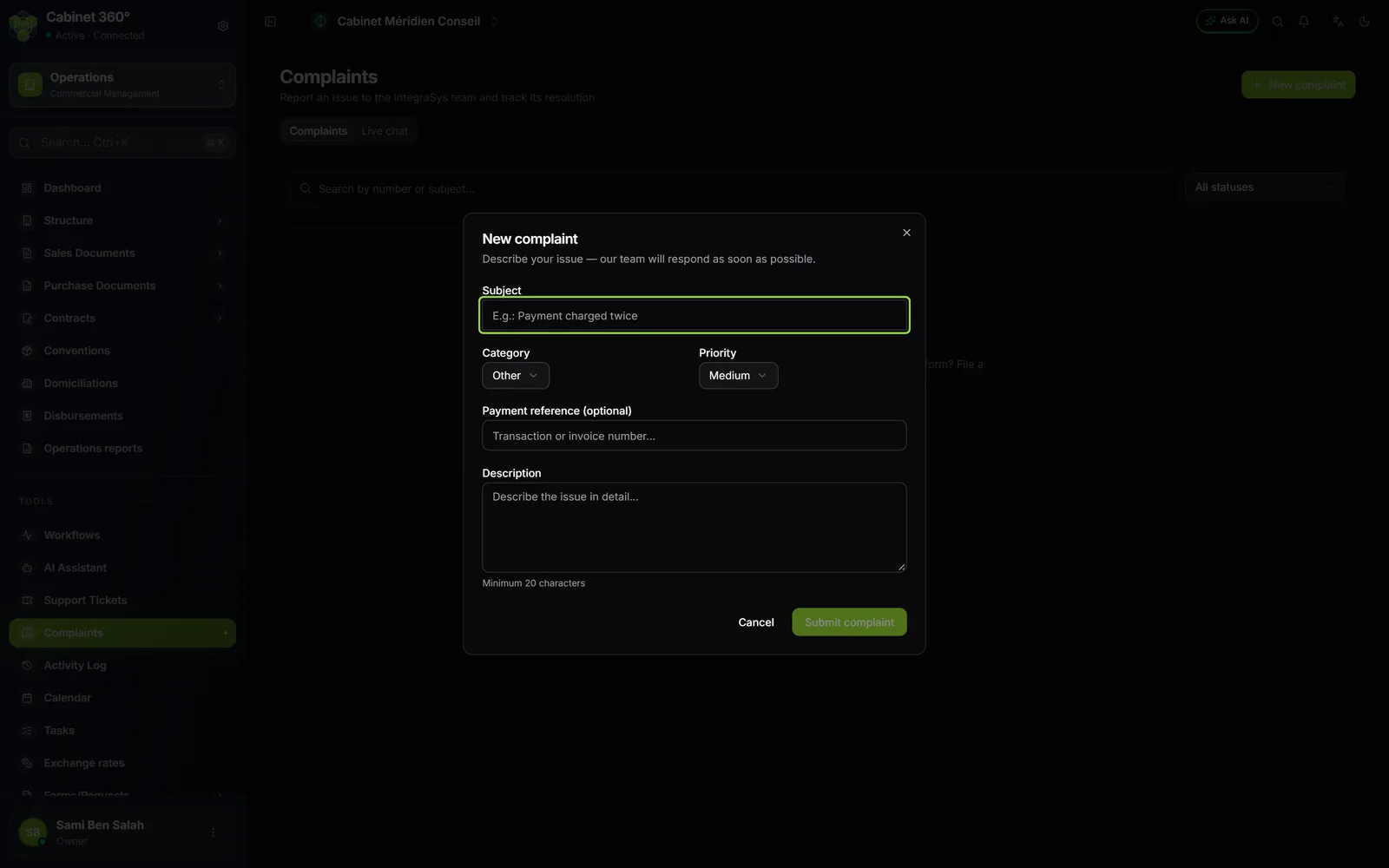
- Click New complaint, at the top right of the page.
- Enter the Subject, at least 5 characters.
- Choose the Category (Payment, Subscription / Billing, Technical or Other) and the Priority (Low, Medium, High or Urgent).
- For a payment, give the Payment reference (optional): the transaction or invoice number.
- Write the Description, at least 20 characters.
- Click Submit complaint. The button stays greyed out while the subject and the description are too short.
The message "Complaint submitted" appears. The complaint appears in the list with its number, for example REC00012, and the status Open. The IntegraSys team is told straight away.
Follow a complaint
Click its row to read the Thread and reply with Send. The team's replies are signed by the support team.
| Status | What it means |
|---|---|
| Open | the complaint has arrived, the team has not taken it yet |
| In progress | the team is dealing with it |
| Awaiting your reply | the team is waiting for your answer: write, and it goes back to In progress |
| Processed | the team has dealt with the problem; its note appears under Processing |
| Closed | the complaint is closed; it may also carry a note |
Only the IntegraSys team changes the status. When it replies or changes the status, a notification « Réclamation REC… — nouvelle réponse » (or with the new status, in French) arrives in the bell of the person who filed the complaint.
On a Processed or Closed complaint, you can no longer write: the page says the complaint is closed and invites you to file a new one if the problem persists. If the team replies on it, it reopens it: it goes back to In progress, and you can write again.
Ask a question through live chat
- Open the Live chat tab.
- Click Start a conversation, or New if you already have some.
- Write your message, then press Enter: the conversation is created when you send. Shift + Enter starts a new line.
- The reply arrives in the conversation. Your exchanges stay under My conversations.
The chat is private: only you and the IntegraSys team read it. A conversation left without a message for seven days (the default delay) is closed; click New to start another one.
A conversation can become a complaint: click File a complaint, read the text offered, tick the confirmation box, then click File the complaint.
What to put in your message
- The screen concerned: the menu path, for example Timesheets › Time Entry, and the page title.
- What you did, step by step, and what you expected.
- The message shown, copied word for word, with the date and time.
- The number of the document concerned: invoice, ticket, client.
You cannot attach a file, neither to a complaint nor to the chat: describe what the screen shows.