
The starting point
Sami Ben Salah, owner of Cabinet Méridien Conseil, keeps the files of LUMEA DESIGN and SA ZENITH himself. He wants each month's closing to be followed without reminders, and the time he spends on it to be noted for billing. The firm has the Operations, Accounting and Tasks modules.
Apply the template
- On 3 November, Sami opens Tools › Tasks › Checklist templates, and clicks Copy next to Clôture mensuelle.
- He keeps the six steps and the type of work Accounting. Three steps tick themselves: Boîte OCR vide, Rapprochement bancaire and Notes de revue répondues.
- He clicks Apply to clients…, adds LUMEA DESIGN and SA ZENITH, chooses himself as Default person, and sets Starting from to 01/10/2026.
- He clicks Apply to 2 clients. October has already ended: for each client, the task « Clôture mensuelle — octobre 2026 » is created at once.
In the following months, nothing to redo: the November task will be born on the morning of 30 November, the December one on 31 December.
The October task
Each step received its date, in working days after Saturday 31 October: the OCR inbox at D+3 (04/11), the reconciliation and the cash at D+5 (06/11), the matching at D+7 (10/11), the review notes at D+8 (11/11), the journal at D+10 (13/11). The task's due date is that of its last step: 13/11/2026.
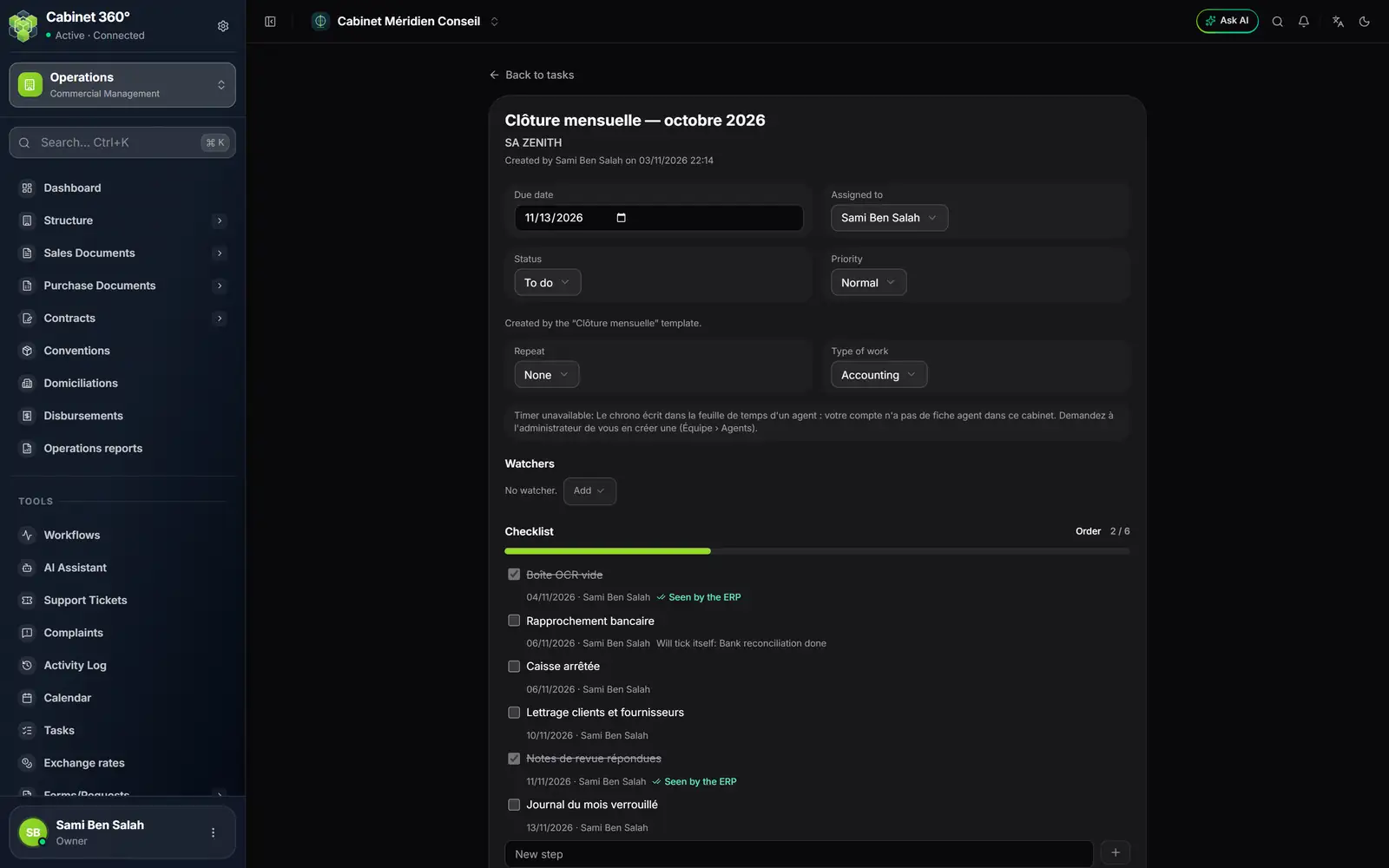
- 1. The October task of SA ZENITH.
- 2. The due date: the date of the last step.
- 3. Timer unavailable: Sami's account has no agent record yet.
- 4. Boîte OCR vide, seen by the ERP.
- 5. Rapprochement bancaire: it will tick itself.
Clear the « Timer unavailable »
When he opens the task, Sami reads that the timer is unavailable: the timer writes into an agent's timesheet, and his account has no agent record in this firm. Time belongs to an agent record, not to an account.
- In Team › Agents, he creates his own agent record.
- He links it to his account, as the owner.
- He reopens the task: Start the timer appears.
The closing, step by step
- In My day, under No due date, Sami finds an ERP task for SA ZENITH: "Verify 4 documents in the OCR inbox". He clicks Open, checks and posts the documents in accounting. The row disappears from his day.
- He reopens SA ZENITH's closing: the Boîte OCR vide step is ticked, marked Seen by the ERP.
- Before the bank reconciliation, he clicks Start the timer. Once the reconciliation is done, he comes back and clicks Stop and save: a line is written in his timesheet, for SA ZENITH, in Accounting, with the task's reference. The Rapprochement bancaire step ticks itself.
- He ticks Caisse arrêtée and Lettrage clients et fournisseurs himself, which the ERP does not judge.
- He deals with the file's review notes in accounting. When all are dealt with, Notes de revue répondues ticks itself.
- He locks the month's journal, ticks the last step, and sets the Status to Done. The record shows "Done by Sami Ben Salah on …".
The time spent, and the invoice
- At the start of December, Sami opens Timesheets › Reports, picks the previous month, and reads Hours by Client and Hours by type of work.
- He clicks the export button, then Excel: one line per entry, with the client, the type of work and the duration.
- He uses it to prepare the fee invoices of LUMEA DESIGN and SA ZENITH in Operations.
What the example used
| Chapter | What it used |
|---|---|
| 2 | the agent record, linked to the account |
| 11 | the Clôture mensuelle template, applying it, the steps that tick themselves |
| 8 and 12 | My day and the ERP task « OCR inbox » |
| 13 | the timer |
| 14 | the Reports and their export |