
The CNSS general scheme declaration
Declarations are prepared for all your clients at once, outside their HR files. The page opens on the current quarter.
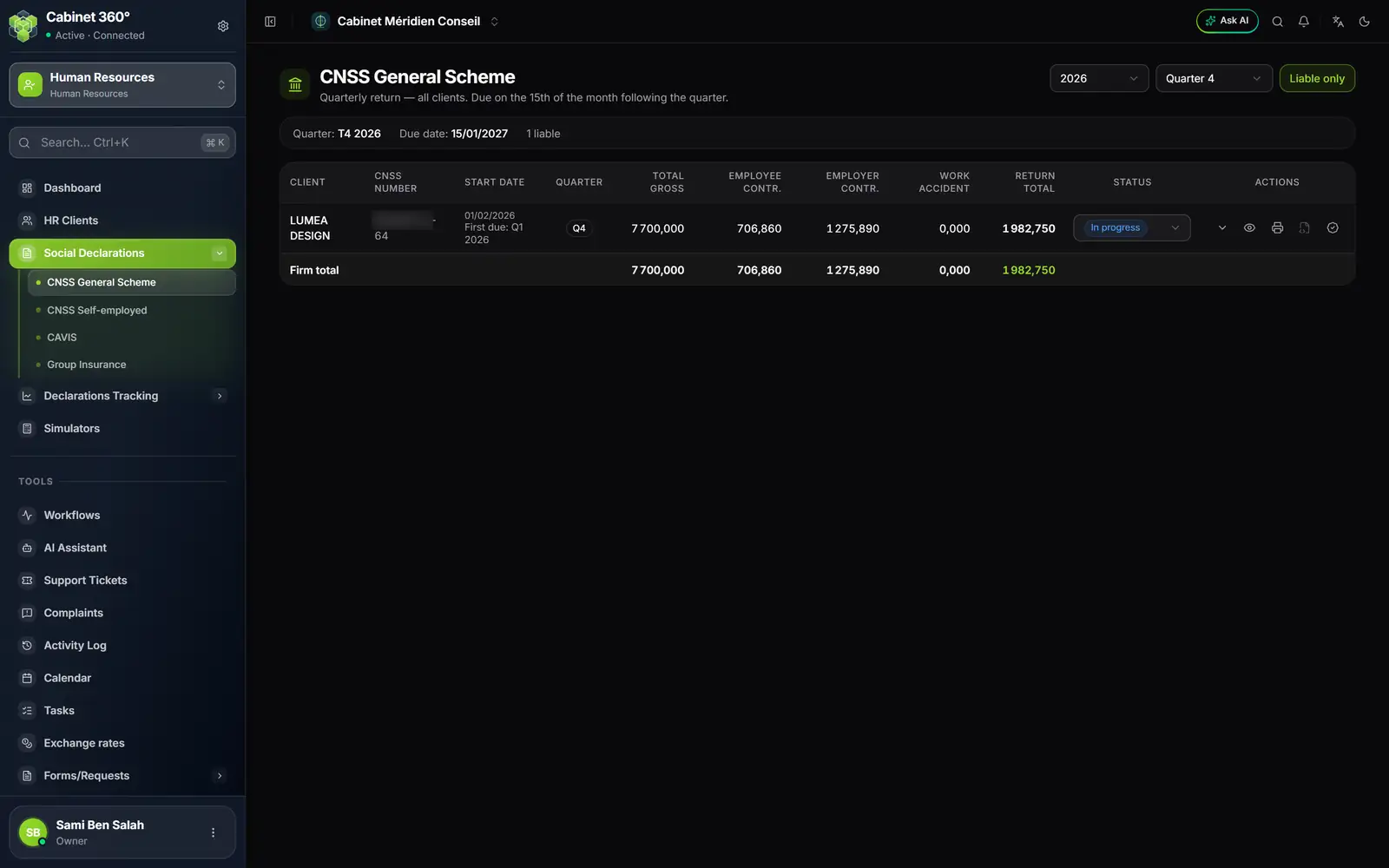
- 1. Year and quarter of the declaration.
- 2. Liable only: by default, the clients not yet liable for the quarter are hidden.
- 3. The due date (the 15th of the month after the quarter) and the number of liable clients.
- 4. The amounts: total gross, employee and employer contributions, work accident, return total.
- 5. The status, to follow up to payment.
- 6. The actions: detail per employee, view, print, e-filing file, validate.
Each row gives a client with its CNSS number, its start date, the Total gross, the contributions and the Return total; the Firm total row adds everything up. The arrow (View details) unfolds the employees; the eye (View the declaration) shows the PDF, the printer downloads it. The PDF bears the employer's identity, one line per employee (CNSS number, name, CIN, the three months, total), the summary of contributions, the total in words and the space for the stamp.
Once the declaration is filed, choose its Status: In progress, Validated, Paid, Rejected or Unpaid; the tick (Validate) goes straight to Validated. A validated declaration is filed as a PDF in the client's drive, under Social & Paie › Déclarations sociales (Social & Payroll › Social declarations), and replaced if it is validated again.
A supplementary payslip is declared on its own row, marked Supplementary. The e-filing file button is there but inactive until its format has been provided.
CNSS self-employed, CAVIS and group insurance
CAVIS and Group Insurance read like the first page. CNSS Self-employed stands apart: no Liable only button, no PDF, no detail per employee.
- CNSS Self-employed lists the clients with a manager under the non-employee scheme (set in the Management tab of the HR file). The amount is each manager's flat-rate contribution, by class, not a sum taken from the payslips. The managers' names follow the client's name; the eye (Voir les gérants, view the managers) gives each one's contribution. The status starts at "À déclarer" (to declare).
- CAVIS lists the HR files where the option is on, from its start date. The CAVIS base column takes what the payslips withheld; the threshold and the rates are shown at the top of the page. A month with no SMIG set is named instead of showing zeros.
- Group Insurance lists the HR files where the option is on, with the Base column; an employee with no group insurance contribution at all is not declared.
Tracking and default entry
CNSS General Tracking, CNSS Self-employed Tracking, CAVIS Tracking and Group Insurance Tracking give a grid: one row per client, one cell per quarter, coloured by the declaration's state, with the legend under the title. Tracking is read only: statuses are changed in the declaration.
Default entry, in a client's HR file menu, keeps track of the quarters when a declaration was not filed. Choose the year; for each liable party (the client under the general scheme, CAVIS and group insurance if they are on, each manager under the self-employed scheme) and each quarter, mark a Partiel (partial) or Total default, then Enregistrer (save). Quarters before the HR file's start date are not applicable.
Group insurance enrollments and statements
When group insurance is on for the HR file, the HR file menu shows Group insurance, with Enrollment and Statement.
Enrollment: enrolling the employees and their relatives with the insurance company. The insurer is mandatory and is chosen among those the HR file has set for the payroll year (Company tab, Insurers of the fiscal year). The enrollment form prints in the employer's name.
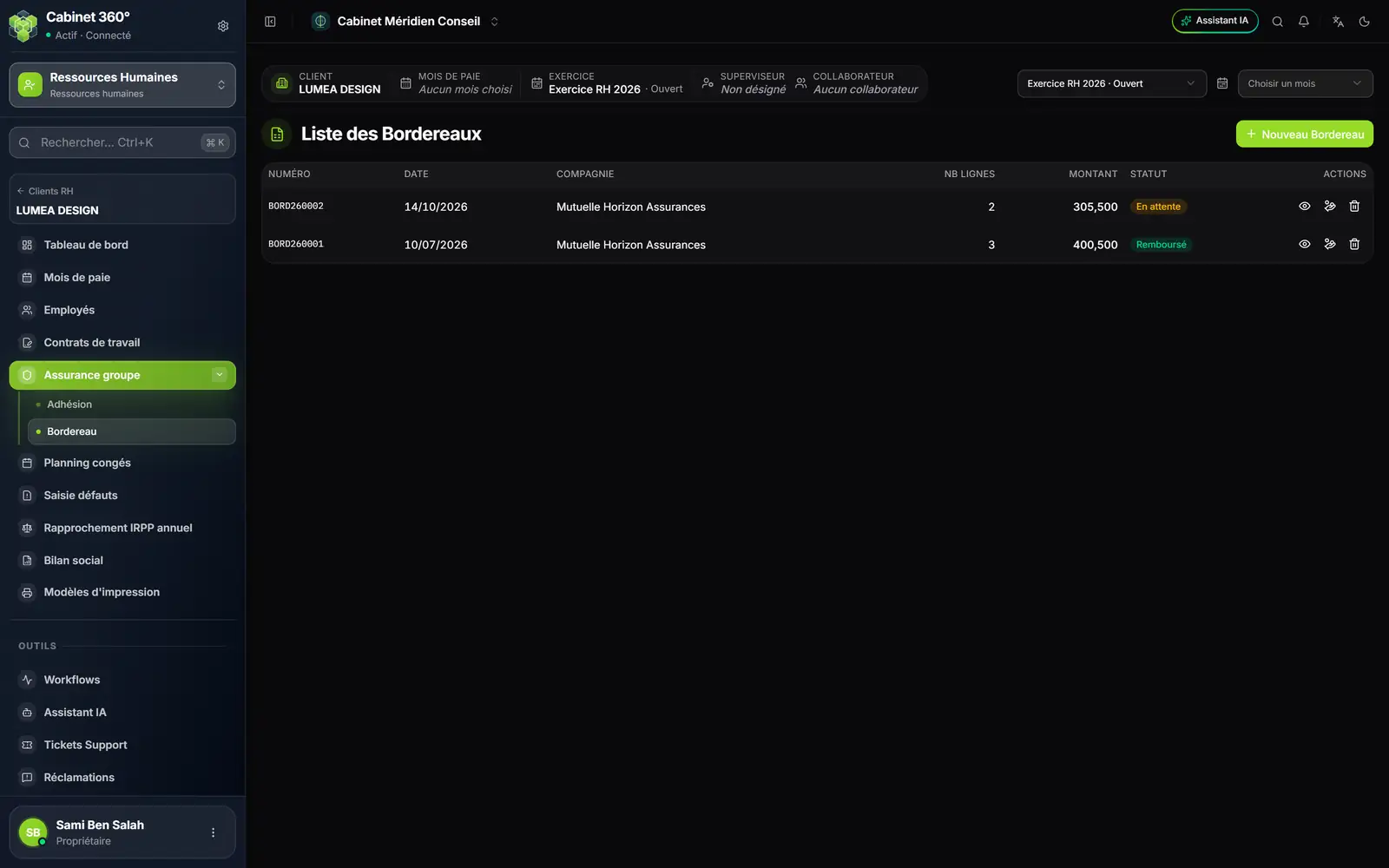
- 1. The number, from the annual numbering series: BORD260001, BORD260002…
- 2. The insurance company of the HR file.
- 3. The status: Pending, Sent, Partly reimbursed, Reimbursed, Closed…
- 4. Preview, Reimburse and delete.
- 5. New claim form.
Statement: the request for reimbursement of care sent to the insurer. Each line carries an enrolled employee, or a family member declared in their enrollments, and the amount of care. The eye (Preview) gives the lines and the total per employee.
When the insurer answers, Reimburse enters, line by line, the amount reimbursed, the amount rejected and the reason for the rejection. The status sets itself: all reimbursed, Reimbursed; all settled with a rejected part, Closed; only part, Partly reimbursed. Once a reimbursement is entered, the statement's lines can no longer be replaced.