
The Employment contracts page
Like Employees, the page opens with no payroll year or month chosen. The list gives the No. (taken from the Employment contract stub), the Type, the Employee ID, the Full name, the Start date, the End date and the Status.
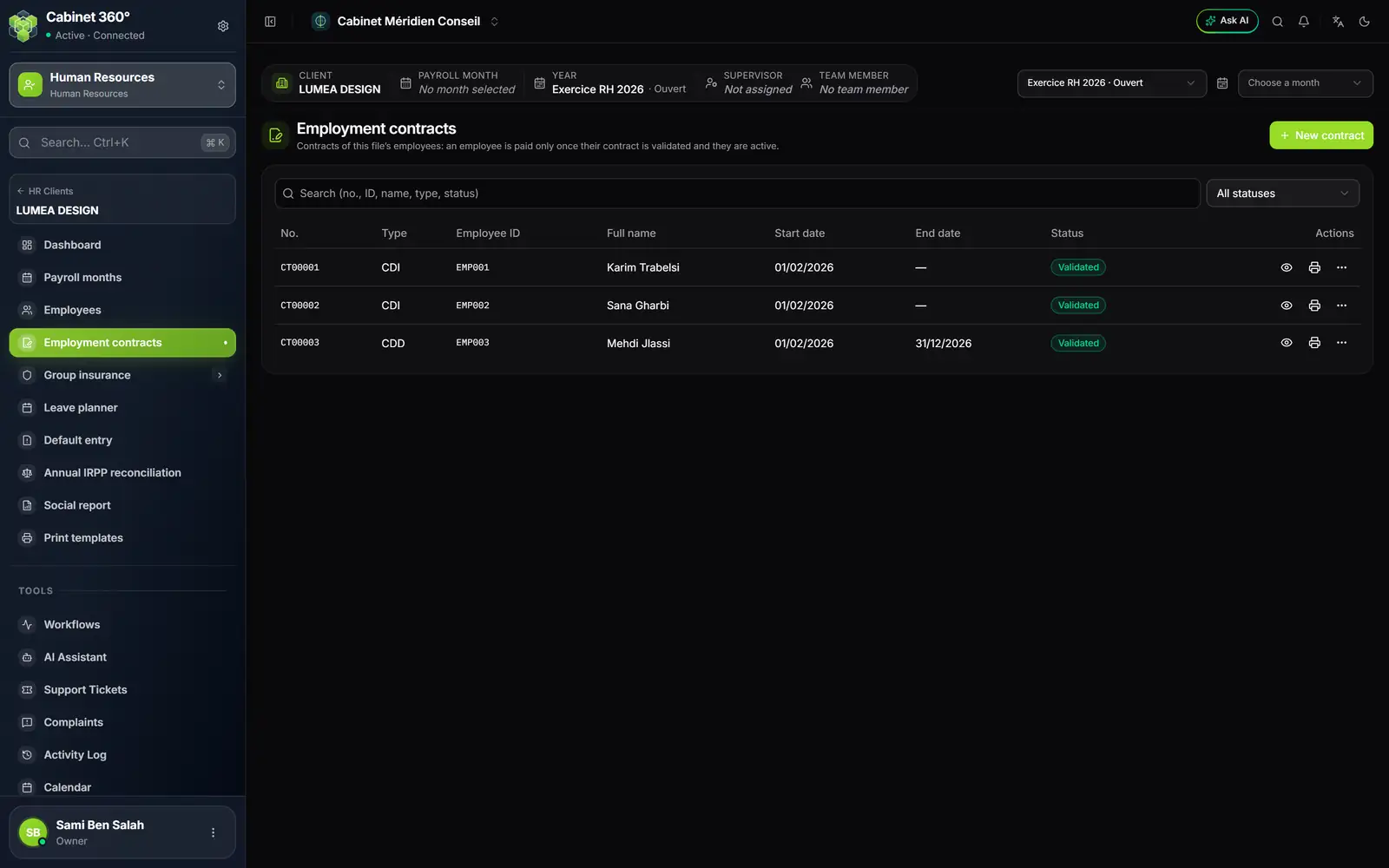
- 1. New contract: a contract for an employee of the file.
- 2. The number, from the Employment contract stub (CT00001…).
- 3. The status.
- 4. Preview, Print, and the ⋯ menu (Validate, Archive, Delete…).
- 5. All statuses: filter the list by status.
A contract comes into being in three ways:
- when a new employee is saved: their contract type and start date are required there;
- when your client adds an employee on their portal, with the same stub;
- with New contract on this page: choose the employee, the type, the Start date and, if there is one, the End date (a CDI has none). The Contract section of the employee record is updated. An employee has only one contract in progress at a time.
The types are those of the reference data: CDI (permanent), CDD (fixed-term), SIVP, CIVP, Karama, internship, apprenticeship, part-time… Some have a maximum length: a CIVP lasts no more than 12 months, a Karama contract 24 months. An end date beyond that is refused, with the reason.
From a contract in progress to a validated contract
| Status | What it means |
|---|---|
| In progress | Entered, not yet signed. It can still be edited. |
| Validated | The signed copy is filed. The employee is paid for the months the contract covers. |
| Terminated | A resignation ended it, on its effective date. |
| Archived | Put away; the employee becomes inactive. |
- While the contract is In progress, correct it with Edit, or from the Contract section of the record.
- Have the printed contract signed (see below).
- Open the row's ⋯ menu, choose Validate and upload the signed copy (PDF or image).
- The copy is filed in the employee's personal folder: Contrat de travail (employment contract), then Contrat de travail 1, Contrat de travail 2… for the following ones.
If you change, on the record, the type or the start date of a contract already validated, a new In progress contract is created: the old one stays, signed, in the history.
Archive and Delete are possible only if no payslip exists for the employee; either one makes the employee inactive. A departure is handled through a resignation (see HR reports and the employee's documents).
Printing on the client's template
On the row, the eye (Preview) opens a PDF summary of the contract; the printer (Print) produces the contract itself, filled from the record, as PDF, as Word or with Print.
The text comes from the template assigned to the client for this contract type:
For each category, choose the IntegraSys standard (CDI, CDD, apprenticeship, internship) or a firm template of that category, which you create further down on the same page. With no template assigned, Print says so and offers Assign a template.
Being warned before a contract ends
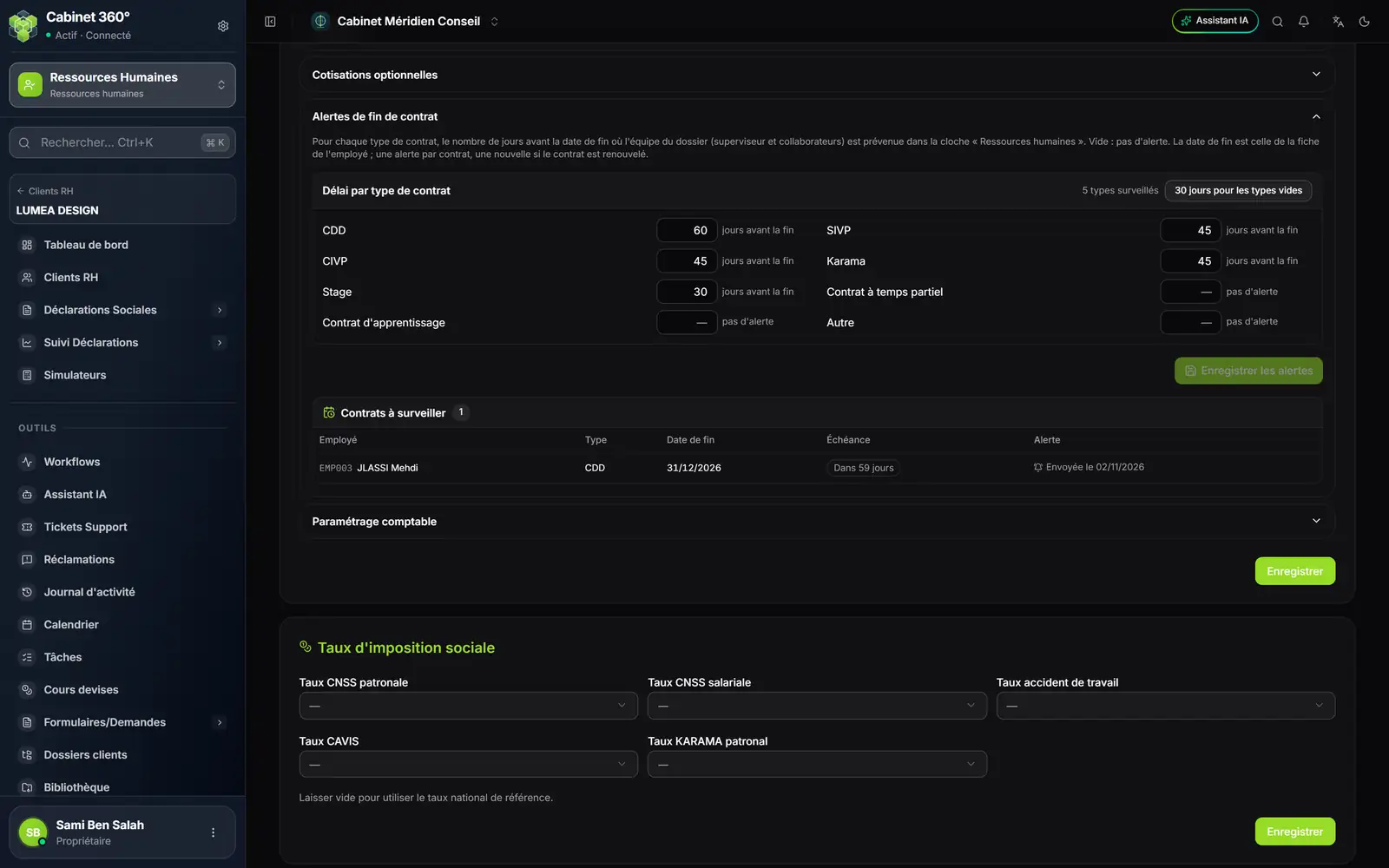
- 1. One delay per contract type: the number of days before the end date. Empty: no alert.
- 2. 30 days for empty types fills the boxes still empty, without touching the others.
- 3. Save alerts: the alerts already due go out at once, the next ones every morning.
- 4. Contracts to watch: the due date ("In 59 days") and the date the alert was sent.
The file's supervisor and team members receive the alert in the bell, under Human resources: "Fin de contrat — …" (contract end): "Le contrat CDD de … prend fin le 31/12/2026 (dans 30 jours). À renouveler, ou à préparer la sortie de l'employé." (The CDD contract of … ends on 31/12/2026, in 30 days. To renew, or to prepare the employee's departure.) A click opens the Employment contracts page. With no team on the file, the firm's administrators receive it.
- The date watched is the End date of the employee record; an employee who has left is no longer watched.
- An alert goes out once per contract, and again if the contract is renewed with a new end date.
- A CDI, with no end date, has no alert.
- A contract that ended longer ago than the delay no longer triggers an alert, but the table shows it as "Ended … days ago" as long as the employee is active.