
Taking over Sage Paie
With the External Connection module, IntegraSys reads the client's Sage Paie database and takes it over into their HR file: the employees, active and inactive, the payroll years and months, the pay plan and the leave.
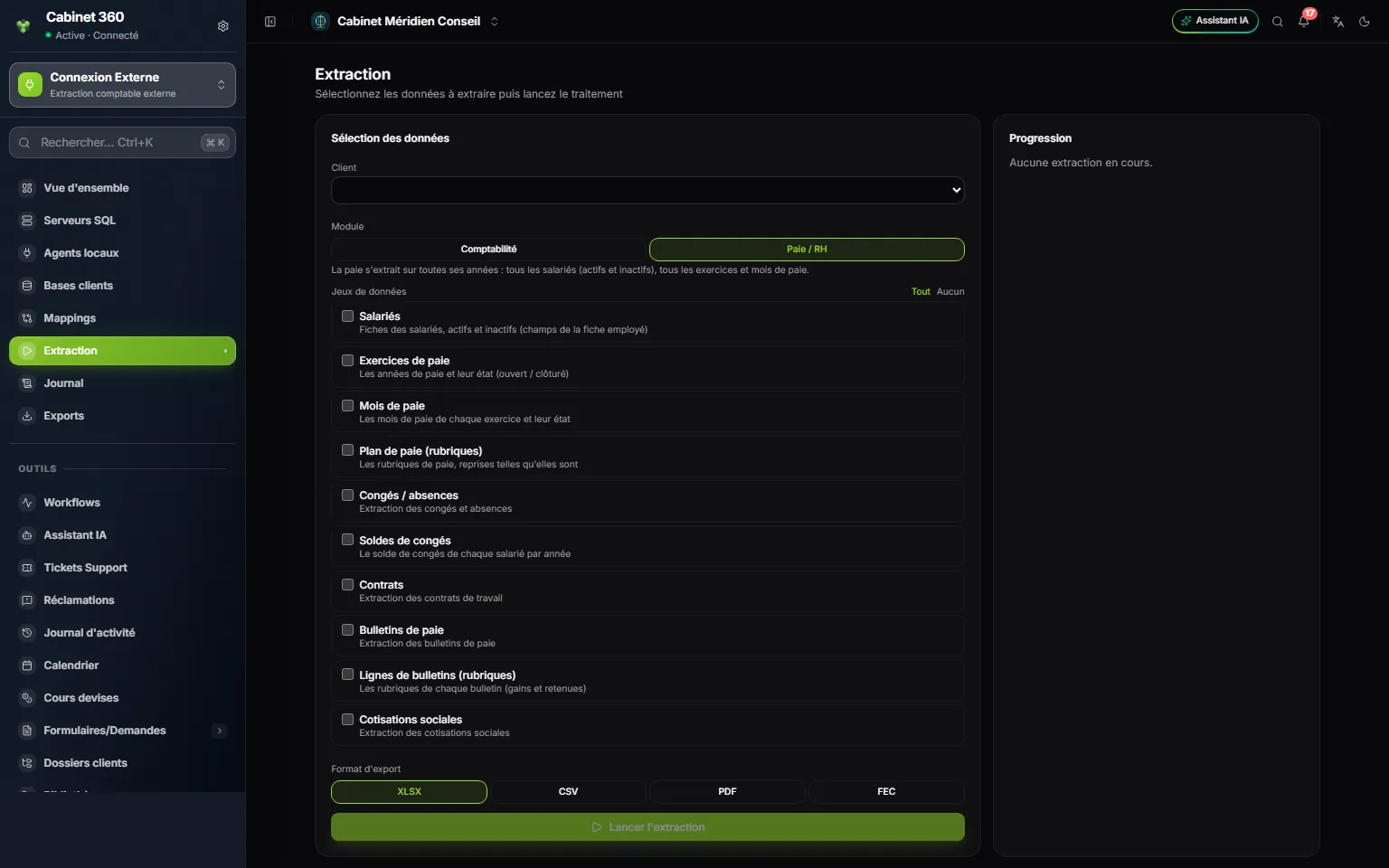
- 1. Module: Payroll / HR: payroll is extracted over all its years, with no payroll year to choose.
- 2. The six data sets taken over: employees, payroll years, months, pay plan, leave and leave balances.
- 3. The four others (contracts, payslips, payslip lines, contributions) are only used for export.
- 4. Run extraction, in the format of your choice.
- Open the client's HR file (see Opening and setting up the HR file).
- In External Connection › Extraction, choose the Sage Paie database in Client; Module switches to Payroll / HR.
- Tick Salariés (employees), Exercices de paie (payroll years), Mois de paie (payroll months), Plan de paie (rubriques) (pay plan), Congés / absences (leave and absences) and Soldes de congés (leave balances), then Run extraction.
- When the status is Succeeded, the Import into the HR file block appears under the files. Check the HR file suggested.
- Click Simulate: "Simulation — nothing was written:" gives the summary, one line per topic, with the refused lines and their reasons.
- If the summary suits you, click Import.
What the import does:
- The pay plan enters the firm's reference data (origin Firm, for all your files). An item that already exists is not rewritten.
- The employees are recognised by their ID. An empty value in Sage changes nothing on an existing record; a re-import duplicates nothing.
- The months arrive with their status: a month closed in Sage arrives closed and is never reopened.
- Approved leave is taken over without duplicates; the balance of the last year becomes the record's Prior-year leave balance (days).
Taking over months paid elsewhere
When a client arrives during the year, their months already paid count for the year's IRPP, the withholding certificate and leave. They are taken over from a workbook.
- Create the employees first: the import creates nobody, it recognises each employee by their ID.
- In Payroll months, click Import, then Download the template: it carries the expected columns and the file's employees, with a "Mode d'emploi" sheet (instructions).
- Fill in one row per employee and per month. Matricule, Année, Mois and Net à payer (ID, year, month, net pay) are required; an empty cell counts as 0. The headers of other software are recognised ("Salaire net", "CNSS", "IRPP"…), and every Excel format is accepted.
- Choose the workbook under Workbook to import: it is checked first, without saving anything, and the summary names each refused row with its reason.
- Click Import.
The imported months are closed and their payslips locked: they are never recalculated. Their amounts and their Congés pris (leave taken) count in the year's totals. A month already calculated in IntegraSys is never replaced; a month already imported is, without duplicates.
Opening leave balances
An employee's leave counter needs a starting point: their balance at the end of the month before the file's first payroll.
In the first payroll month, the Leave balances as at … window opens by itself on Payroll months. Enter each employee's balance, then click Save. The Search an employee field finds someone from the first letters of their last name, first name or ID.
- You may enter only some of them: a balance left empty takes the record's Prior-year leave balance (days) (0 by default), and a balance entered here is written onto the record.
- If the client has no earlier balances, click Skip.
- Until the first generation, Complete balances reopens the window.
- If months have been imported, the file's payroll has already started and the window does not open: then enter the Prior-year leave balance (days) on each employee's record.
Your client can also enter these balances themselves, from the Leave page of their portal, as long as no payroll month of the file is closed: see What your client does on their portal.