
The payslips table
Choose the month in Period: the page opens on the most recent month, not necessarily the active month. The table gives, per employee, the Base, the Bonuses, the OT (overtime), the Reimb. (reimbursed expenses), the Gross, the contributions (CNSS, FAPERE, CAVIS, Grp.Ins), the IRPP, the CSS, the deductions (Adv., Loans, Garn., Deductions), the Net and the employer charges (Empl.charges). A net in red is negative.
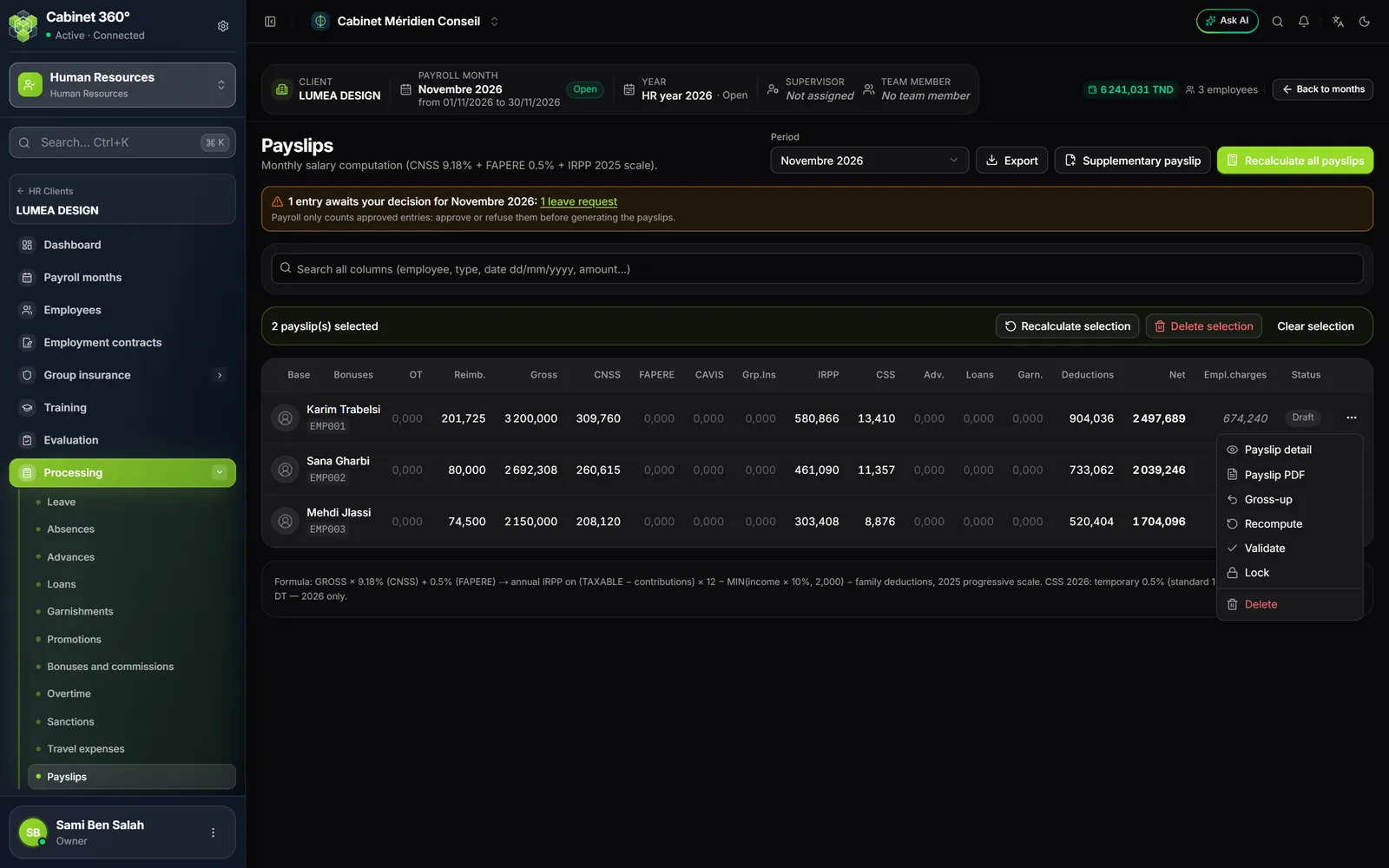
For an open month, the entries still awaiting a decision are shown above the table, as on Payroll months. The Search all columns field finds an employee, an ID number, a status or an amount.
Recompute, validate, lock
Each payslip starts as Draft. To correct it, change the entry at its source, then recompute:
- Recompute, in the row's ⋯ menu, for one employee;
- Recalculate all payslips for the whole month (the button is called Compute period while no payslip exists);
- for a few employees, tick their rows (or Select all in the header), then Recalculate selection.
| Status | What it means |
|---|---|
| Draft | Computed, still editable: each generation recomputes it. |
| Validated | Checked: neither Generate nor Recompute touches it any more. |
| Locked | Frozen in the same way. |
Validate and Lock are in the ⋯ menu. To correct a validated or locked payslip, choose Unlock (it replaces Validate): "Payslip unlocked: back to draft". Recompute it, then validate it again.
As long as the month is not closed, any payslip can be deleted, validated or locked ones included: Delete in the ⋯ menu, or Delete selection for several; the confirmation counts the validated or locked payslips.
The payslip detail and the gross-up
Payslip detail (⋯ menu) shows the payslip's lines as they will print: each pay item that carries an amount has its line.
Gross-up pays an exact net. Enter the Net pay you want and the Pay item that will receive the difference. The window shows the payslip's net and total gross, the Remainder posted to the pay item, the total gross for this net and the resulting net; OK recomputes the payslip.
- Nothing changes in the payroll calculation: CNSS, IRPP and CSS remain those of the law; IntegraSys simply looks for the gross that gives this net.
- The requested net is kept: a new generation of the month recomputes the posted remainder. Remove takes it off.
- Gross-up is greyed out on a validated or locked payslip, and in a closed month.
The supplementary payslip
Besides the month's salary, an employee can receive a supplementary payslip: a productivity bonus, a retirement severance pay… The Supplementary payslip button, at the top of the page, draws it up with its earning pay items.
- A supplementary payslip takes up no pay item already paid on another payslip of the month: the window shows it greyed out, with the reason.
- CNSS, IRPP and CSS are computed on the month's payslips combined: the supplementary payslip carries the difference. The month's payslips added together give the same payroll as a single payslip.
- The two payslips stay separate at closing and each one prints; the supplementary payslip is titled BULLETIN COMPLÉMENTAIRE (supplementary payslip).
- An advance can be withheld from the supplementary payslip rather than from the salary (advance on a bonus).
The printed payslip
Payslip PDF (⋯ menu) prints one employee's payslip; Export › PDF prints all of the month's, one per page. The payslip is titled BULLETIN DE PAIE (payslip) and follows the order of the Sage payslip, in green:
- the employer, your client: name, address, tax ID and CNSS number (the payslip prints no logo);
- the employee: ID number, name, identity document, marital status, dependent children, CNSS number, job, days (or hours) worked;
- the body: one line per pay item that carries an amount, with quantity, base, rate, earnings, deductions and employer share, then the Total Brut (total gross), the contributions and the NET A PAYER (net pay);
- the year-to-date totals and the leave counter: previous month's balance, month's entitlement, earned, taken and month-end balance.
An empty box is not printed. A pay item or a line set to "not printed" is still paid and counted in the totals.