
The payroll simulator
The page has two tabs: Simulateur de paie (payroll simulator) and Assurance vie / CEA (life insurance / CEA). The payroll simulator starts from the monthly net the employee must receive and finds the gross that gives it, with the same rules as the payslips: CNSS, IRPP, CSS, and the employer's charges.
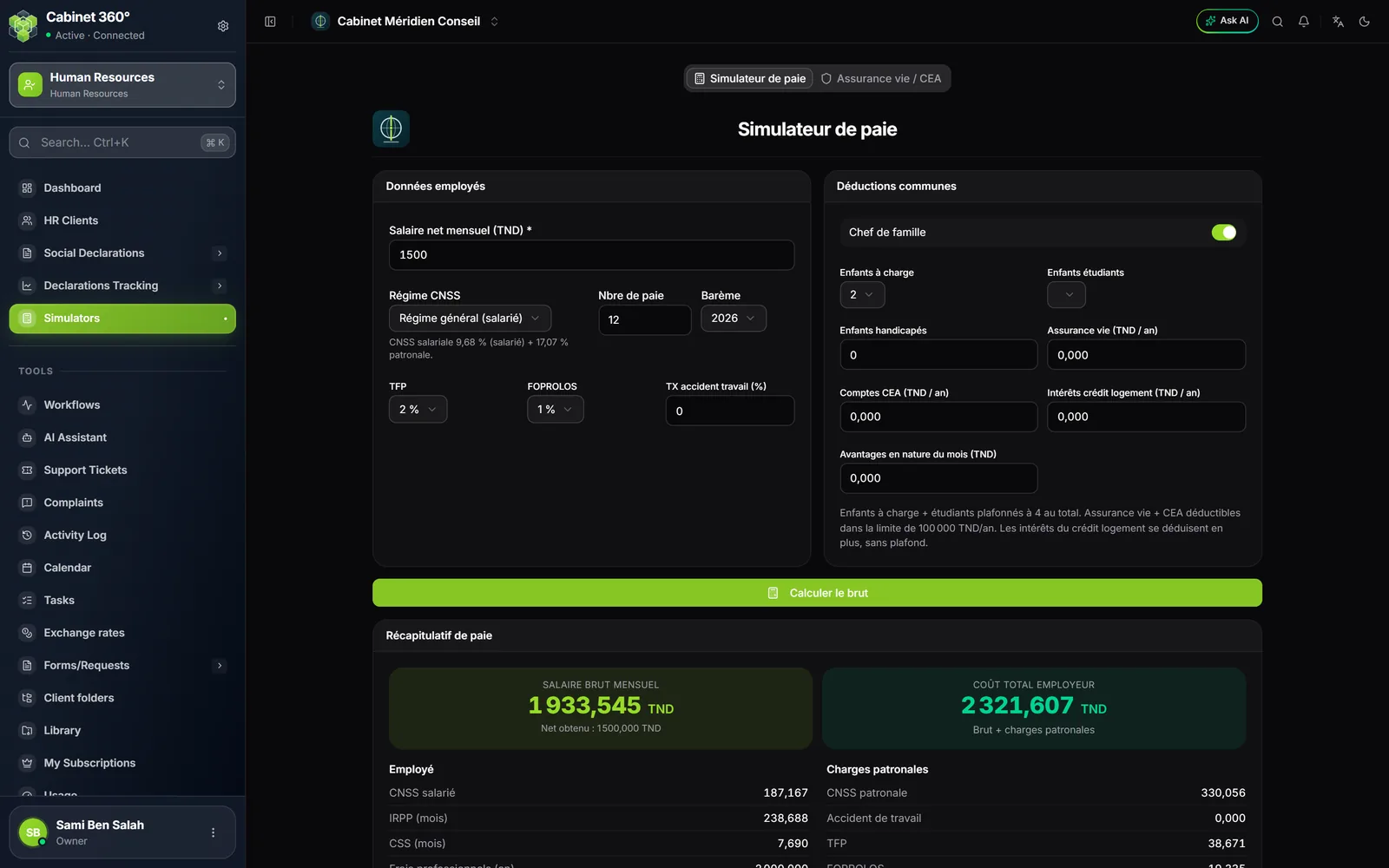
- Enter the Salaire net mensuel (TND) (monthly net salary).
- Choose the Régime CNSS (CNSS scheme: "Régime général (salarié)", general scheme, employee; "CIVP"; "Régime KARAMA"; "Indépendant / non salarié", self-employed; "Startup (Startup Act)"; "Diplômés nouvelles recrues", newly hired graduates), the Nbre de paie (number of pays) in the year and the Barème (scale: the IRPP year).
- Enter the employer's rates: TFP, FOPROLOS and work accident.
- Describe the family: Chef de famille (head of family), Enfants à charge (dependent children), Enfants étudiants (children in education), Enfants handicapés (children with disabilities).
- If the employee pays into a life insurance, a CEA or housing-loan interest, enter the year's amounts.
- Click Calculer le brut (compute the gross): the summary gives the gross, the net, the employee and employer charges and the employer cost, and the Détail calcul d'IRPP (IRPP calculation detail) shows the path, from the annual gross to the month's tax, next to the scale.
What each scheme changes
The simulator applies the rules of the chosen scheme, those of the payslip:
- Régime général: TFP, FOPROLOS and work accident at the rates entered.
- CIVP: no TFP, no FOPROLOS, no work accident; the three fields are greyed out at 0 and a note says why. (In the simulator only: on the payslip, the work accident of a CIVP follows the scheme's variant.)
- Karama: the work accident rate is mandatory; the note recalls that the first 600 DT of the gross bear only a reduced CNSS, with no TFP, FOPROLOS, IRPP or CSS.
- Startup: CNSS at 0,5 % employee and 1 % employer on the whole gross.
- Indépendant (non-employee): no CNSS and no work accident on the pay; TFP and FOPROLOS remain due.
A charge the scheme does not apply is greyed out at 0, and the note under the grid names it: a rate entered that the calculation ignored without saying so would pass for an error. The rate entered comes back if you change scheme.
The printed report
The print button produces a one-page PDF in the payslip's colours: the firm's logo (its name if it has no logo), the Données employés (employee data) and the Déductions communes (common deductions), the Récapitulatif de paie (payroll summary) and its two highlighted amounts, the employee and employer-charge columns, then the IRPP calculation detail and the scale side by side. The report uses the data of the last calculation.
The life insurance / CEA simulator
The second tab estimates the tax benefit of savings: enter the Revenu imposable annuel (TND) (annual taxable income) and the Montant assurance-vie / CEA versé (an) (life insurance / CEA amount paid in the year). The simulator gives the deduction actually allowed and the IRPP saving that results. The Plafond déductible AV/CEA (deductible cap) is the highest amount that leaves the IRPP at least equal to 45 % of the IRPP due, without exceeding 100 000 DT a year.