
Leave request and leave permit
The page lists leave with its No. and its Type (Request or Leave permit), under the tabs All, Pending, Approved, Refused and Cancelled.
- Click New leave. Choose the Employee, the Leave type, the Start date and the End date. For a Special leave, also choose the reason (marriage, birth, death…).
- Click Submit: the request appears Pending, with its DC number (DC260001…).
- In the row's ⋯ menu, choose Approve or Refuse, then confirm.
- Once approved, the request becomes a Leave permit and gets its TC number (TC260001…), keeping its DC number. Refused, it stays a request.
The same menu offers Edit (type, dates, reason; the employee does not change), Print leave, Cancel and Delete. Print leave produces the Demande de congé (leave request) or the Titre de congé (leave permit) as PDF: number, employer, employee and ID number, type, dates, days counted, return date, status and signatures.
What is checked
- The count follows the employee's Leave calculation method: working days (Monday to Saturday, no Sunday or public holiday) or calendar days.
- The half day: a one-day request can count as half a day if the file allows it; otherwise the Half day switch says "turn on 'Half-day leave' in the settings".
- Overlap: two leaves of the same employee cannot overlap. The message names the other leave ("Chevauche le congé « Congés payés » du 12/01/2026 au 13/01/2026.": overlaps the paid leave from 12/01/2026 to 13/01/2026).
- The closed month: leave that starts or ends in a closed month can no longer be entered or approved. Refuse it.
- The balance: when paid leave exceeds the employee's balance and the file (or the employee) is set to Ask for confirmation, the "Negative leave balance" window asks "Do you want to validate it?". Yes saves it; No goes back to the entry. Set to Accept without asking, the leave is saved with no question.
Special leave (marriage, birth, death of a relative, a child's circumcision…) is paid and outside the balance. The legal minimum durations are preset; a file can raise them, never lower them. Beyond the planned duration, the grid warns you.
Set the month's leave in one go
Batch entry opens the Leave for the month grid.
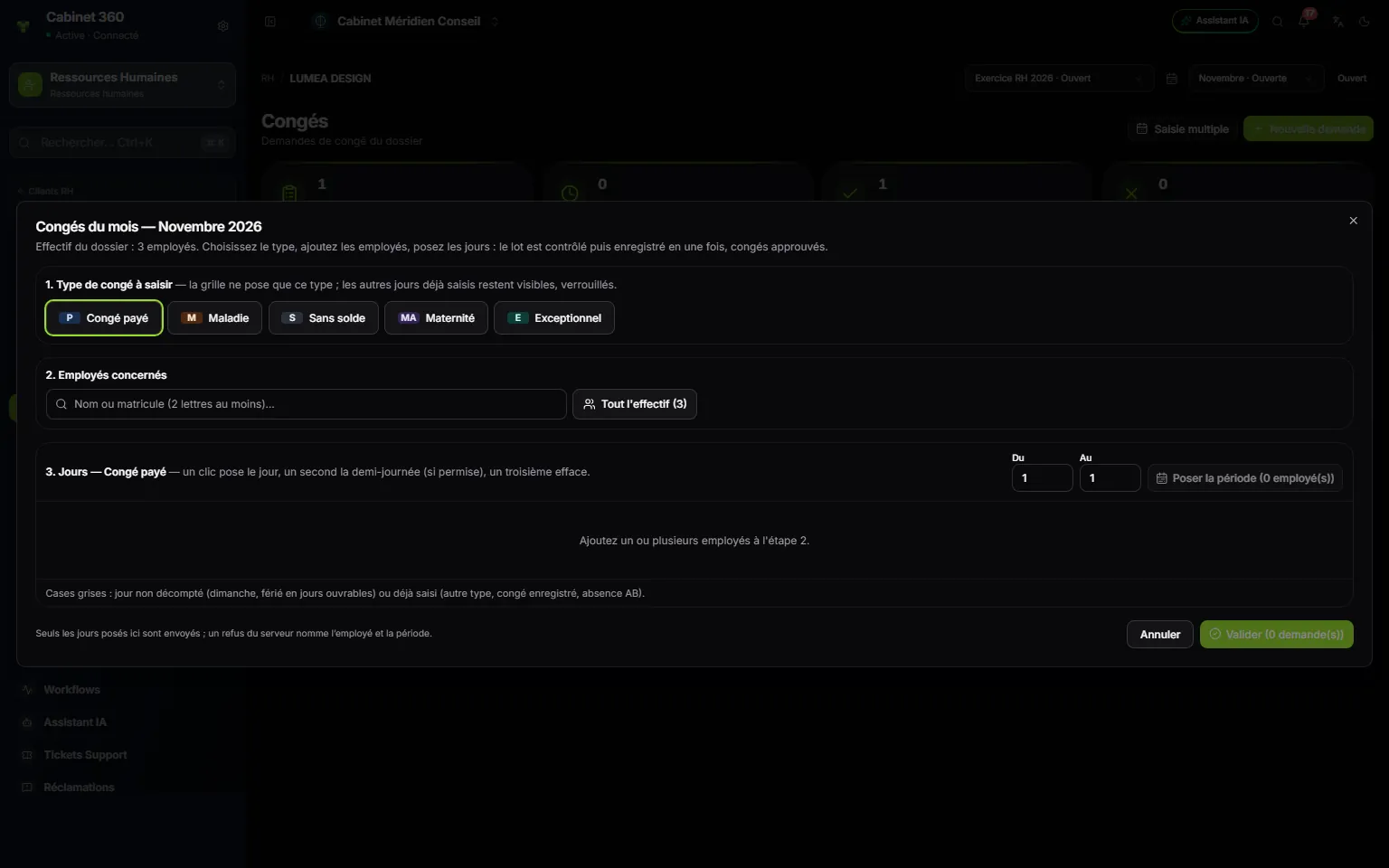
- 1. 1. Leave type to enter: the grid sets only this type; days already entered stay visible, locked.
- 2. 2. Employees: search from two letters, or Whole headcount.
- 3. 3. Days: one click sets the day, a second one the half day, a third clears it.
- 4. From / To, then Set the period for all the employees added.
- 5. Save (n request(s)): everything is saved at once.
An employee's consecutive days make a single request; a Sunday or a public holiday that is not counted does not split it. Leave set through the grid is a leave permit from the start (TC number only), approved: it counts at once.
The counter: entitlement, taken, balance
Each month, an employee's counter moves on like this. The payslip prints these lines in French:
| Line | Calculation |
|---|---|
| Solde mois précédent (previous month's balance) | The balance at the end of the month before (at the start, the balance taken over) |
| Droit du mois (month's entitlement) | The employee's monthly entitlement (otherwise the file's) |
| Acquis dans le mois (earned in the month) | The entitlement prorated to attendance: entitlement × days worked ÷ working days in the month (or in hours for an employee paid by hour) |
| Pris dans le mois (taken in the month) | The days of the paid-leave permits that started in the month |
| Solde fin du mois (month-end balance) | Previous balance + earned - taken |
Days are counted to three decimals ("2,308"). An unjustified absence reduces what is earned; paid leave does not.
Leave can be entered for a month after the open month (in October, leave in November): the balance checked is then the one at the end of the open month, without the entitlement of the following months.
The planner and the leave statement
Leave planner, in the file's menu, shows who is away, in Day, Week or Month view. Pending requests appear dotted, permits solid; refused and cancelled leave does not appear. The filters All directions, All departments and All positions narrow the display; All employees isolates one person.
Two reports print leave:
- Report, at the top of the Leave page: the approved leave of the active payroll month, by type then by employee, with subtotals and a summary;
- HR reports › Leave statement: for one month, per employee, the Solde M-1 (balance at the end of the previous month), the Droit (entitlement), the Pris (taken) and the Solde (balance), each column totalled.