
The module's documents
| Document | From | What comes out | Template |
|---|---|---|---|
| Company form summary | Form record or wizard, Print | An A4 PDF, the eleven steps | IntegraSys fixed layout |
| Power of attorney | Power of attorney page, Print | The browser's print, or a PDF | Firm template "Power of attorney", required |
| Articles | List (⋯ menu) or articles record, Print | Preview window: Print or Download PDF | Firm template, otherwise built-in template |
| Shareholder list | Articles list (⋯ menu) or articles Preview | The table, and the PDF (RNE C 012) form, eight associates at most | Official form |
| Notice of meeting | Notice row or record, Print | The notice letter | Firm template, otherwise built-in template |
| Minutes | Minutes row or record, Print | The minutes | Firm template, otherwise built-in template |
| Share transfer | Transfer record, Print | The transfer act | Firm template "Share Transfer" |
| Precision act | — | Nothing: the act records a correction, it is not printed | — |
The built-in templates
Three documents print from day one, without any setting: the articles, the notice and the minutes. As long as your firm has no template of that type, IntegraSys prints its built-in template.
- Legal statutes: the company's header (name, form and capital, registered office, identifier), the title "STATUTS" or "STATUTS MIS À JOUR", the appearance of the associates, then six articles (form, name, purpose, registered office, capital and shares, management), the content entered on the articles, "Fait à …, le …" (done at …, on …) and the associates' signatures. A draft carries the mention "PROJET" (draft).
- Notice of meeting: the company's header, "CONVOCATION À L'ASSEMBLÉE…" (notice of the meeting), the number, the letter to the associates with the day, the date, the time and the place, the agenda, the documents made available, the signature and the list of recipients.
- Minutes: the company's header, the title and the number, the date in words and the start time, the place, the attendance table, the quorum, the chairperson and the secretary, the agenda, the documents, each resolution and its vote ("PREMIÈRE RÉSOLUTION… adoptée à l'unanimité", first resolution… adopted unanimously), the closing time and the signatures.
The firm's templates
The "Print templates — Legal" page lists the firm's templates for the module. For each type without a firm template, it shows the built-in template, marked "Built-in template": "Printed until the firm defines a template of this type."
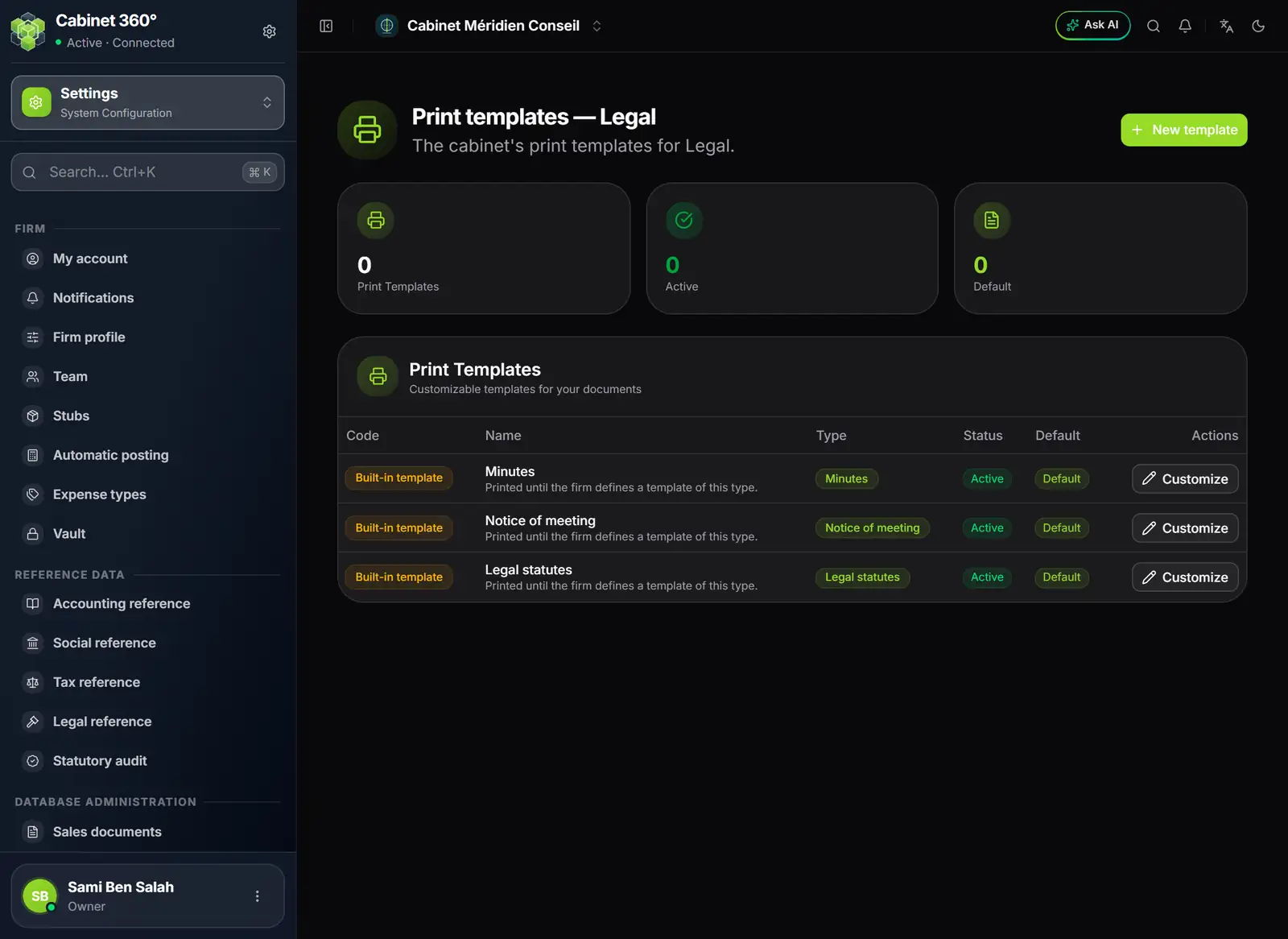
- 1. New template: a firm template, of any type of the module.
- 2. Built-in template: Minutes, Notice of meeting, Legal statutes.
- 3. The type of the template.
- 4. Active and Default.
- 5. Customize: a firm template, pre-filled with the built-in text.
- On a built-in template's row, click Customize: the editor opens, pre-filled with IntegraSys's text. Or click New template and choose the type.
- Shape the text the firm's way: header, wording, layout. The variable buttons insert the document's data (name, capital, associates…).
- Save the template, Active and Default. From then on, it replaces the built-in template for that type.
From a record, "Print" offers the active templates of the type (so does the articles window). From a list row, the notice and the minutes print with the active template marked "Default", otherwise with the built-in template.
The platform's templates
IntegraSys can also publish shared templates. Your firm receives a copy, marked "Platform template", which you can edit: it then reads "Platform template, changed by your cabinet" and no longer follows the platform's updates. Your own template stays the default template.
What the variables print
A variable is written between braces, for example {client.intitule}. At printing, it is replaced by today's data:
{client.…}: the company, as its record describes it today, or as adopted articles froze it (name, legal form, capital and capital in words, number of shares, nominal value, registered office, city, corporate purpose);{statut.…},{convocation.…},{pv.…}: the document printed;- the tables of associates, managers, attendees, agenda items and resolutions.
Each value entered is printed as is, without being able to change the layout.