
Before you start
- The company is a legal entity, not inactive, with its associates and their shares on its record.
- To print the act, a template of type "Share Transfer" exists in the firm's templates (chapter 15).
Entering a transfer
Click New transfer.
- In General information, choose the Client / Company (it can no longer change afterwards) and the Transfer date. The Transfer price (TND), the Signing location and the Notes are optional. The client's data shows below, read-only.
- In Transferors, click Add a transferor, choose the Associate: the shares held show, and their ID, address and nationality fill in, editable. Enter the Number of shares transferred; the screen says what the associate has left ("Remaining: … shares").
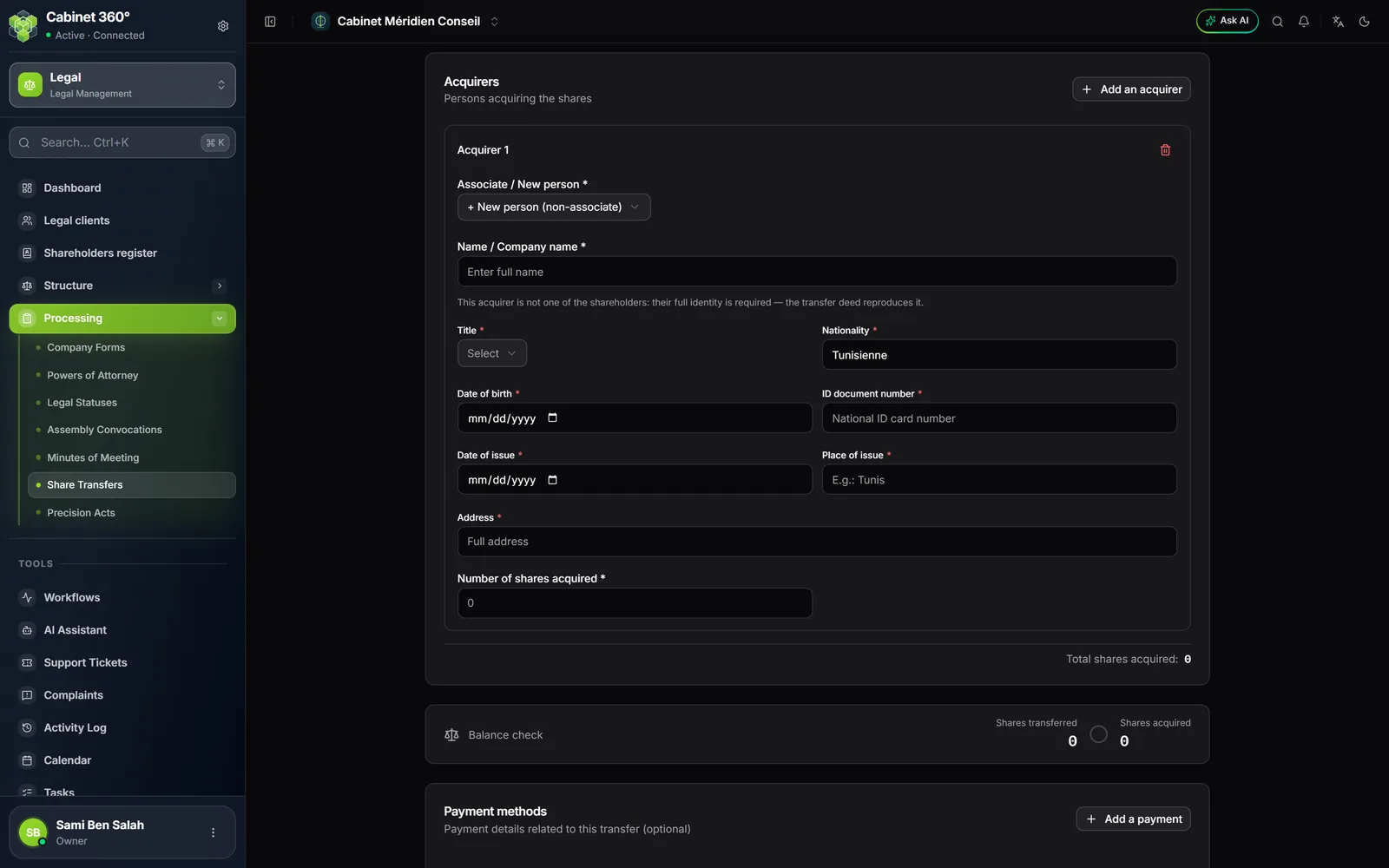
- In Acquirers, click Add an acquirer, then choose an associate, or + New person (non-associate) for a third party. Enter the Number of shares acquired; the screen says their new total.
- Under Balance check, the shares transferred must equal the shares acquired.
- In Payment methods, optional, Add a payment: the Payment method (Cheque, Bill of exchange, Transfer, Cash, Bank card or Direct debit), the Amount (TND), and if needed the bank, the instrument number and the due date.
- Click Save: the record opens as a Draft.
There must be at least one transferor and one acquirer. An associate cannot be both transferor and acquirer.
The acquirer who is not a shareholder
A third party has no associate record: the act therefore takes their full identity, entered in the transfer. All these fields are required:
- Name / Company name;
- Title and Nationality;
- Date of birth;
- ID document number, Date of issue and Place of issue;
- Address.
No date can be in the future, and the ID cannot be issued before the birth.
Validate: the shareholders are updated
Click Validate. Nothing is validated yet: a window first shows the Capital split after the transfer, associate by associate:
- the Shares before, the Shares after and the Change;
- New associate for the third party who joins;
- Leaves the company for a transferor who transfers all their shares.
Confirm with Validate. The transfer moves to Validated, and the client record changes:
- each transferor loses the shares transferred; at zero, they leave the list of associates;
- an acquirer who is already an associate gains theirs;
- a third party becomes an associate, with their identity and their shares.
The transfer's record says so: "Company associates updated on dd/mm/yyyy". The transfer enters the event timeline and the shareholders register.
An incomplete transfer says so
If a transfer was entered before a rule existed, a red banner lists what "Validate" would refuse: a missing transferor or acquirer, the identity of a new acquirer, totals that do not balance. On a draft, Complete the transfer leads to entry.
Register
Once the transfer has been filed, click Register, then confirm in the "Register transfer …?" window: "Registration is final: a registered transfer can no longer be reopened or edited."
Reopening a validated transfer
Only a Draft transfer can be edited or deleted; otherwise, "Edit" is not offered. On a validated transfer, Reopen undoes the update: the transferors get their shares back, the acquirers give theirs back, the new associate is removed, and the transfer goes back to draft.
A company's transfers are undone in reverse order: as long as a more recent transfer updated the associates after this one, Reopen is refused and names the one to reopen first. If one of the later transfers that updated the associates is already registered, the transfer can no longer be reopened.
Printing the transfer act
Print, on the transfer's record, produces the act from the firm's "Share Transfer" template, whatever its status. Without this template, printing shows "Template not configured". On the record, the transfer price, the payment methods and the capital are written in the product's amount format; an amount not entered is written "—", never "0,000".