
A print tool
The page is titled "Mandate / Power of Attorney — Create a power of attorney or mandate". The company's manager, the principal, gives power to one or more agents. The page keeps nothing: no number, no list, no draft. Reopened, it starts from scratch. Keep the PDF or the paper.
The same screen also opens from the Tools workspace.
Before you start
- The manager is on the client record (Legal tab, Managers section) or among the managers of their company form (step 6, "Management").
- The agents exist in the firm's reference list (below).
- A print template of type "Power of attorney" exists in the firm's templates (chapter 15). The power of attorney has no built-in template: without a firm template, printing shows "Template not configured — The print template for mandates is not yet configured."
The firm's agents
Agents are the people your clients most often give power to: a member of the firm, a courier. They belong to your firm, and only you write them. New representative opens the form at the top of the list: Last name, First name, ID type (CIN, Passport or Residence card), Number, Issue date, Place of issue and Active. Last name, first name and number are required. Also fill in the issue date and place: a power of attorney often quotes "holder of ID card no. …, issued on … at …". A future issue date is refused. Create saves the agent.
The list's Issued column sums up the date and place. Deleting an agent is confirmed in a window that names them. Only active agents are offered in the power of attorney.
Preparing the power of attorney
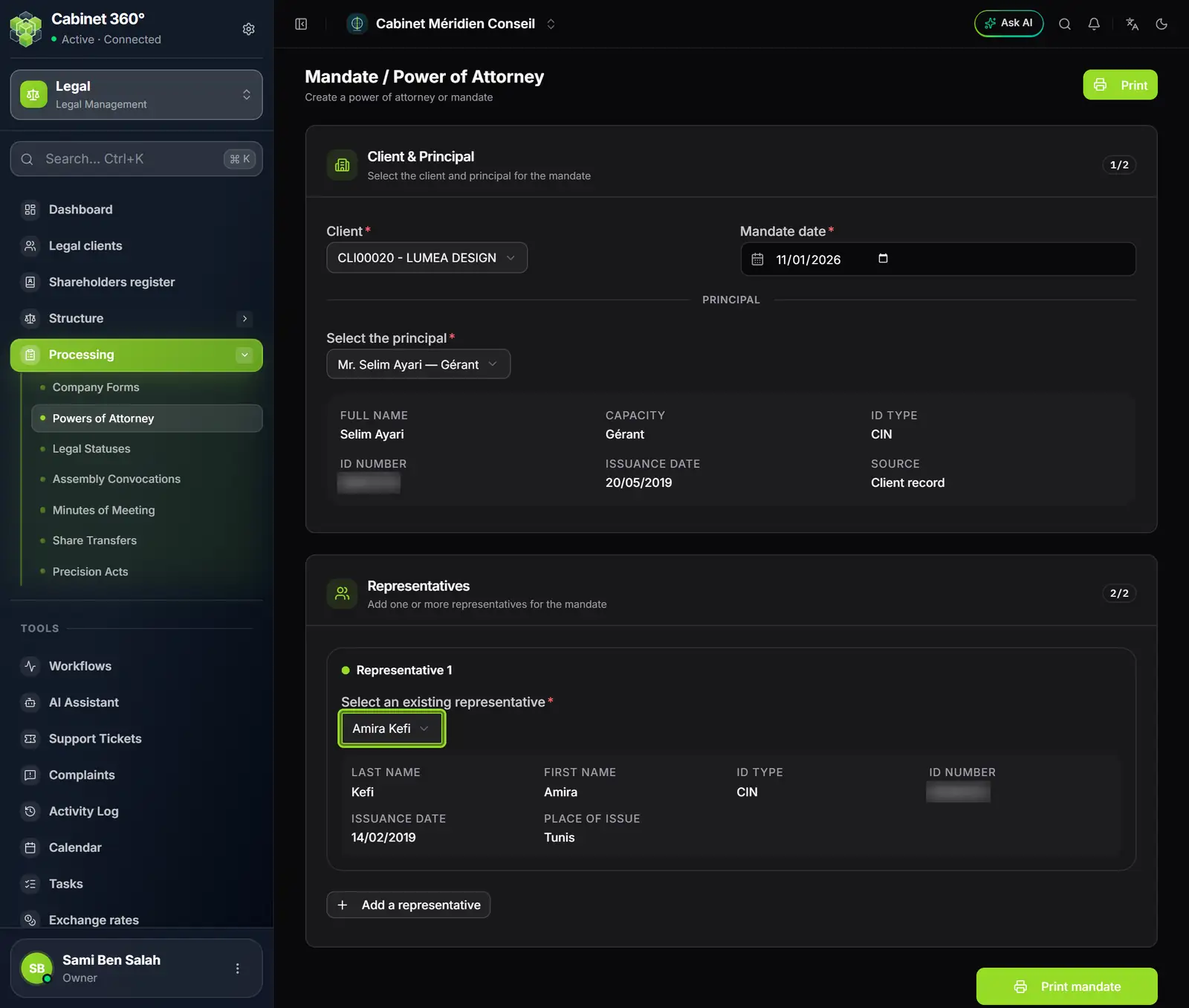
- 1. Client: any client that is not inactive, company being incorporated included.
- 2. Mandate date: today by default, it is the date printed.
- 3. Select the principal: managers on the record and managers in the form.
- 4. Their identity: name, capacity, ID, issue date, and the source.
- 5. Representative 1: chosen from the firm's reference list.
- 6. Add a representative opens one more line.
- 7. Print mandate, active as soon as everything is chosen.
- In Client & Principal, choose the Client. Check the Mandate date.
- Open Select the principal. The list brings together the managers on the Client record and the managers in the Company form, each under its source. The same person is offered only once. Their identity shows below: last and first name, capacity, ID type and number, issue date, source.
- In Representatives, under Representative 1, open Select an existing representative and choose the agent: their name, ID, issue date and place show. Add a representative opens one more line; the cross removes one.
- Click Print at the top, or Print mandate at the bottom. They become active as soon as the client, the principal and an agent are chosen. The browser's print window opens: print, or save as PDF.
What the power of attorney prints
The firm's template receives the page's data: the client, the mandate date, the principal and each agent, ID document included. Titles are printed the French way ("M.", "Mme"). An agent without a place of issue leaves that passage empty, never a dash in the middle of the sentence. Chapter 15 details the templates and their variables.