
What the module does
The Legal module keeps the corporate secretarial work of the companies your firm follows. There you prepare the incorporation file, the articles of association and the power of attorney for the formalities, then, each year, the notices and minutes of meetings, the share transfers and the acts that correct a document already drawn up.
The principle is simple: nothing is typed twice. The capital, the shareholders, the managers and the address of the registered office come from the client record. A printed document therefore shows the company as it is today, not as it was in last year's file. Only adopted articles print the company frozen at their validation: that is what they state.
Opening the Legal workspace
At the top of the left bar, the workspace selector shows the open module. Choose Legal: the bar then shows the module's menu, under the title "Legal Management". The workspace appears only if your firm subscribes to the Legal module.
The menu, in the order of a company's life
The module's menu reads from top to bottom.
| Entry | What you do there | Chapter |
|---|---|---|
| Dashboard | Where your documents stand, what needs action | 4 |
| Legal clients | The companies you follow and their event timeline | 5 |
| Shareholders register | The capital movements, from incorporation to today | 6 |
| Structure | Your agendas, resolutions and meeting documents | 3 |
| Processing | The seven legal documents | 7 to 14 |
Under Processing, the documents follow the order your work gives them: incorporation first, then the acts that follow.
- Company Forms: the incorporation file, in eleven steps.
- Powers of Attorney: the power the manager gives for the formalities.
- Legal Statuses (the articles of association): the articles of incorporation, then the updated articles.
- Assembly Convocations (notices of meeting): announcing a meeting to the shareholders.
- Minutes of Meeting: the report of the meeting and its resolutions.
- Share Transfers: shares passing from one shareholder to another, or to a third party.
- Precision Acts (deeds of clarification): the record of a correction made to an existing document.
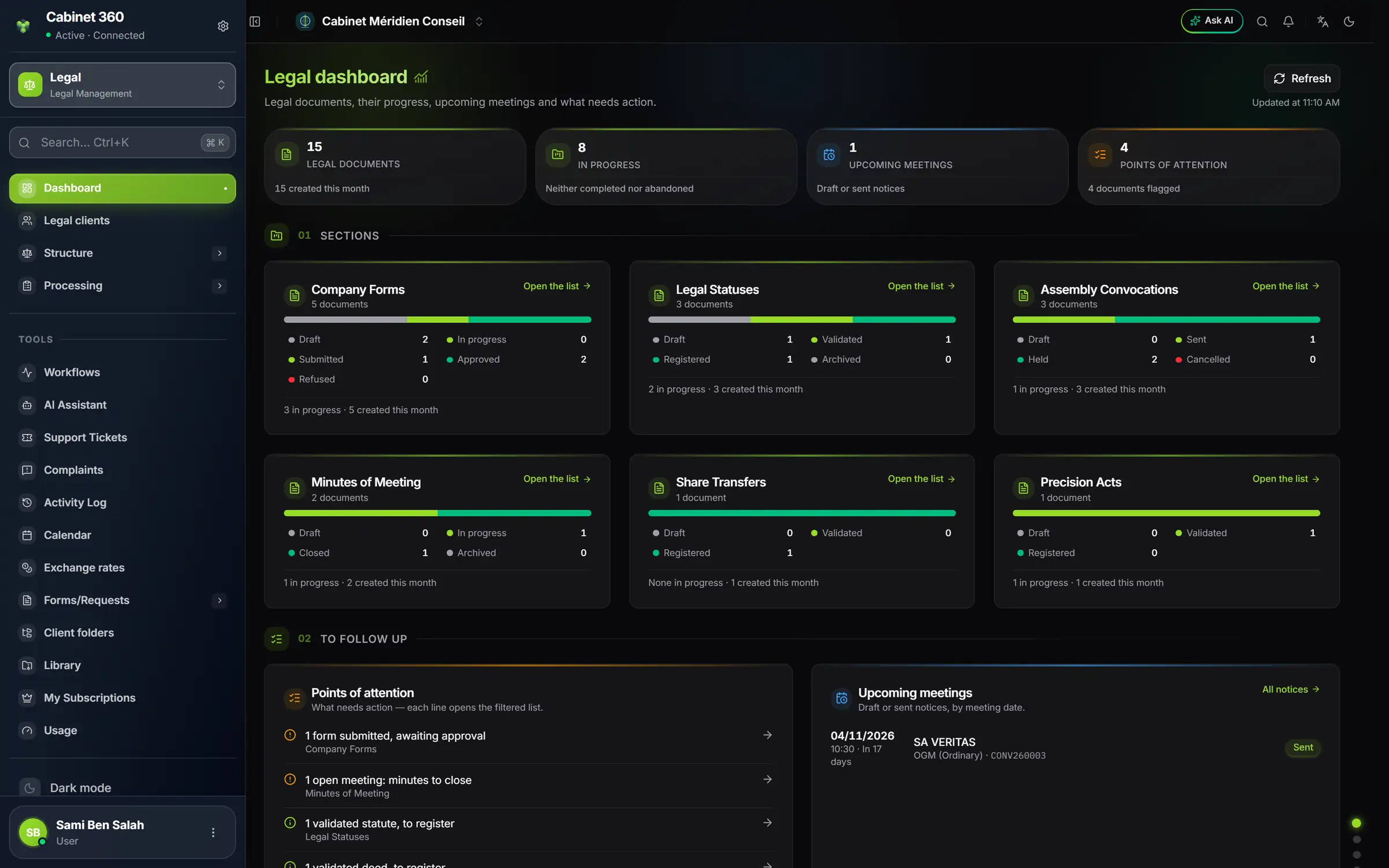
- 1. The workspace selector: Legal, "Legal Management".
- 2. Dashboard, first entry and home page of the module.
- 3. Structure and Processing open with a click on the arrow.
- 4. Four figures sum up the module.
- 5. One card per document, with its statuses.
The legal lists: one template
The six lists of the Processing menu (forms, articles, notices, minutes, transfers, precision acts) all look the same. Once you know the first, you know the other five.
- One create button, top right: "New form", "New statute", "New notice", "New minutes", "New transfer", "New deed".
- A band of figures: the total, then a count per status. Each status card is also a filter: click "Drafts" and the list shows only drafts. "Total" removes the filter.
- A search bar and a status list; some lists add a type filter.
- Twenty rows per page, with pagination at the bottom. The page goes back to 1 as soon as you change a criterion.
- Clicking a row opens the record. The row's icons show their name on hover.
- Deleting is confirmed in a window that names the document. A server refusal is shown with its reason.
Status colours
Each document moves forward by statuses. A status has the same colour everywhere: the row's badge, the bar at the left of the row, the record and the dashboard. Grey for a draft, the theme colour for a document under way, green for a completed document, red for a refusal or a cancellation. The colours follow the chosen theme and dark mode.
What can be edited, what becomes final
A legal document binds the company. The module therefore protects it with a simple rule, which the server applies again:
| Document | Can be edited | Can be deleted | Becomes final when |
|---|---|---|---|
| Company form | draft, in progress | draft, in progress | it is submitted |
| Articles | draft | draft | they are validated |
| Notice of meeting | draft, sent | draft without minutes | it is held |
| Minutes | draft, in progress | draft | they are closed |
| Share transfer | draft | draft | it is validated |
| Precision act | draft | draft | it is validated |
Most often, a button that cannot be used stays visible, greyed out, and says why on hover: "reopen it from its record", "Send the notice first"… Elsewhere it disappears: the bin of a document that can no longer be deleted, "Edit" on a final transfer or act. To correct a final document, you reopen it from its record when allowed. Each chapter says when.