
Sending the link
The Send by email button is on the form's record and at the top of the wizard. It is offered on a Draft or In progress form.
- Save the form: a form not saved, or whose entry differs from what is saved, cannot be sent.
- Click Send by email. The "Send the form to the client — FORM…" window names the Recipient: "The email address on the client record. To change it, edit the client record."
- Click Send. The link leaves; it is valid for 30 days.
The same window keeps the Latest send and the Previous sends. After a first sending, the button becomes Send again: "A new link is sent; the previous one stops working."
The recipient is always the address on the client record: it is not typed, and not swapped for a contact's. Without an address on the record, the button is greyed out and offers Add the client's email; when you come back from the client record, the button unlocks.
A new sending cuts all the previous links of the form: only the latest link opens the file.
What the client sees
The client, often a company not yet formed, has neither account nor portal. They open the link in the e-mail and land on a page of their own. The page reads in French, Arabic or English; the summary itself stays in French. They read the form there, step by step, then answer:
- I approve;
- I request changes: a comment is then required, and they can add a remark on each step.
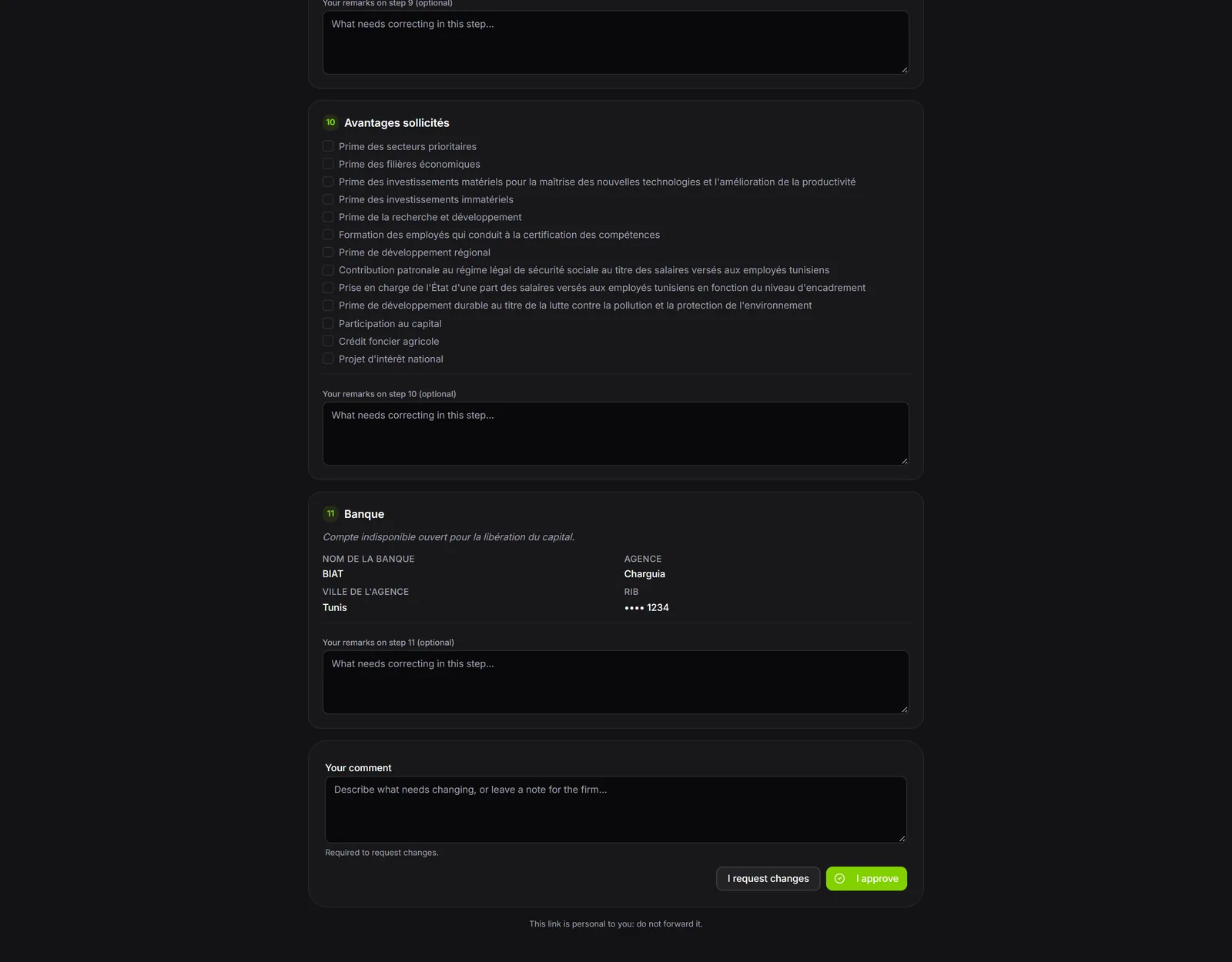
The client never edits the form: what it holds stays what your firm entered. And their approval does not submit the form: you always submit.
Once they have answered, the page no longer shows the file: it states the decision and its date. The link can no longer be used to answer a second time.
The page is titled "Company form to review". It says who sent it and until what date the link is valid. Each answer is confirmed ("Approve the form?", "Request changes?"): after it, the client can no longer answer through this link. The comment holds 4 000 characters, each remark 2 000.
When the link no longer works
The client's page says so, with the cause:
- Link expired: the 30 days have passed; the client asks you for a new sending;
- Unknown or revoked link: a more recent sending replaced it, you revoked it, or the form's client, or the e-mail address on its record, changed;
- Form unavailable: the firm's legal subscription is cut off.
If you submitted the form in the meantime, the client can still read it, but no longer answer. If you edited it while they were reading it, the page asks them to read it again before answering, keeping their remarks.
Reading the answer and handling it
Your firm receives a notification. On the form's record, a banner shows the answer: "The client approved the form on …", or "The client requests changes (answer of …)", followed by their comment and their remarks, each under its step ("Step 3 — Project information").
- Read the answer on the record.
- Apply the requested corrections: Edit, correct, Save.
- Click Mark as handled in the banner: it then shows "Handled on … by …".
- If needed, send the form again for a new review.
Cutting a link
Revoke the link cuts the latest active link, answered or not: the client can no longer read the form, and their answer, if they gave one, is kept. A link that no longer opens anything (client or address changed) carries the "Link cut" badge, and the record's banner asks you to send again.