
Opening the dashboard
It is the first menu entry, and the page that opens when you enter the Legal workspace. The title reads "Legal dashboard". At the top right, Refresh reads the figures again; the time of the last reading shows below ("Updated at 1:11 PM").
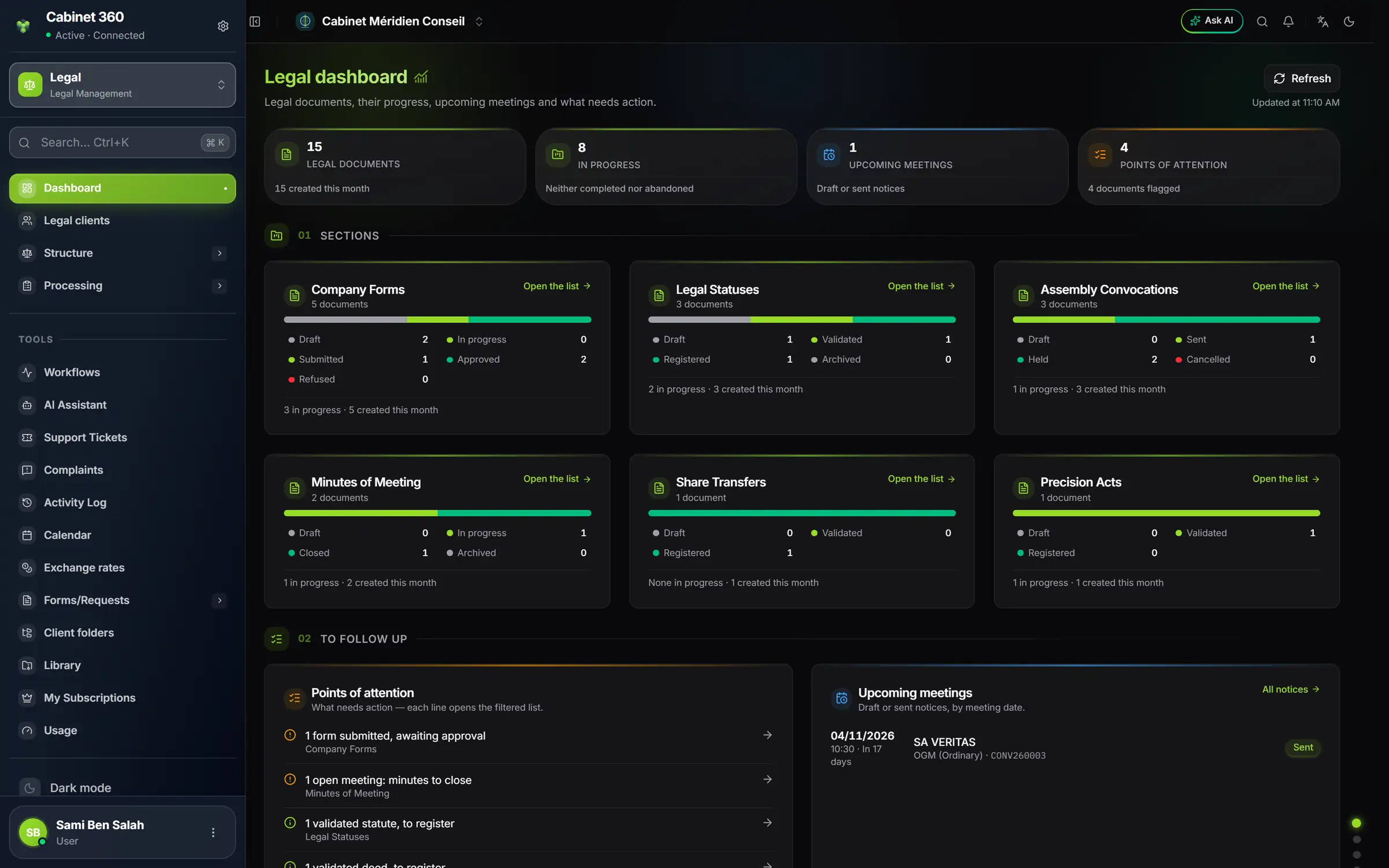
- 1. Legal documents: the total, and how many were created this month.
- 2. In progress: neither completed nor abandoned.
- 3. Upcoming meetings: notices in draft or sent.
- 4. Points of attention: the number of documents flagged.
- 5. One card per section: its statuses, and "Open the list".
- 6. Points of attention: each line opens the filtered list.
- 7. Upcoming meetings: date, time, company, type and number.
01 — Sections
One card per legal document, in menu order: Company Forms, Legal Statuses, Assembly Convocations, Minutes of Meeting, Share Transfers, Precision Acts. The power of attorney is not there: it is printed, not saved.
Each card gives:
- the number of documents in the section;
- a bar split by status, and the legend with a count per status;
- at the foot, the number in progress and the number created this month;
- the Open the list link.
The counts are those of the lists: the dashboard and a list's band of figures always say the same thing.
02 — To follow up
Points of attention
"What needs action — each line opens the filtered list." The points are ordered from most to least serious. Here are those the module flags:
| Point of attention | What to do |
|---|---|
| Notice still in draft for a meeting in less than 15 days | Print and hand out the notice, then mark it sent |
| Minutes closed without quorum | Check the meeting's attendance |
| Form submitted, awaiting approval | Approve or refuse the form |
| Past meeting whose notice is not marked "held" | Draw up the minutes, or mark the notice held |
| Open meeting: minutes to close | Close the minutes |
| Validated statute, to register | Register the articles |
| Validated transfer, to register | Register the transfer |
| Validated deed, to register | Register the act |
| Draft not modified for 30 days | Resume it, or delete it |
| Form in progress not modified for 30 days | Resume it |
A click on the line opens the section's list, already filtered on the right status. When nothing is waiting: "Nothing needs action for now."
The meetings agenda
"Upcoming meetings" lists the notices in draft or sent whose meeting takes place today or later, in calendar order. Each line gives the date, the time (or "Time to be set"), the delay ("Today", "Tomorrow", "In 18 days"), the company, the meeting type, the notice number and its status. Eight meetings at most are shown; if there are more, a sentence says so. The All notices link, at the top of the card, opens the list.
03 — Activity
- Documents created over twelve months: a chart stacked by section, current month included.
- Latest changes: the ten most recently modified documents, each with its link.
04 — Structure
"What minutes and notices reuse.": the number of your Agendas, Resolutions, Minutes documents and Active minutes types. An empty structure shows up here at once.