
The subscription and the rights
The module opens for a firm subscribed to the Legal module. Then each member sees only the screens their role grants.
In the Roles tab, Rights per screen lists the screens of the Legal module: each is ticked with View (included by default), then Create, Edit and Delete as needed. The "Firm settings" book describes the screen in detail. Three points specific to the Legal module:
- Company Forms has a separate action, Approve / refuse. The person who enters a form is not necessarily the one who decides: without it, a member prepares, saves and submits, but does not approve.
- Edit also covers the cycle actions: submitting and reopening a form; validating, registering, archiving and reopening articles; validating, registering and reopening a transfer or a precision act.
- The three Structure screens (Agendas, Resolutions, Meeting Documents) are view-only: their rows are written only by the firm's owner and administrators (chapter 3).
The owner and administrators have every right.
The client record of a company you follow
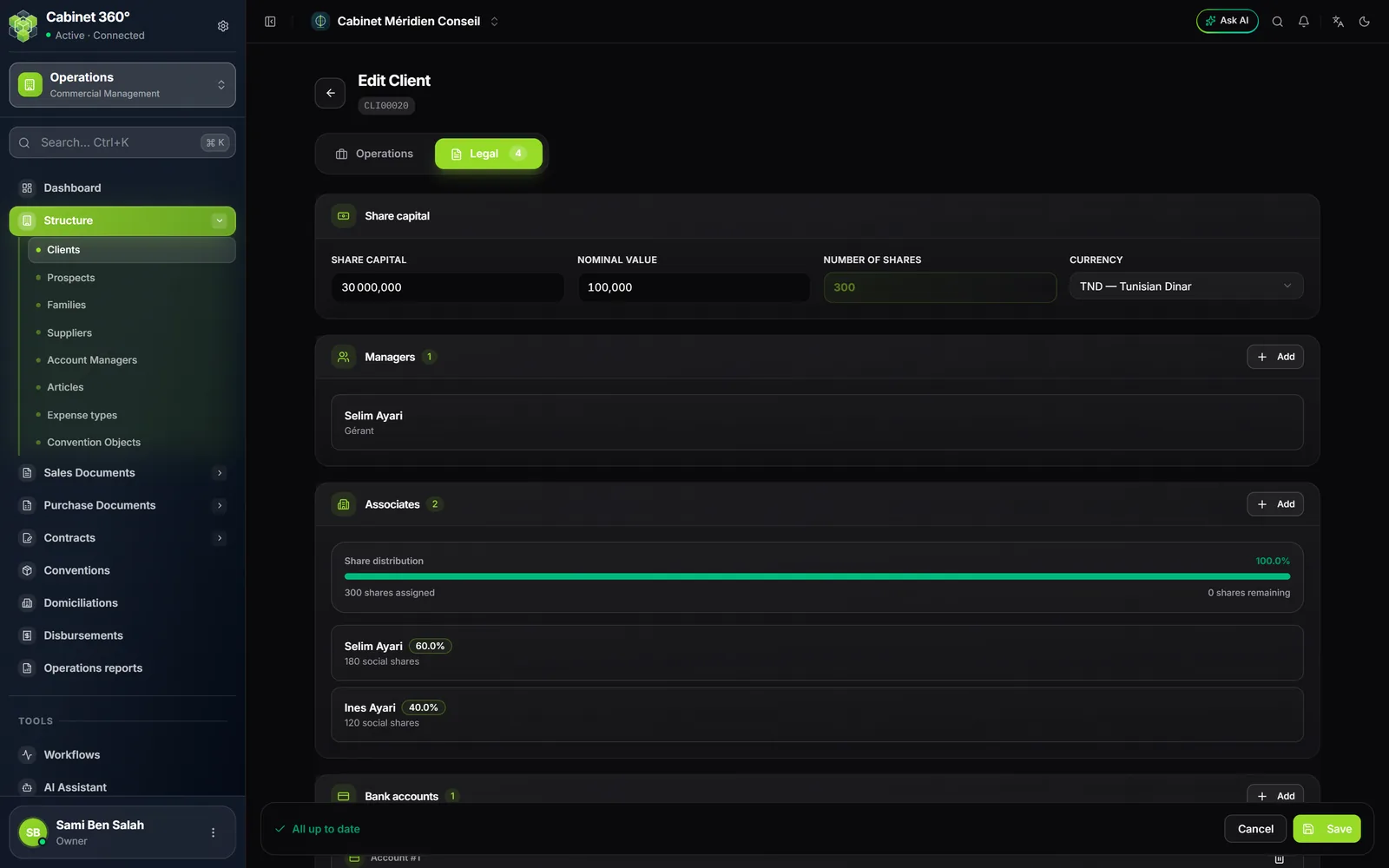
The Legal module does not create clients: the company is created in Operations (the "Operations" book describes it), and the Legal module reads its record. On each company's record, check:
| Where | What | Why |
|---|---|---|
| Operations tab | Type: legal entity or association | No legal act offers a natural person (only the power of attorney accepts one) |
| Operations tab | Services & start of service: the Legal switch on | The company appears in "Legal clients" |
| Operations tab | Legal form (SARL, SA, SUARL…) | It is printed at the top of every act; without it, no meeting can be called |
| Operations tab | Creation date (registration date of the articles) | It opens the event timeline and bounds old minutes |
| Operations tab | Address, city, e-mail | The registered office is the proposed meeting place; the e-mail receives the form |
| Legal tab | Share capital: capital, nominal value, currency (the number of shares is computed) | They are printed in the articles and the minutes |
| Legal tab | Managers and Associates (with the Share distribution), and their ID document | Principal of the power of attorney, attendees of the minutes, transferors of a transfer |
| Legal tab | Bank accounts | The company's account, taken over by the form |
A company in progress of incorporation is offered everywhere, like an active company. An inactive company is offered nowhere.
The Legal reference
Eight lists serve every firm. IntegraSys maintains them for you; your firm reads them, in tabs:
| Tab | What it holds | Who reads it in the module |
|---|---|---|
| Legal Forms | SARL, SA, SUARL, association… | the client record, printed acts |
| Functions | Manager, Co-manager… | the record's managers, the form's management |
| Corporate Objects | standard corporate purposes | — |
| Approvals | business approvals | — |
| Specifications | the specifications (cahiers des charges) | — |
| Meeting Minutes Types | OGM, EGM, mixed meeting… | minutes |
| Activity Sectors | the sections of the Tunisian activity nomenclature | — |
| Activities | the activities of the nomenclature | — |
A missing row is requested from IntegraSys: no firm changes these lists. The Agents, the people your clients give power to, are yours: you keep them in Settings › Firm › Agents (chapter 10).
Document numbering
Six legal documents number themselves when saved, in an annual series: the abbreviation, the year in two digits, then a four-digit counter.
| Document | First number of 2026 |
|---|---|
| Company form | FORM260001 |
| Articles | STAT260001 |
| Notice of meeting | CONV260001 |
| Minutes | PV260001 |
| Share transfer | CESS260001 |
| Precision act | PREC260001 |
The year is the year of entry: the first minutes of 2027 will be PV270001. The number is announced on the creation page, even before saving. The power of attorney has no number: nothing is saved. The series can be read in Settings › Stubs (the "Firm settings" book describes them).
Print templates
The articles, the notice and the minutes print from day one, on IntegraSys's built-in templates. The power of attorney and the share transfer need a template of your firm. Chapter 15 says how to create them.