
Generating the articles from the form
This is the incorporation path: the approved company form provides everything.
On the form's row, click the Generate the statutes icon. The "Generate the statutes — FORM…" window opens: it checks the form without writing anything.
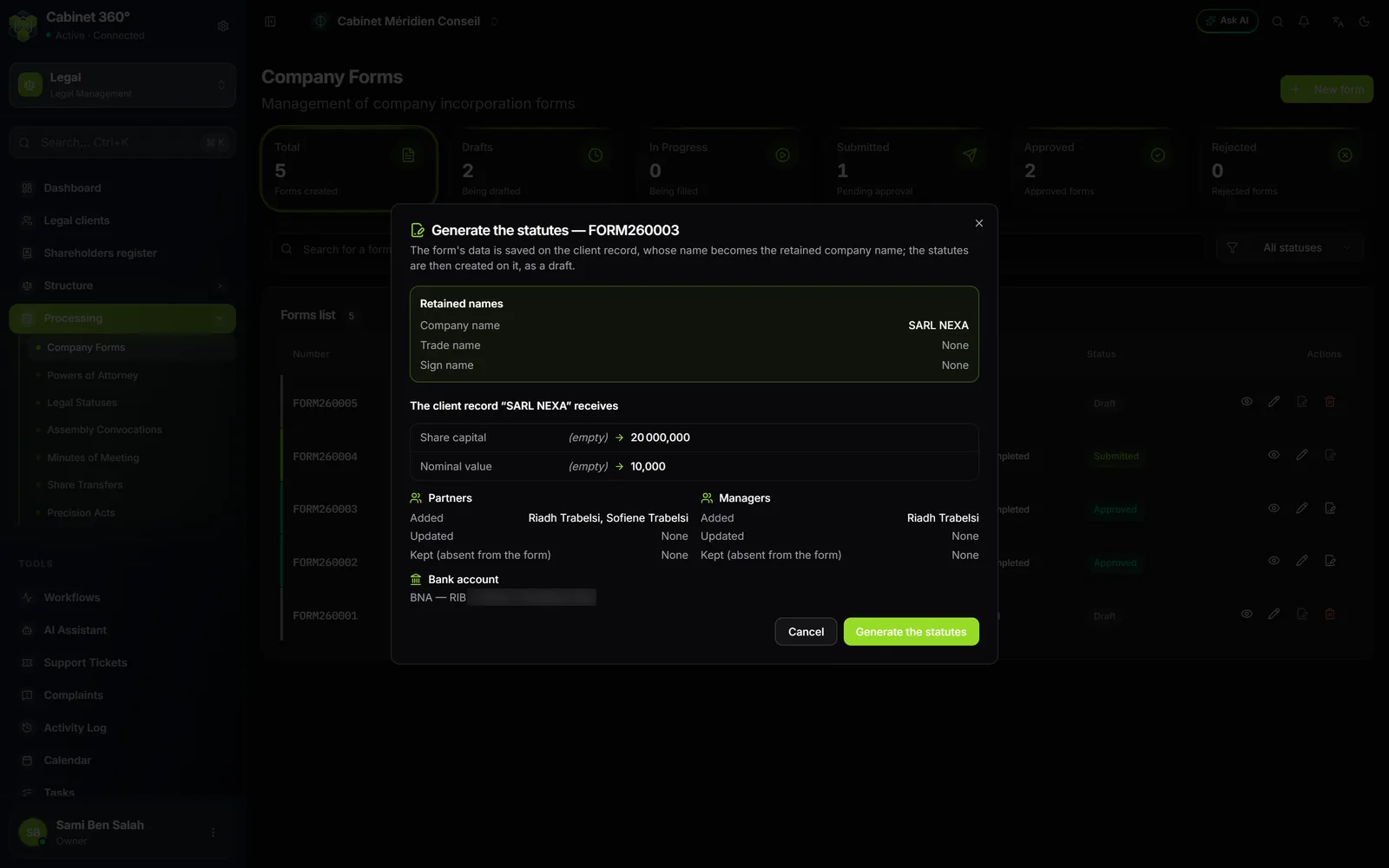
The window shows:
- the Retained names;
- what the client record receives, field by field, before and after: its name becomes the retained company name, then the retained trade name and sign, the legal form, the capital, the currency, the nominal value, the address and the contact;
- the Partners and the Managers: added, updated, and "Kept (absent from the form)";
- the Bank account of step 11.
Nothing is erased on the record: an empty value in the form does not replace the record's, and a person on the record who is absent from the form is kept.
Click Generate the statutes: "Statutes STAT… generated". The articles open as a Draft, of type Articles of incorporation, dated today, and their record links back to the form. Everything is done in one block: if the client record refuses any data, nothing is written.
When generating is impossible
The window names each reason, with the step where to correct it:
- it is not a creation form;
- the form is refused, or not yet approved ("it must be APPROVED before its articles are generated");
- its articles are already generated (their number shows);
- the form has no client, or its client is a natural person, or inactive;
- the retained company name is not set, or the proposed trade name and sign do not have theirs: Set the retained name opens the window of chapter 7.
On the list row, the icon is already greyed out, with its reason on hover, in the first three cases; a missing, natural-person or inactive client is named only in the window.
Generating needs three rights: reading company forms, creating articles and editing clients (it rewrites the record). A missing right is named.
Creating articles by hand
For companies formed before IntegraSys, or for an update, click New statute. The "New Legal Status" page opens:
- General information: the number ("Automatically generated"), the Client / Company, the Status type, the Status date, and, optional, the official Registration date;
- Company data: the company as its record describes it;
- Status content: the Subject / Motive, the Detailed content and the Observations (a note of the firm: the built-in template does not print it).
Two types of articles:
- Articles of incorporation: the first version, with no parent;
- Amended articles: an update. Its purpose is required. On creation, it becomes the next version of the company's last adopted articles (validated, registered or archived).
The articles' record has three tabs: Information, Company and History. It shows the parent articles and the next versions; the history unrolls the whole chain, the version displayed marked "Current Version".
Validate: the required fields
Articles can be entered incomplete; they can be validated only when complete. On a draft's record, a box says so: "3 mandatory fields must be completed before validating:". It names each gap, with the link where to fix it: Edit the statutes, or Complete the client record on the right tab.
What is required:
- on the articles: the date, and the purpose of amended articles;
- on the client record: the company name, the legal form, the registered office (address and city), a share capital and a nominal value that divide into whole shares, at least one manager and one associate, and associates' shares equal to the capital.
The company is read on the client record live: a gap fixed on the record disappears from the box. When it says "All mandatory fields are filled in: the statutes can be validated.", click Validate. While something is missing, "Validate" stays visible, greyed out: "Complete the mandatory fields first."
The articles' cycle
| Action | From | To | Note |
|---|---|---|---|
| Validate | Draft | Validated | every required field filled in |
| Register | Validated | Registered | keeps the registration date entered, otherwise today |
| Archive | Validated, Registered | Archived | simple confirmation, no way back |
| Reopen | Validated, Registered | Draft | archived articles cannot be reopened |
Only a draft can be edited or deleted. The dashboard flags each "validated statute, to register".
The actions menu of the list
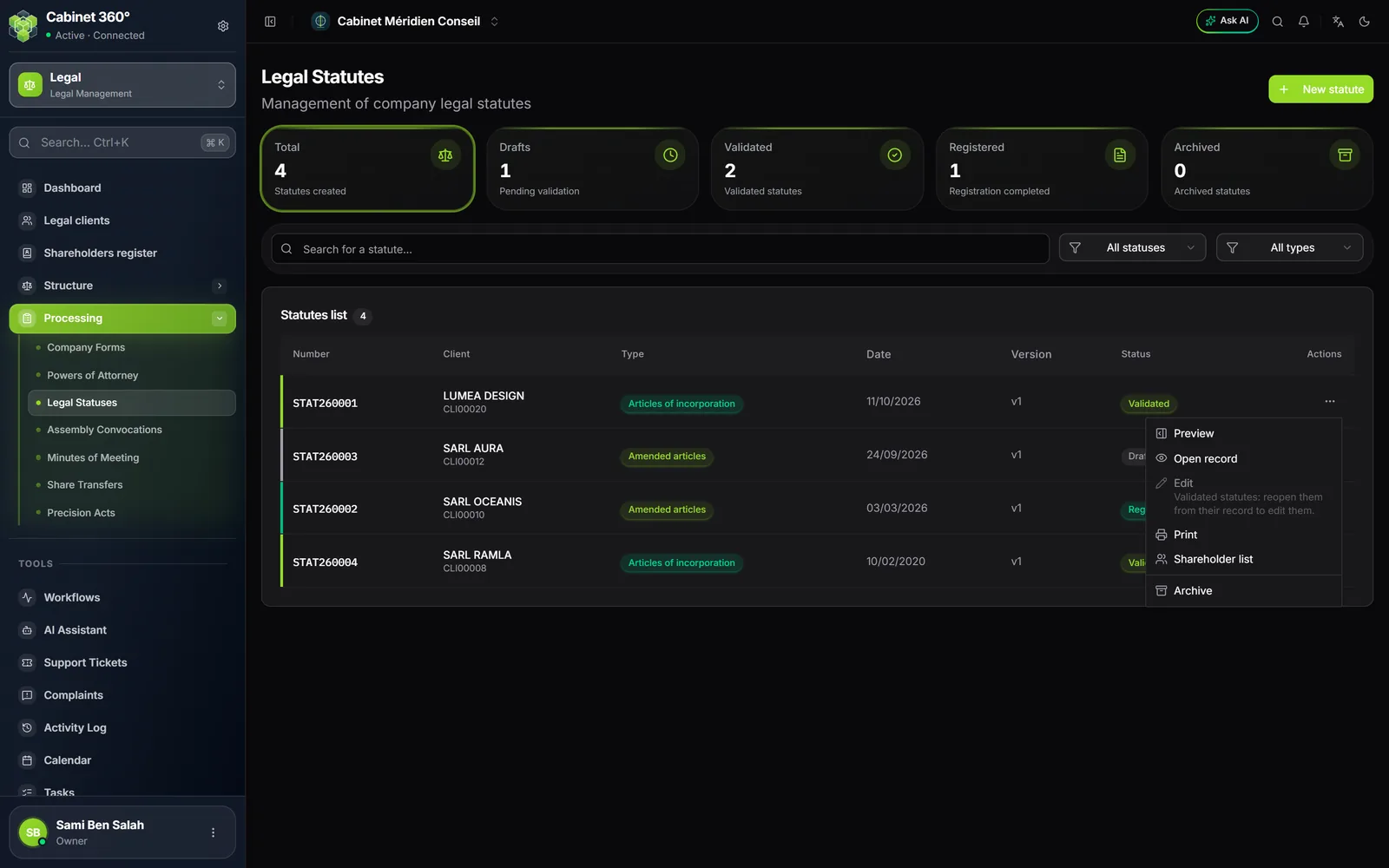
Each row has a ⋯ menu: Preview, Open record, Edit, Print, Shareholder list, then Archive and, for a draft, Delete. A greyed-out entry gives its reason on a second line.
Preview
A panel on the right sums up the articles without leaving the list: the status, the company stated and its source ("today's client record" for a draft, "Frozen at validation on dd/mm/yyyy" afterwards), the managers, the associates with their shares and their percentage, the purpose, the content and, for a draft, what is missing.
The "Print statutes STAT…" window shows a preview of the paper, with Print and Download PDF. It follows the firm's template; if the firm has several, a Print template selector offers them; if it has none, the window says so and uses the built-in template (chapter 15). A draft carries the mention "PROJET — statut en brouillon, non validé" (draft, not validated). The title reads "STATUTS" for articles of incorporation, "STATUTS MIS À JOUR" (updated articles) for amended articles; the capital is also written in words.
Shareholder list
The "Shareholder list — STAT…" window, read-only, uses the columns of the financial statements filing list (Dépôt EF): Type, Name / Denomination, ID type, ID number, Birth date, Nationality, Cash shares, In-kind shares, Total. It reads today's record for a draft, the validation snapshot afterwards. It opens from the ⋯ menu or from the Preview.
PDF (RNE C 012) draws the registry's official form in a new tab. The form holds eight associates at most: beyond that, or with no associate, the button is greyed out and says why. The PDF never cuts the list.
Archive
Archiving moves validated or registered articles to Archived, after a confirmation: "Archived statutes can no longer be reopened or edited."