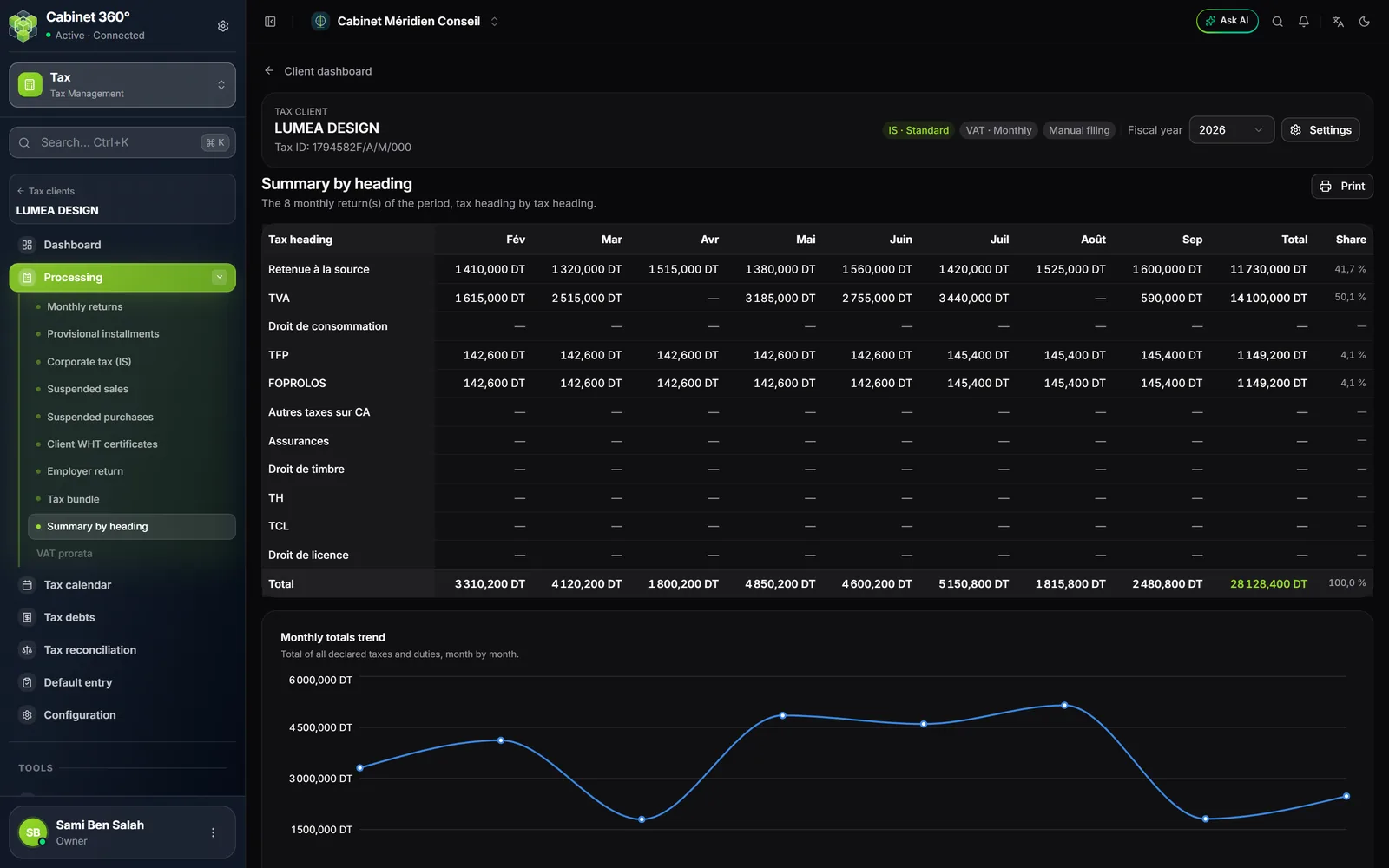
The summary by heading
The summary takes the monthly returns of the fiscal year, and only them: the installments, the corporate tax and the employer return do not go into it. All returns count, whatever their status.
| Rows | Columns |
|---|---|
| The eleven tax headings, always in the same order: Retenue à la source (withholding tax), TVA (VAT), Droit de consommation (consumption duty), TFP, FOPROLOS, Autres taxes sur CA (other turnover taxes), Assurances (insurance), Droit de timbre (stamp duty), TH (hotel tax), TCL, Droit de licence (licence duty) | Tax heading, then one month per declared period (« Jan », « Feb »…), Total and the Share of each heading in the total |
Each heading counts what it makes the client pay: a month of VAT credit counts as zero, never as a negative. A curve, « Monthly totals trend », shows the total of all the taxes declared, month by month.
The detail of a heading
Double-click a cell: the heading's detail opens. From a month's cell, that month is highlighted; from the total, the share or the heading's name, the detail opens on all periods, with nothing highlighted.
The detail holds two blocks:
- Recap by rate: for each month, the base and the amount of each rate (or of each item without a rate), then the total;
- the detailed table: each line of the return, its rate, its base, one amount per period and the total, grouped by category with their subtotal.
Here, the amounts keep their sign: a deduction is negative. The detail's VAT total can therefore differ from the VAT row of the summary, which counts a credit as zero. Also show the lines left empty shows the lines with no amount. The Summary by heading link, at the top, takes you back to the table.
What comes out
On the summary as on the detail, Print offers PDF, in landscape, or Excel. The summary's PDF carries the company name, the tax ID, the periods and the number of returns, and its Excel takes the on-screen table; the detail's Excel gives the lines first, then the recap by rate.
The tax reconciliation
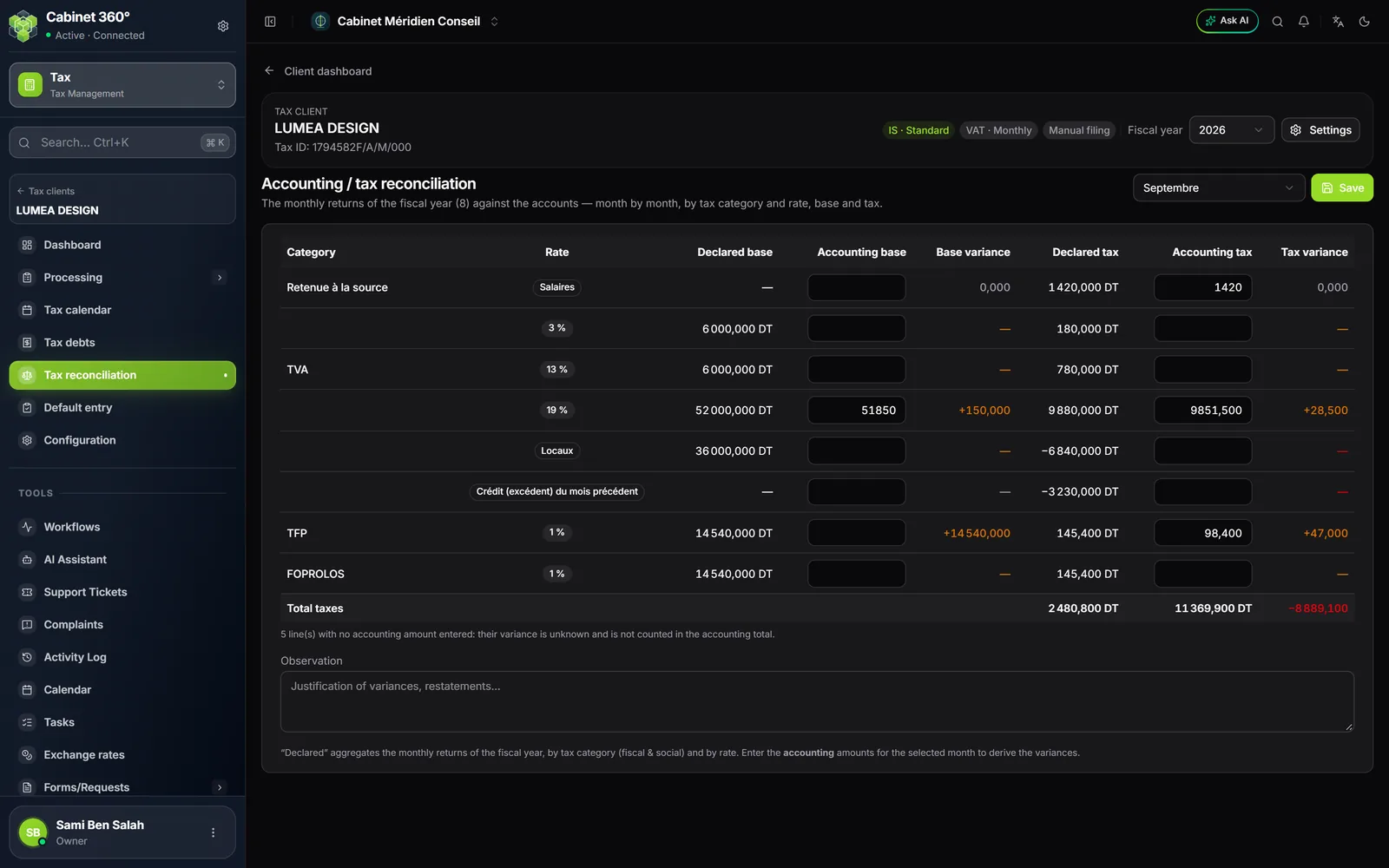
The « Accounting / tax reconciliation » page sets the amounts declared in the fiscal year's monthly returns against the accounting amounts. These accounting amounts, you type them in: the module does not read the client's accounts. A tax fiscal year and its returns are enough; no accounting file is needed.
- At the top, choose the period: the page opens on the last declared month.
- For each row (one per tax and per rate), enter the Accounting base and the Accounting tax.
- Read the Base variance and the Tax variance: the declared amount minus the accounting amount, to the millime.
- Justify the variances in Observation.
- Click Save: « Reconciliation saved. »
| Colour of the variance | What it says |
|---|---|
| Grey | No variance. |
| Orange | The declared amount exceeds the accounting amount. |
| Red | The accounting amount exceeds the declared amount. |
A row with no accounting amount shows « — »: its variance stays unknown, and the foot of the table counts these rows. Total taxes totals the tax columns; while some rows have no accounting amount, the total variance is overstated.
The last period of the list, All periods, adds the months up: it can be read but not changed. Entry is done month by month, and the cumulative view is their sum.