
The page
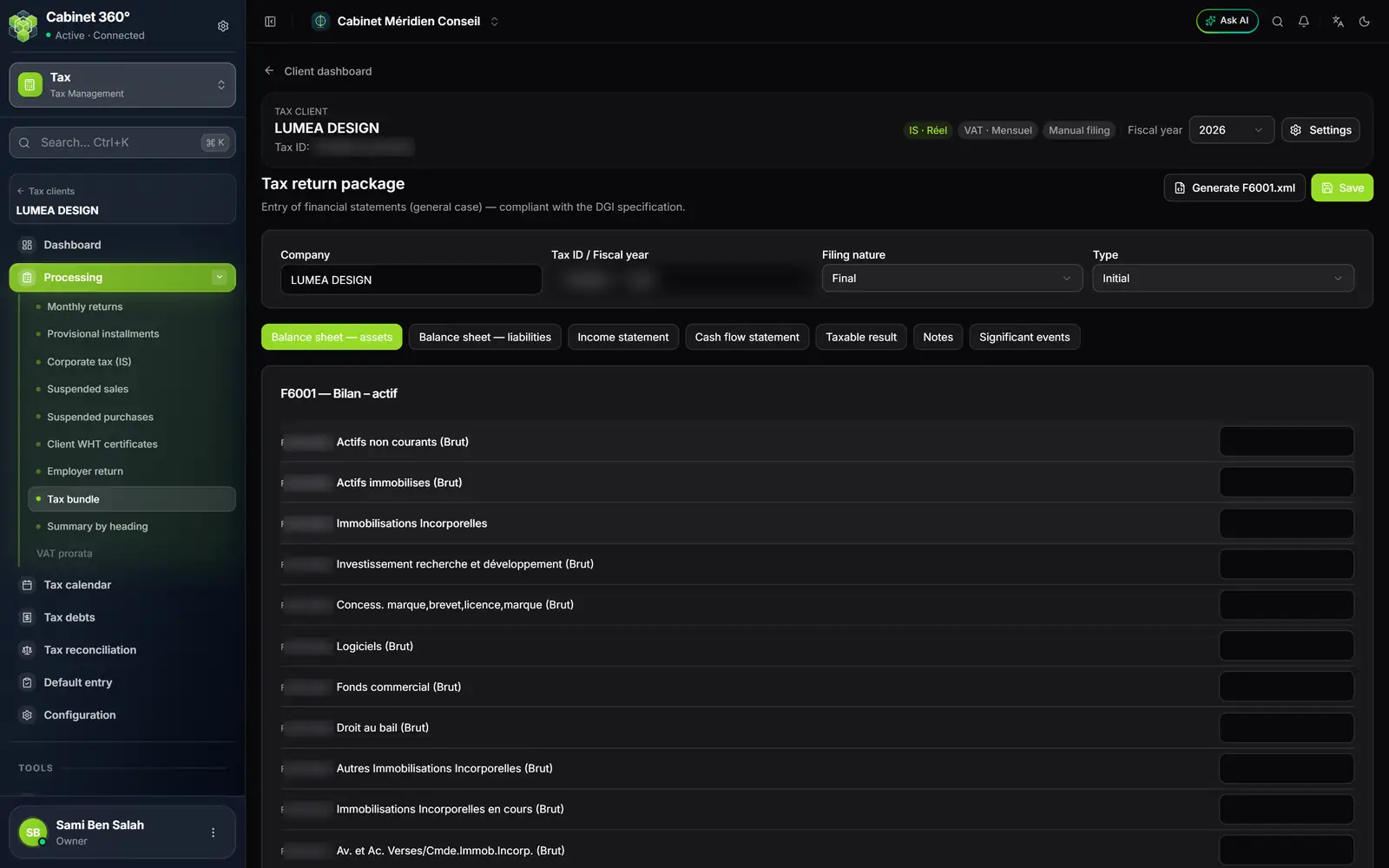
- 1. Generate F6001.xml: the file of the open statement.
- 2. Save: writes the bundle; generating the file does not save.
- 3. Company, tax ID and fiscal year: the client and the open tax fiscal year.
- 4. Filing nature and Type of the return.
- 5. The seven tabs: one per statement.
- 6. One box per line of the statement.
The title recalls the frame: « Entry of financial statements (general case) — compliant with the DGI specification. » At the top, Company and Tax ID / Fiscal year can be read but not changed: the tax ID (seven digits and the check letter) comes from the client record, the fiscal year is the one open in the client's workspace. Choose the Filing nature, Final (default) or Provisional, and the Type, Initial (default) or Amending.
The seven statements
| Tab | Statement code | What it holds |
|---|---|---|
| Balance sheet — assets | F6001 | Assets: gross, depreciation, net |
| Balance sheet — liabilities | F6002 | Equity and liabilities |
| Income statement | F6003 | Income and expenses |
| Cash flow statement | F6004 | The cash flow statement |
| Taxable result | F6005 | The move to the taxable result |
| Notes | F6006 | The notes to the financial statements, as free text |
| Significant events | F6007 | The fiscal year's significant events |
As soon as a line is filled in, the tab shows how many are (except Notes). Enter the amounts line by line; Significant events only holds texts and dates, which must be valid. Click Save: « Package saved. » On a closed fiscal year, the page can be read but not changed.
Generating a statement's file
The Generate … .xml button produces the file of the open tab: Generate F6001.xml on the assets balance sheet, Generate F6003.xml on the income statement, and so on. The file is named, for example, F6001-(tax ID)-2026.xml. The Notes tab has no file.
Before producing the file, the module checks: the tax ID on the client record and its check letter, the fiscal year, the nature and the type, at least one value in the statement, readable amounts and dates. If a field blocks, « File not generated: … field(s) to correct — see the check report. » shows and the report opens — chapter 13.
The accounting bundle
In the client's accounting, the saved financial statements also print as a bundle, with Print the bundle: a single PDF, from the cover page to the fixed-asset tables, tax computation included — chapter 7. That is the paper document; the Tax module's page produces the XML files.
The filing itself is followed under Document filings › Tax bundle, with the other yearly filings — chapter 4.