
Which return for which client
| Client | Processing menu | Tracking grid |
|---|---|---|
| Company, cooperative | Corporate tax (IS) | Corporate tax (IS) |
| Individual | Income tax (IRPP) | Income tax (IRPP) |
| Association | Neither: it is not liable to them | Neither of the two |
The menu only offers the client's own return: its client record (legal entity or individual) decides.
The corporate tax return
The Impôt sur les sociétés (corporate tax) page lists the fiscal year's IS returns: period, type, due date, status and amount.
- Check the Fiscal year at the top, then click Nouvelle déclaration IS (new IS return).
- If the accounting tax computation is ready, click Reprendre le décompte comptable (take over the accounting computation): « Décompte repris de la comptabilité » (computation taken from accounting). Nothing is written before Enregistrer (save).
- In Identification et cadre de la déclaration (identification and frame of the return), choose the Type de déclaration (return type): Provisoire (provisional) or Définitive (final, selected by default).
- In Éléments d'imposition (tax items), complete the turnovers, the Résultat comptable (accounting result), the add-backs and the deductions, then the Résultat fiscal (tax result).
- In Liquidation de l'impôt dû (working out the tax due), choose the Régime (regime) and split the profit by rate: IS brut (gross IS) computes itself.
- Read the Régularisation (regularisation): withholding taxes, installments, IS à payer (IS to pay).
- In Période (period), keep the fiscal year's Année (year), enter the Échéance (due date), choose the Statut (status) and the Filing type, then click Enregistrer.
Taking over the computation
Reprendre le décompte comptable fills the return with all the fields of the accounting tax computation — chapter 7: local turnover including VAT, export turnover, tax base, withholding taxes, installments and CSS. Six of them lock; both turnovers and the base carry the mention « repris du décompte » (taken from the computation). The installments filed in the Tax module replace those of the computation: the return deducts what was really paid.
If « Rien à reprendre » (nothing to take over) shows, the message says what is missing. Most often, the financial statements are not saved, or the computation was changed since: save them again first. Without a computation, the turnovers are typed by hand.
Working out the tax
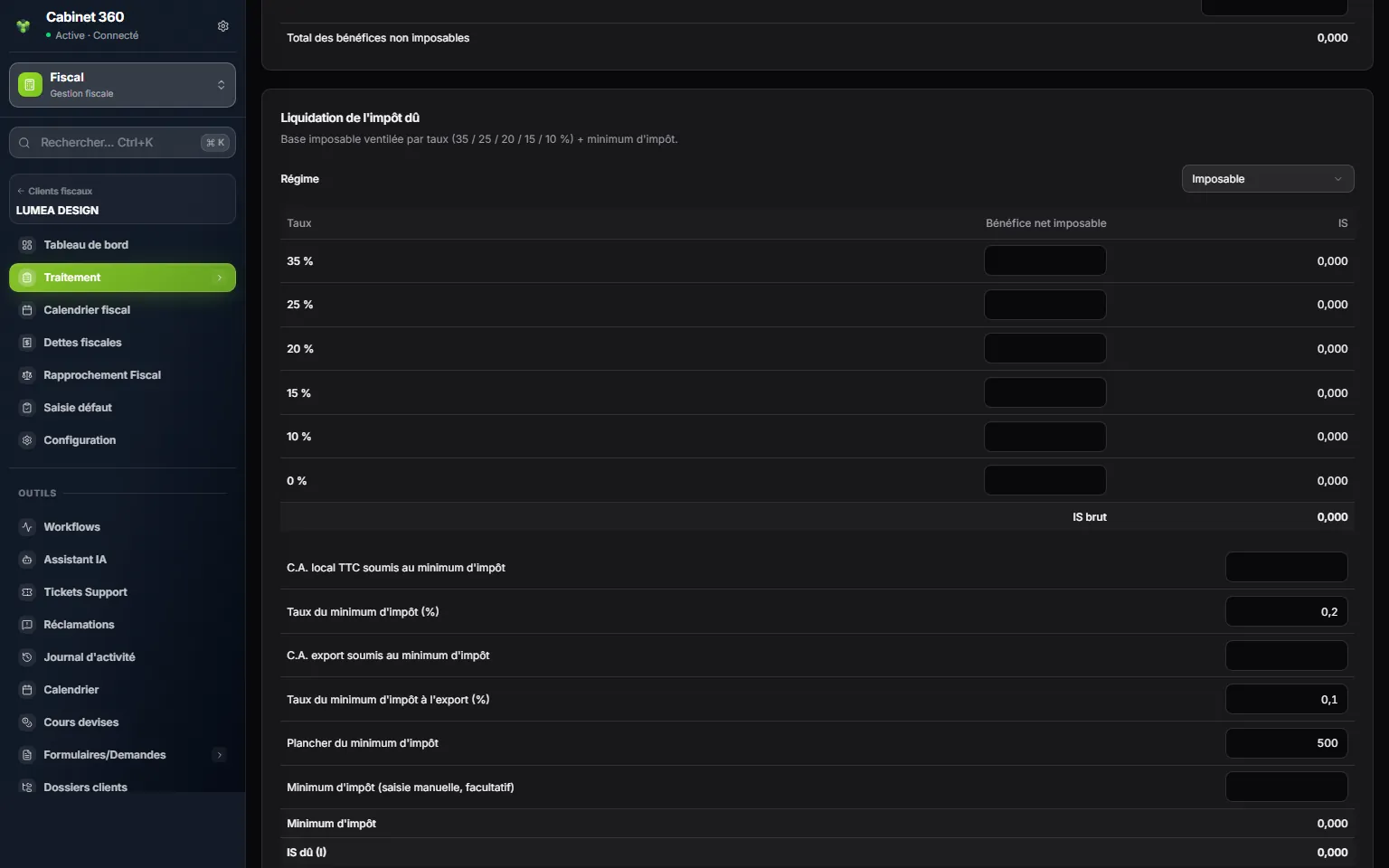
- 1. Liquidation de l'impôt dû: the taxable base split by rate, then the minimum tax.
- 2. The tax regime.
- 3. The taxable profit, split among the rates of the table.
- 4. IS brut: the sum of each share multiplied by its rate.
- 5. The minimum tax: percentages of local and export turnover.
- 6. The floor of the minimum tax.
- 7. IS dû (I): the higher of gross IS and minimum tax.
The minimum tax adds a percentage of local turnover including VAT (0.2 % by default) and another of export turnover (0.1 % by default), without going below the Plancher du minimum d'impôt (minimum tax floor). These rates and this floor can be changed in their fields. The minimum only applies if one of the two turnovers is filled in. Minimum d'impôt (saisie manuelle, facultatif) (minimum tax, typed by hand, optional) replaces it with your amount; the Exonéré (total) (fully exempt) regime brings the IS and the minimum down to zero.
IS dû (I) (IS due) keeps the higher of gross IS and minimum tax.
The regularisation
- The withholding taxes come from the computation.
- The provisional installments filed for the fiscal year are deducted on their own, for the amount paid, on the line Acomptes provisionnels payés (provisional installments paid); the detail per installment is in the Acomptes provisionnels block. Only installments marked Filed are taken.
- An amount restitué (refunded) by the administration is added to the tax to pay: it is no longer to deduct.
IS à payer computes itself; if it is negative, the line becomes Report d'IS (IS carried forward). The Contribution sociale de solidarité (CSS) follows the same logic, in its own section, down to CSS à payer (CSS to pay) or Report de CSS (CSS carried forward): IS is deducted from IS, CSS from CSS, never one from the other. The CSS due is typed in, or comes from the computation: the return does not compute it from the profile's rate.
From the provisional return to the final one
| Step | Due date (fiscal year closed on 31/12) | What it does |
|---|---|---|
| Provisoire | 25/03 of the following year | Works out the tax on the figures known. |
| Définitive | 25/06 of the following year | Takes everything up again, and deducts what the provisional return made the client pay. |
For the final return, add a second return, of type Définitive: IS payé sur déclaration provisoire (IS paid on the provisional return) and CSS payée sur déclaration provisoire (CSS paid on the provisional return) are then added on their own to the deductions. All the fiscal year's provisional returns count, whatever their status. For a non-calendar fiscal year, the due dates follow the closing date: the 25th of the 3rd and 6th month after it.
In the Returns tracking › Corporate tax (IS) grid, the two columns Provisional and Final follow these two due dates for each company.
The personal income tax return
For an individual, the personal income tax return is prepared the same way: Nouvelle déclaration IRPP (new IRPP return), Reprendre le décompte comptable if the accounts are kept (the amounts are copied, without locking any field), then the sections of the form, and Enregistrer.
| Section | What it holds |
|---|---|
| Cadre de la déclaration (frame of the return) | The type, the family situation, the regime. |
| 1 — Bénéfices industriels et commerciaux (régime réel) (industrial and commercial profits, standard regime) | The profit of the commercial activity. |
| 2 — Autres catégories de revenus (other income categories) | Non-commercial profits, agricultural income. |
| 3 — Revenus fonciers (property income), 4 — Traitements, salaires, pensions et rentes (wages, salaries, pensions and annuities), 5 — Capitaux mobiliers et autres revenus (investment and other income) | The other incomes, category by category. |
| Déficits reportables des années antérieures (losses carried forward from prior years) | The losses to carry forward. |
| Déductions communes (common deductions) | Head of household, dependent children, savings… |
| Liquidation de l'impôt (working out the tax) | The taxable income, rounded up to the dinar, and the tax on the scale. |
| Régularisation, CSS, other taxes and penalties | What is deducted, the CSS, the total to pay. |
What changes compared with IS:
- the tax follows the progressive personal income tax scale: the 2025 scale from the year 2025, the old one before;
- the minimum tax is based on local turnover, with its own floor;
- the CSS computes itself: the rounded income multiplied by the Taux CSS (%) (CSS rate), 0.5 % by default;
- installments are not deducted on their own: enter them in the regularisation;
- only one initial return per fiscal year: nothing from a provisional return is deducted.
The Income tax (IRPP) tracking grid sets the due date on 25/04 of the following year, on 25/05 for non-commercial profits. In the form, the Échéance is typed in.
What comes out
Imprimer (print), in the form or on the row of the list, opens the return on a right-to-left page: title and identity in Arabic, headings and amounts in French, then the total to pay. For IS: the frame, the tax items, the reinvested income, the working out of the tax and the regularisation. For IRPP: the income by category, the deductions and the working out of the tax, the regularisation and the CSS.