
Computing an installment
- Check the Fiscal year at the top, then click Nouvel acompte (new installment).
- In Base de calcul de l'acompte provisionnel (installment calculation base), choose the Impôt de référence (reference tax): Impôt sur les sociétés (corporate tax) or Impôt sur le revenu (income tax).
- Enter the past year's base, the capital gain or loss, then the Impôt théorique (base de calcul des acomptes provisionnels) (theoretical tax, the base of the installments).
- Read the line « 30 % de l'impôt théorique » (30 % of the theoretical tax). The Taux de l'acompte (% de l'impôt théorique) (installment rate) can still be changed.
- In À déduire (to deduct), enter what is offset: surpluses, withholding taxes, advances, installment already paid.
- In Récapitulatif de l'acompte (installment summary), add the Pénalités de retard (late penalties) if needed, and read the Total à payer (total to pay).
- In Période (period), choose the Installment No., keep the fiscal year's Année (year), enter the Échéance (due date) and choose the Statut (status).
- Click Enregistrer (save): « Return saved ».
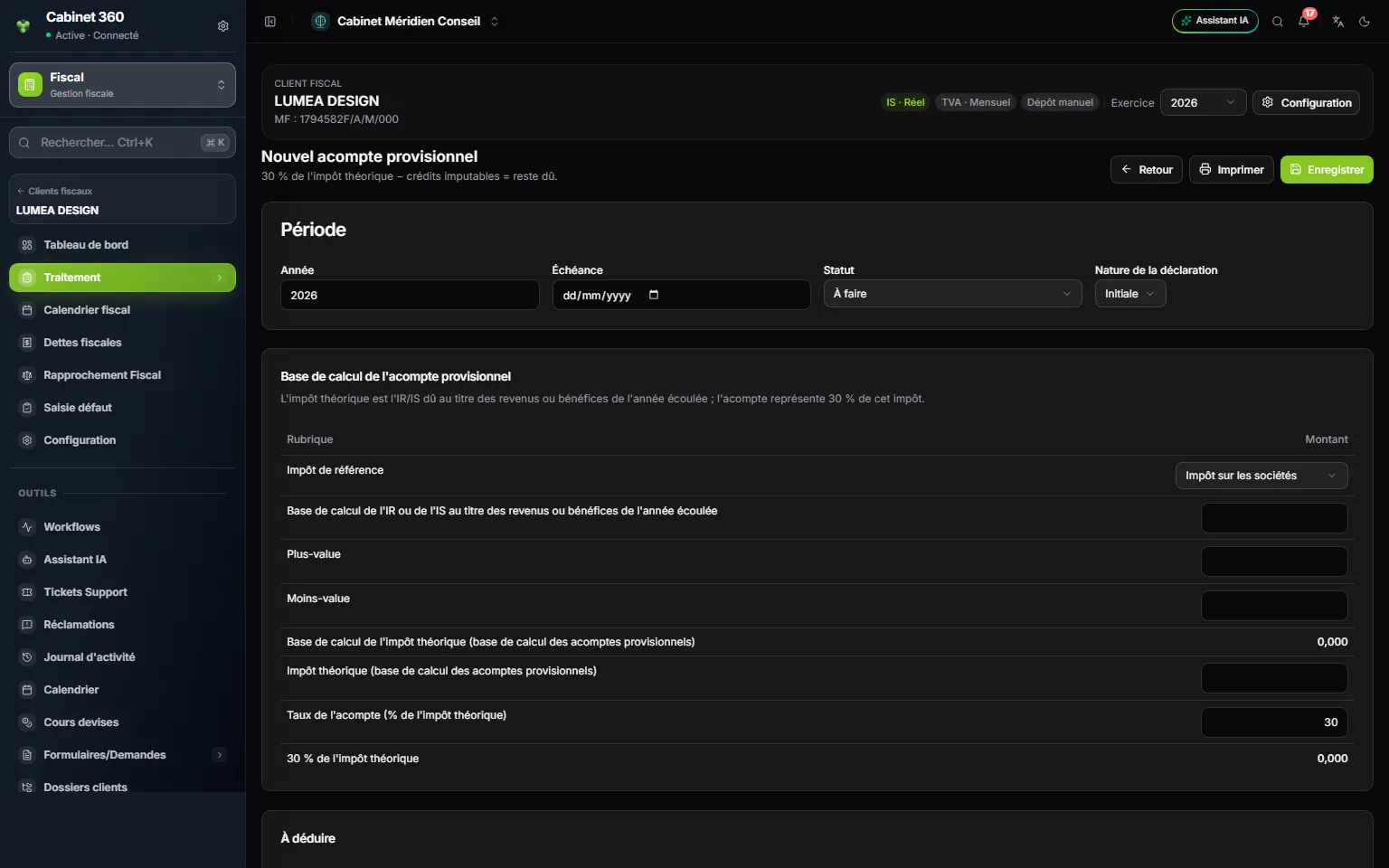
- 1. The calculation rule, as a subtitle: 30 % of the theoretical tax, minus the credits that can be offset.
- 2. Période: year, due date, status, filing type.
- 3. Impôt de référence: IS or income tax.
- 4. Impôt théorique: the base of the three installments.
- 5. The installment rate: 30 % by default, can be changed.
The Impôt théorique is typed in: the module does not derive it from the base. The installment equals that tax multiplied by the installment rate. The seven lines of À déduire add up, and the line Reste : (P) dû ou (F) excédent (balance: P due or F surplus) gives the result: P when something remains to pay, F when the deductions exceed the installment. The Total à payer adds the penalties to the balance due.
The three due dates
| Installment | Month of the due date (calendar year) | Day |
|---|---|---|
| 1st installment (A1) | June | the 28th for a legal entity, the 25th for an individual |
| 2nd installment (A2) | September | same |
| 3rd installment (A3) | December | same |
For a non-calendar fiscal year, the installments fall in the 6th, 9th and 12th month after the previous closing. The Installment No. list shows them with their date, for example 2nd installment (A2 · 28/09), and proposes the first number still free in the fiscal year.
Following the portfolio's installments
The grid has one column per due date: A1, A2 and A3. Each saved installment goes into the column of its number. Hover over a cell to read the client's due date.
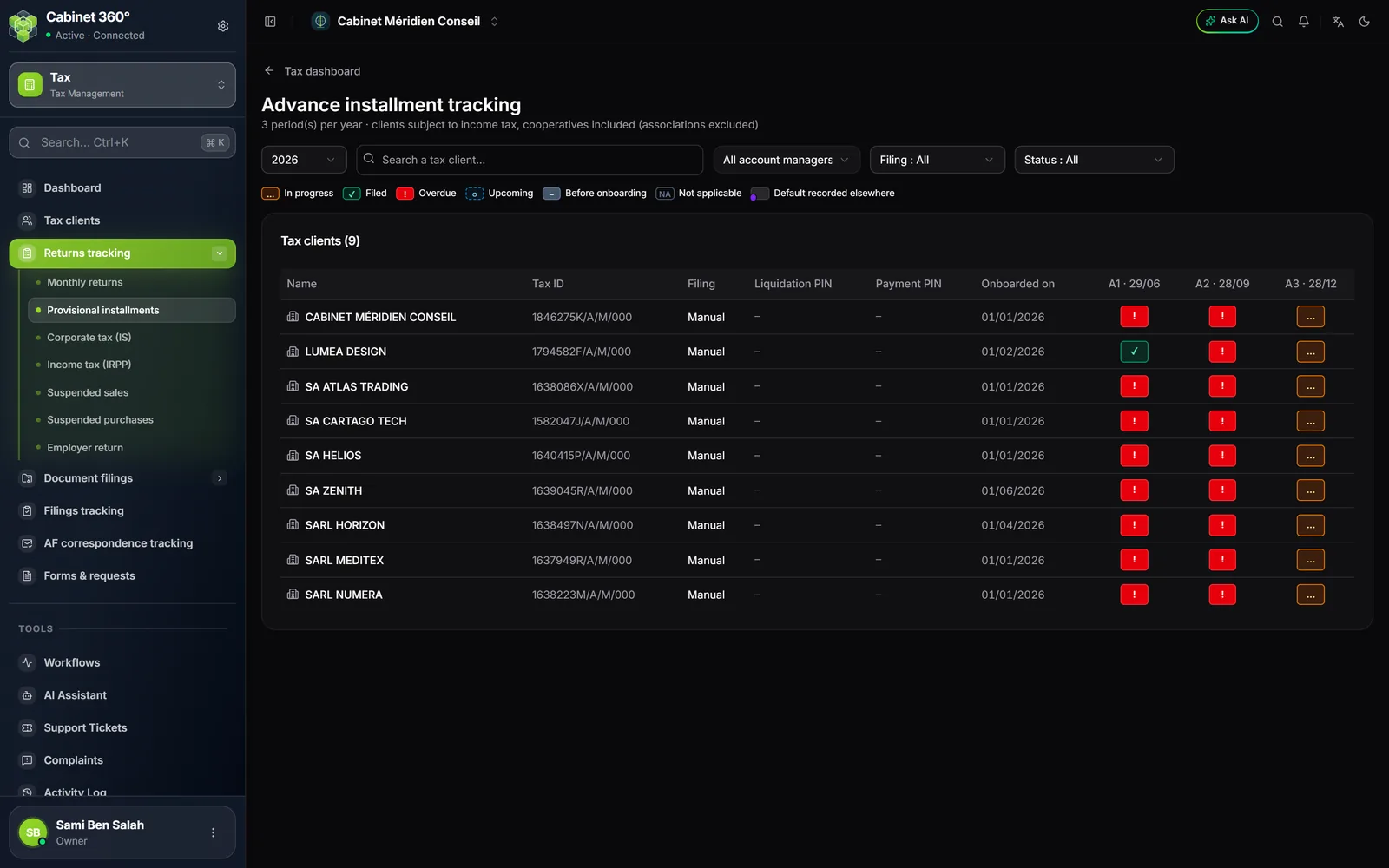
Click a client's cell to set the Declaration status to Filed, or attach the PDF under Declaration (PDF) and the proof under Payment receipt (PDF). Attaching the return sets the cell to Filed; deleting the PDF never sets it back to To do: change the status by hand.
The grid lists the active clients with Taxation, except those whose profile is Deactivated or not Tax-managed. A cooperative appears in it, like a company. An association does not: it is not liable to provisional installments.
What comes out
Imprimer (print), in the form or on the row of the list, opens the installment on a right-to-left page, with Arabic titles and French labels: the calculation base, the amounts to deduct, the balance due (P) or the surplus (F), and the total to pay.