
What the module does
The Tax module keeps the tax file of your firm's clients. For each of them it holds:
- its tax profile: unique identifier, regimes, taxes it is liable to, filing method, tax rates;
- its fiscal years, created with the profile up to the current year, then opened year by year;
- its returns: monthly returns, provisional installments, corporate tax or personal income tax, suspended sales and purchases, employer return, tax bundle;
- its registers: withholding-tax certificates it received, tax debts, letters from the tax administration.
For the whole portfolio, it computes the deadlines, flags what is late and produces the files to file with the DGI after checking them.
Two levels: the portfolio, then the client
The module opens on the Tax workspace, which looks at all your clients at once. One click on a client takes you into its workspace, on one fiscal year: that is where its returns are prepared.
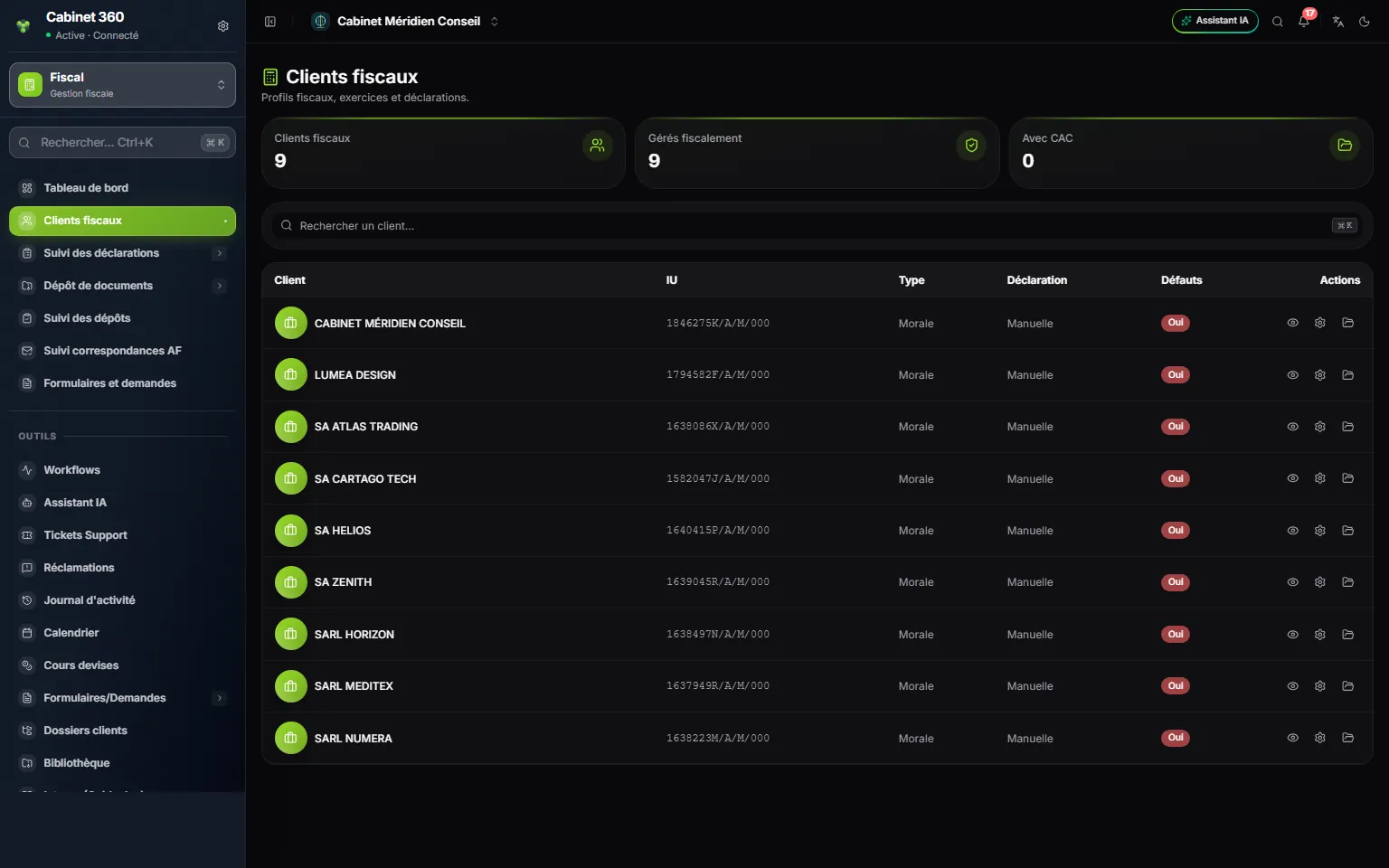
- 1. The Tax workspace menu: it looks at the whole portfolio.
- 2. Three counters: tax clients, tax-managed clients, clients with an auditor.
- 3. One client per row: unique identifier, type, filing method and defaults.
- 4. Three icons: open the client's workspace, edit its tax profile, view it.
The Tax workspace menu
| Menu entry | What it is for |
|---|---|
| Dashboard | The overview: upcoming deadlines, filings this month, tax debts to follow, incomplete files. |
| Tax clients | The list of tracked clients and their tax profile. |
| Returns tracking | One grid per return: one client per row, one period per column. |
| Document filings | The filings: commercial and accounting software (once), financial statements, auditor report and tax bundle (every year). |
| Filings tracking | Where these filings stand, for all clients. |
| AF correspondence tracking | Letters from the tax administration and your replies. |
| Forms & requests | The forms and requests to send to the administration. |
A client's menu
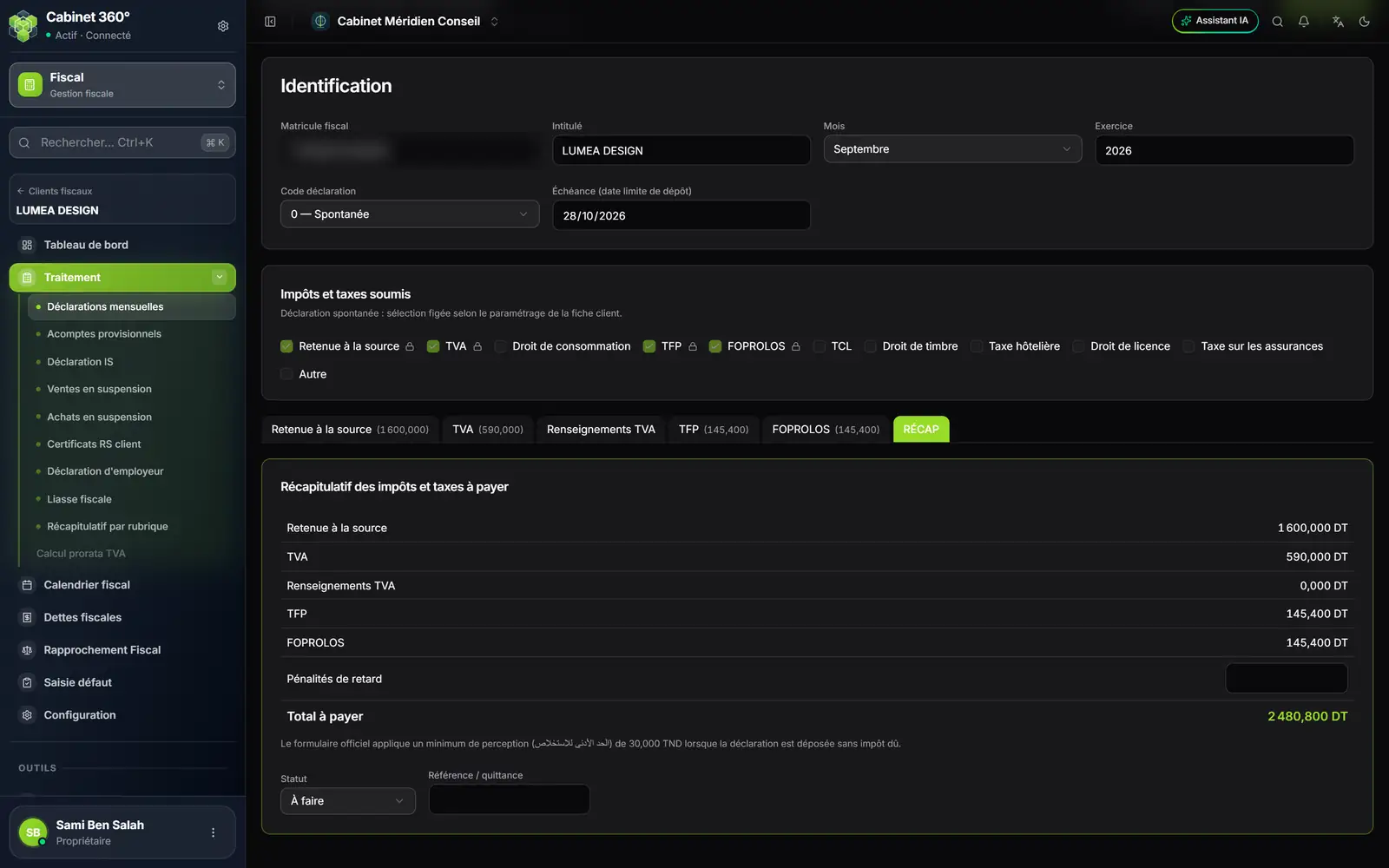
- 1. Back to the list: the arrow returns to Tax clients.
- 2. Processing: one page per return, from the monthly return to the VAT prorata computation.
- 3. The client's registers: calendar, debts, reconciliation, defaults, configuration.
- 4. The return's header: month, fiscal year, code and due date.
| Menu entry | What it is for |
|---|---|
| Dashboard | The overview of the fiscal year, and the list of the client's fiscal years to close or reopen. |
| Processing | The returns: Monthly returns, Provisional installments, Corporate tax (IS) or Income tax (IRPP), Suspended sales, Suspended purchases, Client WHT certificates, Employer return, Tax bundle, Summary by heading, VAT prorata. |
| Tax calendar | The client's deadlines month by month, with the public holidays. |
| Tax debts | Taxes owed and their payment schedule. |
| Tax reconciliation | What the accounts show, against what was declared. |
| Default entry | Breaches found, month by month. |
| Configuration | The client's tax profile. |
The Processing menu follows the client's profile. A company sees Corporate tax (IS); an individual sees Income tax (IRPP). An association sees neither, nor the provisional installments: it is not liable to them. VAT prorata stays greyed out for a client that is not partially liable to VAT.
The rhythm of a year
The module follows each client's calendar of obligations. For a company whose fiscal year runs from 01/01 to 31/12, the year looks like this:
| When | What | Where in the module |
|---|---|---|
| Every month | The monthly return for the past month | Processing › Monthly returns |
| Every quarter | The lists of suspended sales and purchases, if the client declares any | Processing › Suspended sales, Suspended purchases |
| June, September, December | The three provisional installments | Processing › Provisional installments |
| March, then June of the next year | The corporate tax return, provisional then final | Processing › Corporate tax (IS) |
| Once per fiscal year | The employer return | Processing › Employer return |
| Once per fiscal year | The tax bundle and the yearly filings | Processing › Tax bundle, Document filings |
| As they come | Letters from the tax administration | AF correspondence tracking |
The exact dates depend on the client: its form (legal entity or individual), its filing method, the closing date of its fiscal year. The module computes them for you: chapter 3 explains how.
Your team's rights
The module is set in the firm's roles, like the others, on four levels:
- View lets a person read the grids, profiles and returns;
- Create lets a person add a return, a certificate, a letter, a filing;
- Edit lets a person correct a profile, a tracking cell, a saved return, and attach a file to it;
- Delete lets a person remove a fiscal year, a filing, an attached file.
A team member only sees the clients whose accounting file they follow, as Supervisor or Collaborator. The owner and the firm's administrators see all clients, and so do team members whose grade is supervisor, manager or partner.