
Cost of capital
The five pages of the Cost of capital group fill in one and the same sheet per scenario. Cost of equity, Cost of debt and Capital structure each have an Enregistrer (Save) button; on Beta, the retained beta is saved when you leave its box; the WACC page is not entered by hand. Rates are entered in points: 8 for 8%.
Cost of equity
Enter the Taux sans risque (%) (Risk-free rate, %), its Source du Rf (Source of the Rf; « 10-year BTA, BCT, 31/12/2026 ») and its Date du Rf (Date of the Rf); the Prime de risque marché (ERP) (%) (Market risk premium, ERP, %) and its source; the Prime de risque pays (CRP) (%) (Country risk premium, CRP, %) and its source; the Bêta retenu (Retained beta) and its source; where relevant, the Prime de taille (%) (Size premium, %), the Prime spécifique (%) (Specific premium, %), the Autres primes (%) (Other premiums, %) and their Justification des primes (Justification of the premiums).
The page builds: Ke = Rf + beta × ERP + CRP + premiums.
Beta
A sample of comparable companies can inform the beta. Click Ajouter un comparable (Add a comparable): Société (Company), Bêta endetté (Levered beta), Taux d'impôt (%) (Tax rate, %; 15 by default), Dette (Debt), Capitaux propres (Equity), Source. The page unlevers each beta, gives the mean and the median, then relevers the median on the scenario's structure.
Reprendre le bêta réendetté de la médiane (Use the median's relevered beta) writes this beta as the retained beta, with its source; the button only appears once equity (E) is entered in Capital structure. The retained beta is still the one you enter: the median only sheds light.
Cost of debt
Enter the Taux de la dette actuelle (%) (Current debt rate, %), the Spread (%), the Taux d'impôt appliqué (%) (Tax rate applied, %), the Source and the Justification. The page gives the Kd brut (Gross Kd; rate + spread) and the Kd après impôt (After-tax Kd): this is the only place where the tax saving on debt is counted.
Capital structure
Enter the Dette (D) (Debt, D) and the Capitaux propres (E) (Equity, E) as amounts, the Type de structure (Structure type) and the Justification. The page computes the weights D/(D+E) and E/(D+E). As long as neither debt nor equity carries an amount, the WACC is not computed.
WACC
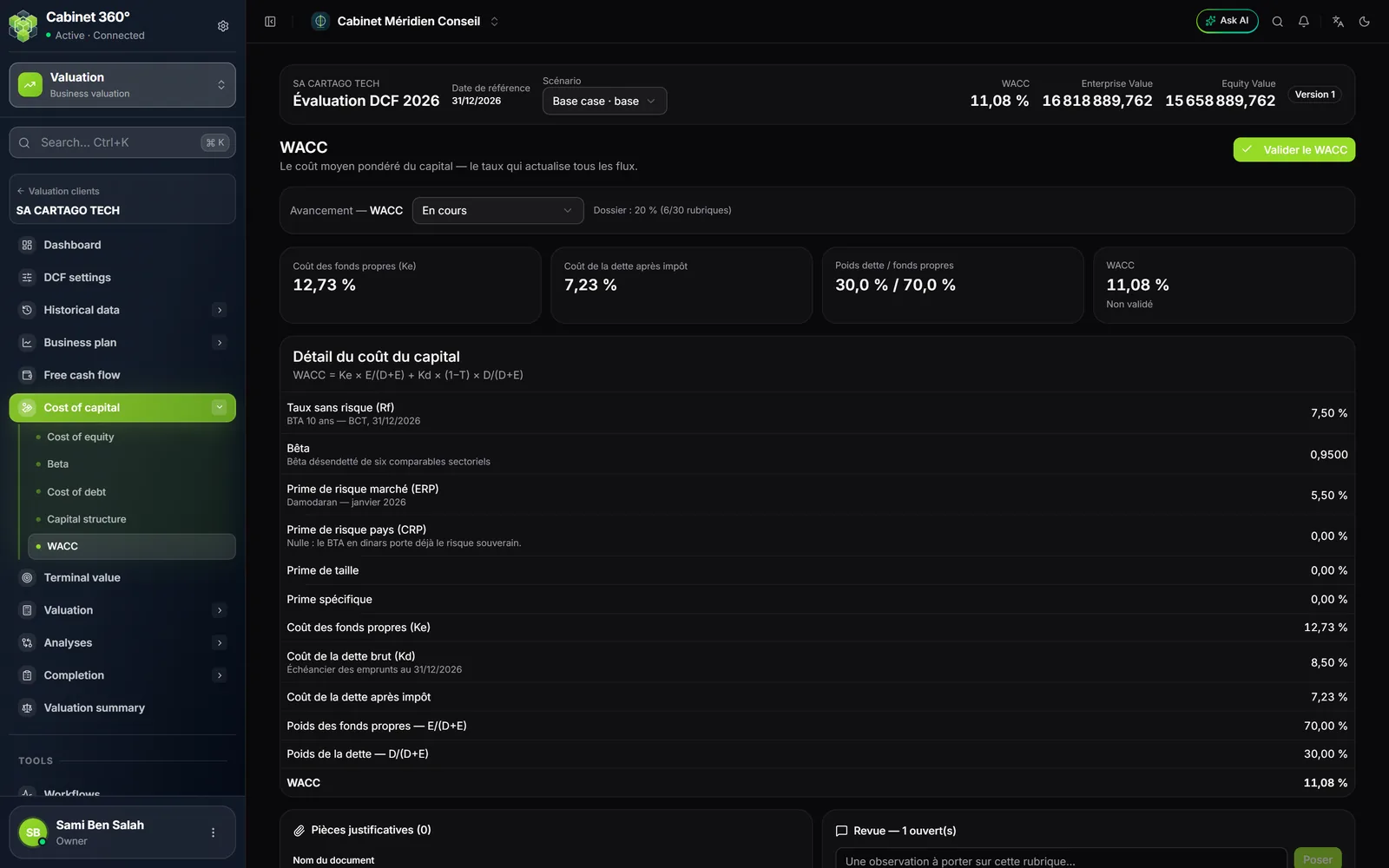
The page details WACC = Ke × E/(D+E) + Kd × (1 − T) × D/(D+E), component by component, with each source; a missing source shows in colour. Click Valider le WACC (Validate the WACC). Validation belongs to the engagement manager or the firm's management, and it is refused:
- without the source of the risk-free rate, of the market risk premium or of the beta;
- if a size or specific premium is applied without a justification.
Terminal value
Enter the Croissance à l'infini (g), en % (Perpetual growth (g), in %), its source and its justification. For the multiple method, choose the Agrégat terminal (Terminal aggregate: EBITDA or EBIT) and the Multiple de sortie (Exit multiple), with its source. Choose the Méthode RETENUE (Selected method): Gordon-Shapiro (default) or Multiple de sortie, justify the choice, then Enregistrer.
- Gordon-Shapiro: FCFF of the last year × (1 + g) ÷ (WACC − g).
- Multiple de sortie: aggregate of the last year × multiple.
The two methods are computed separately and compared, never averaged; the Comparaison des deux méthodes (Comparison of the two methods) card gives the difference between them. The selected method carries the file's value.
Valuation
Discounting
Each FCFF is brought back to the valuation date: factor = 1 / (1 + WACC)^t. The rank t starts again at 1 on the first forecast year (0,5; 1,5; 2,5… at mid-period). The terminal value is discounted at the same rank as the last cash flow: N at end of period, N − 0,5 at mid-period. Nothing is entered here.
Enterprise value
Enterprise Value = sum of the discounted cash flows + discounted terminal value. The page shows the share of each. Above 85%, a banner recalls that the value then depends more on perpetual growth than on the plan: this is not an error, it is a point the report must explain.
Net debt
Click Ajouter un élément (Add an item): Catégorie (Category: Dette financière, Financial debt, or Trésorerie et équivalents, Cash and equivalents), Date, Libellé (Label), Valeur comptable (Book value), Valeur retenue (Retained value; empty: the book value), Source, Justification de l'écart (Justification of the difference). The retained value is what counts: net debt = retained financial debt − retained cash.
Adjustments
Click Ajouter un ajustement (Add an adjustment): Nature (Type: Actif non opérationnel (non-operating asset), Immobilier hors exploitation (non-operating property), Participation non consolidée (non-consolidated shareholding), Excédent de trésorerie (surplus cash), Élément assimilable à de la dette (debt-like item), Intérêts minoritaires (minority interests), Provision assimilable à de la dette (debt-like provision), Autre ajustement (other adjustment)), Sens (Direction: Ajouté (+), Added, or Retranché (−), Deducted), Libellé, Montant (valeur absolue) (Amount, absolute value), Source, Justification. The direction is chosen: it is never guessed from the label.
Equity value
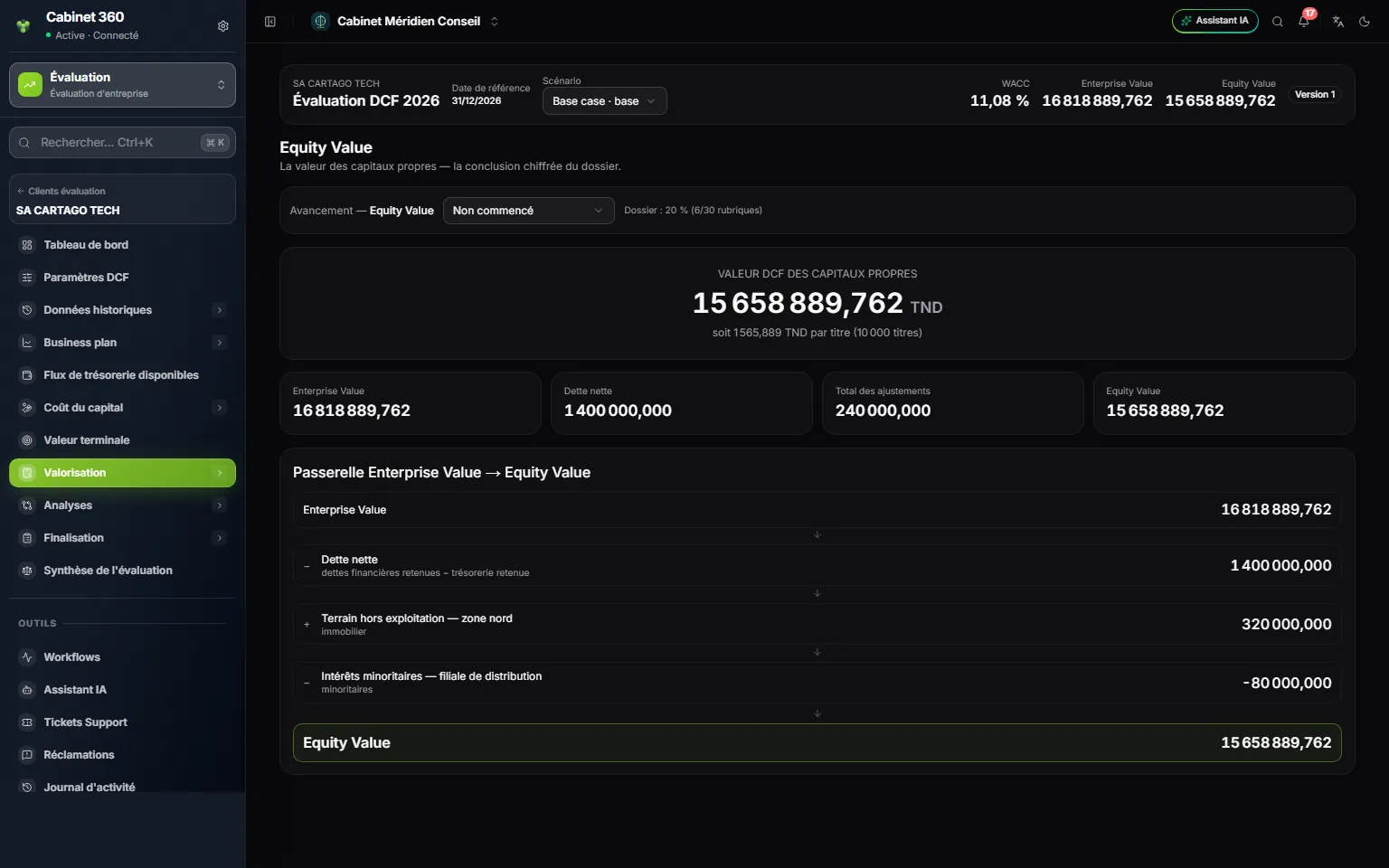
- 1. The scenario on which the page is computed.
- 2. The DCF value of the equity, and the value per share.
- 3. The four cards: Enterprise Value, net debt, adjustments, Equity Value.
- 4. The bridge: each line deducted or added, with its type.
- 5. Equity Value = Enterprise Value − net debt ± adjustments.
The value per share divides the Equity Value by the Nombre de parts / actions (Number of shares) in the settings; at zero shares, it is not computed.
Analyses
Sensitivity analysis
Fill in Ajouter une matrice (Add a matrix): an Intitulé (Title; « WACC / g » by default), the Axe des lignes (Row axis) and the Axe des colonnes (Column axis: WACC, Croissance à l'infini (g), Multiple de sortie, EBITDA terminal, Terminal EBITDA), their steps, and the Pas de part et d'autre du centre (Steps on each side of the centre; 2 by default, up to 6). Click Ajouter (Add). Each cell runs the whole engine again and gives an Equity Value; « N/M » marks a cell where the calculation does not hold.
Scenarios
A scenario is a complete set of projections. Choose a Type (Base case, Upside case, Downside case, Custom), a Code and an Intitulé, then:
- Dupliquer le cas de base (Duplicate the base case) copies projections, costs, years, CAPEX, cost of capital and terminal value, and resets the WACC validation;
- Créer un scénario vide (Create an empty scenario) starts from nothing.
Travailler dessus (Work on it) makes the scenario the current scenario in the bar. Valider (Validate) belongs to the engagement manager or the firm's management. The base case cannot be deleted: it is the one the valuation summary, the checks and the lock read. Comparaison des scénarios (Scenario comparison) runs each scenario again and gives the gap between the highest and the lowest Equity Value; a scenario without an Equity Value, such as an empty scenario, counts as zero there.
Completion
Controls and lock
Twenty-one checks judge the file: twelve blocking, nine warnings. They are read on the scenario in the bar; the lock, however, always runs again those of the base case. Lock from the base case: on a variant, the button can be active while the server will refuse, or greyed out while the base case passes.
| Blocking | Warnings |
|---|---|
| Business plan on every year, revenue not zero, EBITDA and FCFF computed every year, tax rate on every year, WACC computed, structure at 100%, g below the WACC, terminal value computed, cash flows discounted, Equity Value computed, no section in « corrections demandées » (corrections requested) | History filled in, working capital, CAPEX and depreciation filled in, sources of the Rf, the ERP and the beta, net debt documented, terminal value below 85% of the EV, premiums justified, base scenario validated |
Locking, versions and reopening follow the rule shared by the three files (chapter 4). Each version keeps the Enterprise Value, the Equity Value and the WACC of the moment.
DCF summary
Nothing is entered here. The page brings together the DCF value of the equity and the value per share, the WACC, perpetual growth, the Enterprise Value and the share of the terminal value; the two bridges (from the cash flows to the Enterprise Value, then on to the Equity Value); what the plan projects; what remains to be dealt with; the retained notes. The Rapport d'évaluation (Valuation report) button leads to the report.
Notes and report
Report notes and Valuation report work as in the two other files (chapter 4 and chapter 12). The DCF report adds two appendices: the historical analysis and the assumptions register.