
Multiples
Multiples calculation
Nothing is entered here. One row per comparable, one column per ticked multiple, with the Enterprise Value and the Capitalisation (Market capitalisation) of each. Only the comparables marked Retenu (Retained) enter the statistics; the others stay on screen, dimmed.
- « N/M » (non significatif, not meaningful): the denominator is zero or negative, a loss-making company under a P / E, a negative EBITDA under an EV / EBITDA. The observation leaves the median; a zero would have pulled it down.
- Écarter cette seule observation (Set aside this observation only): the icon of a retained cell opens a window that requires the reason, then Écarter l'observation (Set aside the observation). The observation leaves this multiple only: the comparable stays retained for the others. Réintégrer cette observation (Bring this observation back) puts it back.
Statistical analysis
For each multiple: n (the number of observations), Min, Q1, Moyenne (Mean), Médiane (Median), Q3, Max, on the retained comparables only, without the « N/M » or the observations set aside.
The Observations aberrantes (Outliers) card applies Tukey's rule: an observation outside [Q1 − 1,5 × interquartile range; Q3 + 1,5 × interquartile range] is flagged, never excluded automatically. A multiple of 8,9x among multiples around 6x may reflect real growth: the expert decides, on the calculation page, with a reason. Below four observations, nothing is flagged.
Selected multiple
One card per computed multiple:
- Tick the multiple to retain it in the valuation.
- Choose the Base retenue (Base retained): Médiane (Median; default), Moyenne (Mean), Premier quartile (First quartile), Troisième quartile (Third quartile), Minimum, Maximum or Valeur retenue manuellement (Value set by hand).
- Enter the Poids (%) (Weight, %).
- Choose the Agrégat de la cible (Target's aggregate): Normalisé (défaut) (Normalised, default) or Publié (Published).
- Write the Justification du multiple retenu (Justification of the selected multiple). Each field is saved when you leave it.
For a Valeur retenue manuellement, type the value in Valeur retenue (Retained value; for example 6,5) and leave the box: the base is saved with its value.
Valuation
Application to the target
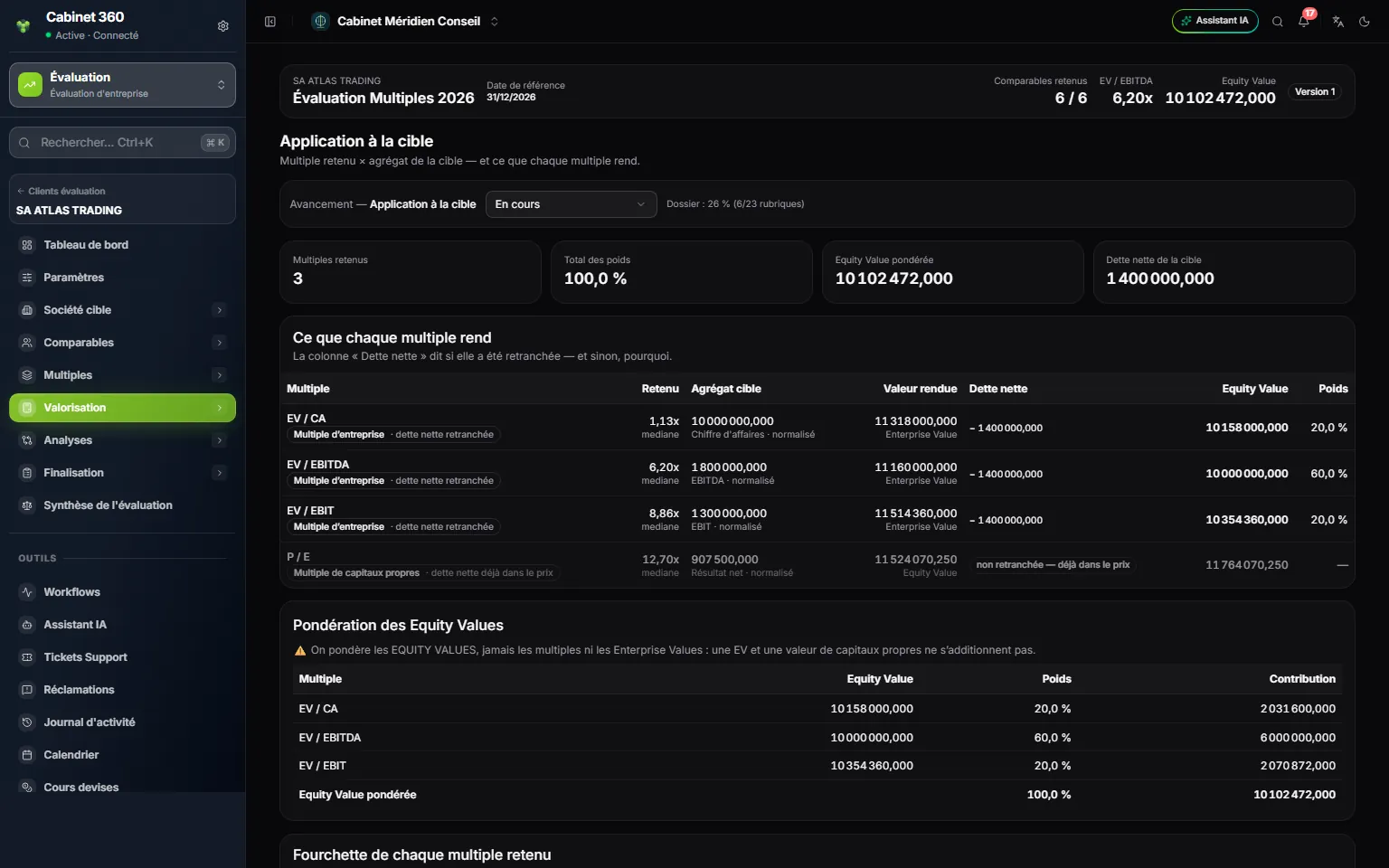
- 1. Total des poids (Total of the weights) and Equity Value pondérée (Weighted Equity Value).
- 2. The multiple and its family: enterprise multiple or equity multiple.
- 3. Selected multiple × the target's aggregate = value given.
- 4. Dette nette (Net debt): deducted, or « déjà dans le prix » (already in the price).
- 5. Pondération des Equity Values (Weighting of the Equity Values): weight and contribution of each.
Nothing is entered here. Each row multiplies the selected multiple by the target's aggregate. The Dette nette column says whether it was deducted, and if not, why. Pondération des Equity Values adds up the contributions: you weight the equity values, never the multiples or the Enterprise Values. Fourchette de chaque multiple retenu (Range of each selected multiple) gives the Equity Value at the sample's minimum, quartiles, mean and maximum.
Enterprise value
The file's Enterprise Value is that of the enterprise multiple retained with the highest weight: it is not an average. A file that retains only P / E or P / Book has no Enterprise Value, and that is correct: the page says so. Equity multiples are shown « pour mémoire » (for reference).
Net debt and adjustments
The two pages work as in the DCF (chapter 8): Ajouter un élément (Add an item: financial debt or cash, book value and retained value) and Ajouter un ajustement (Add an adjustment: type, direction, label, amount). Here, net debt is deducted only from enterprise multiples; adjustments apply to all.
Equity value
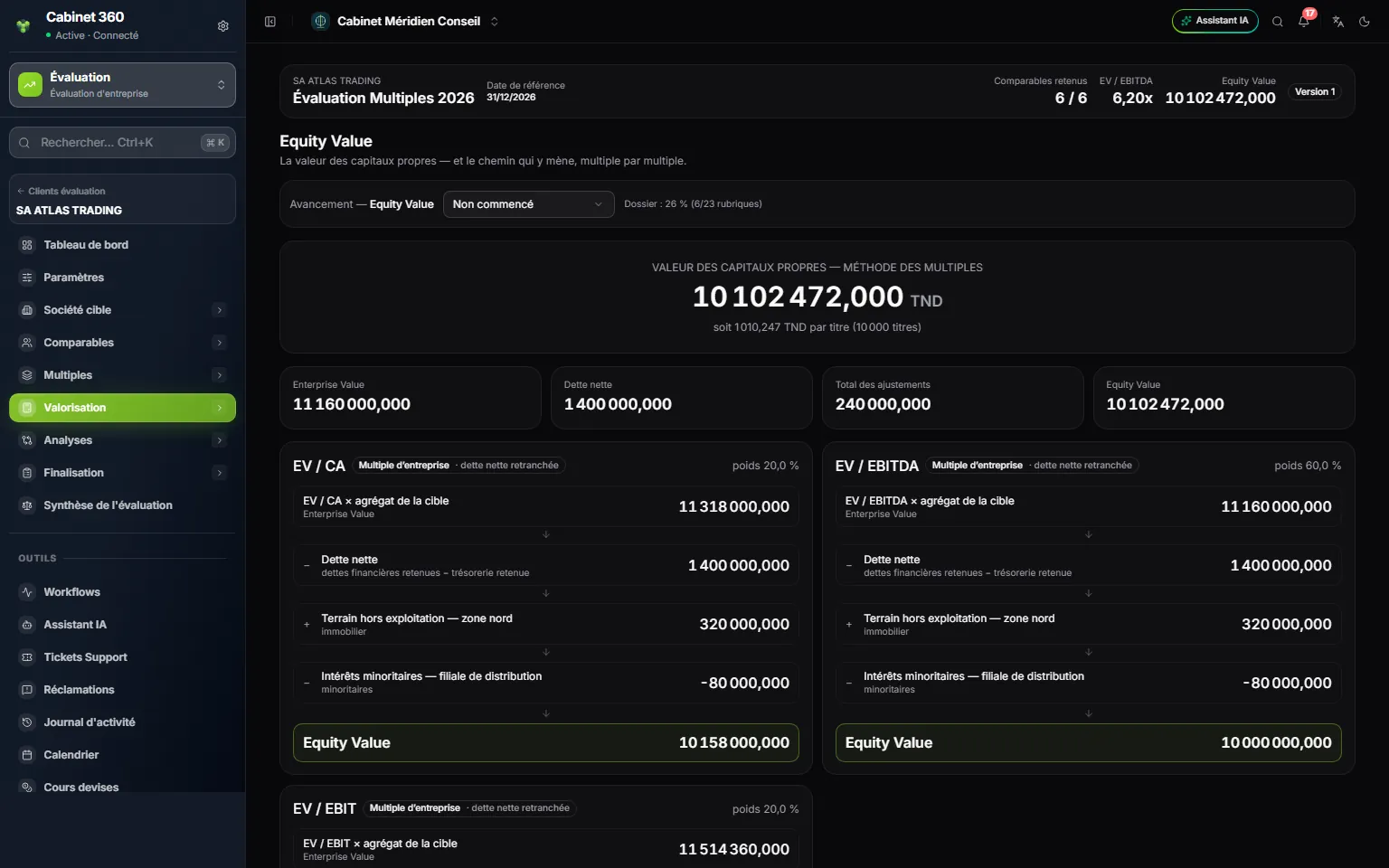
- 1. The equity value, weighted average, and the value per share.
- 2. Enterprise Value, Dette nette, Total des ajustements (Total adjustments), Equity Value.
- 3. The path of a multiple: multiple × aggregate, then net debt.
- 4. Equity Value of this multiple, and its weight at the top right.
The big figure is the weighted average of the Equity Values of the retained multiples. Each card retraces the path of one multiple: multiple × the target's aggregate, − net debt (enterprise multiples only), ± each adjustment, = Equity Value. For a P / E or a P / Book, the card recalls that net debt is not deducted.
Value per share
The weighted value divided by the Nombre de titres (Number of shares) in the settings, to the millime, with the detail multiple by multiple. Without a number of shares, the page says so and offers Ouvrir les paramètres (Open the settings): the value per share is missing, not zero.
Analyses
Sensitivity analysis
Fill in Ajouter une matrice (Add a matrix): an Intitulé (Title), the Multiple, the Pas du multiple (Multiple step; 0.25 by default), the Pas de l'agrégat (%) (Aggregate step, %; 5 by default) and the Pas de part et d'autre (Steps on each side; 2 by default, up to 6). Click Ajouter (Add). The grid gives the Equity Value of this multiple when the multiple and the aggregate vary; the centre cell is the retained value. A matrix cannot be edited: delete it and create it again.
Multiples comparison
The Football field chart places each retained multiple from its Equity Value at the minimum to the one at the maximum, the line marking the retained value, then the weighted value. Le détail des fourchettes (The ranges in detail) and Multiples retenus, en un coup d'œil (Selected multiples at a glance) complete the reading. Synthèse de l'évaluation (Valuation summary) leads to the engagement's summary.
Completion
Controls and lock
| Blocking | Warnings |
|---|---|
| Les données financières de la cible sont saisies (The target's financial data are entered) | Les agrégats retenus sont normalisés (The retained aggregates are normalised) |
| L'échantillon compte au moins trois comparables retenus (The sample has at least three retained comparables) | Chaque comparable retenu porte sa source (Each retained comparable carries its source) |
| Chaque exclusion porte sa justification (Each exclusion carries its justification) | Les données de marché portent leur date (Market data carry their date) |
| Au moins un multiple est calculé (At least one multiple is computed) | Les multiples non significatifs sont identifiés (Non-meaningful multiples are identified) |
| Un multiple est retenu et justifié (A multiple is retained and justified) | Les observations aberrantes ont été revues (Outliers have been reviewed) |
| L'Enterprise Value est calculée (The Enterprise Value is computed) | Les agrégats comparés portent la même période (The aggregates compared cover the same period) |
| L'Equity Value est calculée (The Equity Value is computed) | La dette nette est documentée ligne à ligne (Net debt is documented line by line) |
| La pondération des multiples totalise 100 % (The weighting of the multiples adds up to 100%) | La valeur par part est calculée si le nombre de titres est connu (The value per share is computed if the number of shares is known) |
| Aucune rubrique en « corrections demandées » (No section in « corrections requested ») | Une analyse de sensibilité est générée (A sensitivity analysis is generated) |
- A file that retains only P / E or P / Book shows Sans objet (Not applicable) for « L'Enterprise Value est calculée »: it locks all the same.
- « Les observations aberrantes ont été revues » only passes once no observation is flagged any more: set aside, with their reason, those you judge to be outliers.
- The weighting check only applies when several multiples are retained: for a single multiple, check yourself that it carries 100%.
Locking, versions and reopening follow the shared rule (chapter 4).
Multiples summary
Nothing is entered here. The « Synthèse — méthode des multiples » (Summary — multiples method) page brings together the value of the equity and the value per share, the retained comparables and multiples, the Enterprise Value and net debt, the table of retained multiples with their justification, the football field, what remains to be dealt with and the retained notes. Rapport (Report) and Synthèse de l'évaluation lead further.
Notes and report
Report notes follows the shared rule, with Monter (Move up) and Descendre (Move down) for the order (chapter 4). The report is described in chapter 12.