
Preparing the client
LUMEA DESIGN is a client from Operations. On its record, the partner switches on Valuation in the Services & start of service card and uploads the company's logo. LUMEA DESIGN appears at once in Valuation › Valuation clients.
Opening the engagement
On the client's page, New engagement:
| Field | Entry |
|---|---|
| Engagement title | Évaluation 2026 |
| Purpose of the valuation | Évaluation des titres dans le cadre d'un projet de cession (valuation of the shares for a planned disposal) |
| Valuation reference date | 31/12/2026 |
| Valuation method | ANCC — Actif Net Comptable Corrigé (adjusted net asset value) |
| Valuation context | Cession (Disposal) |
| Currency | TND |
| Scope | 100 % du capital (100% of the share capital) |
| Engagement start date | 05/01/2026 |
| Engagement manager | Karim Jaziri |
Save: « Engagement created ». A double-click opens the ANCC file.
The ANCC file
- ANCC settings: the corporate tax rate (15%), the number of shares, three assumptions (« Continuité d'exploitation. », Going concern, …). Enregistrer les paramètres (Save settings).
- Reference balance sheet: fiscal year 2026, Ouvrir (Open), then Modèle Excel (Excel template). The accountant fills in the workbook, Importer (Import), checks the grid and Enregistrer les états financiers (Save the financial statements). Both checks pass.
- Reprendre comme bilan de référence (Take over as reference balance sheet): total assets come out at 60 000 000,000, equity at 46 000 000,000, liabilities at 14 000 000,000. « Le bilan balance » (The balance sheet balances).
- Asset retreatments: Tangible assets (land, building, machines) +9 000 000,000 on an expert appraisal; Receivables and other assets, doubtful customers −1 600 000,000; Inventory and work in progress −1 600 000,000. Each line carries its justification.
- ANCC calculation: « Les deux approches se répondent — actif net corrigé de 51 800 000,000 DT. » (The two approaches agree — adjusted net assets of 51 800 000,000 DT.) Control difference: 0,000.
- Checks and validation: no blocking point, one warning, « Tout ajustement porte sa pièce justificative » (Every adjustment carries its supporting document). The team member uploads the appraisal reports in the sections' Pièces justificatives (Supporting documents) panels; the warning stays on screen, it does not prevent the lock. Karim Jaziri moves the sections to « Validé » (Validated), then Verrouiller le dossier (Lock the file), reason « Rapport signé le 15/02/2027 » (Report signed on 15/02/2027): « Dossier verrouillé — version 1 » (File locked — version 1).
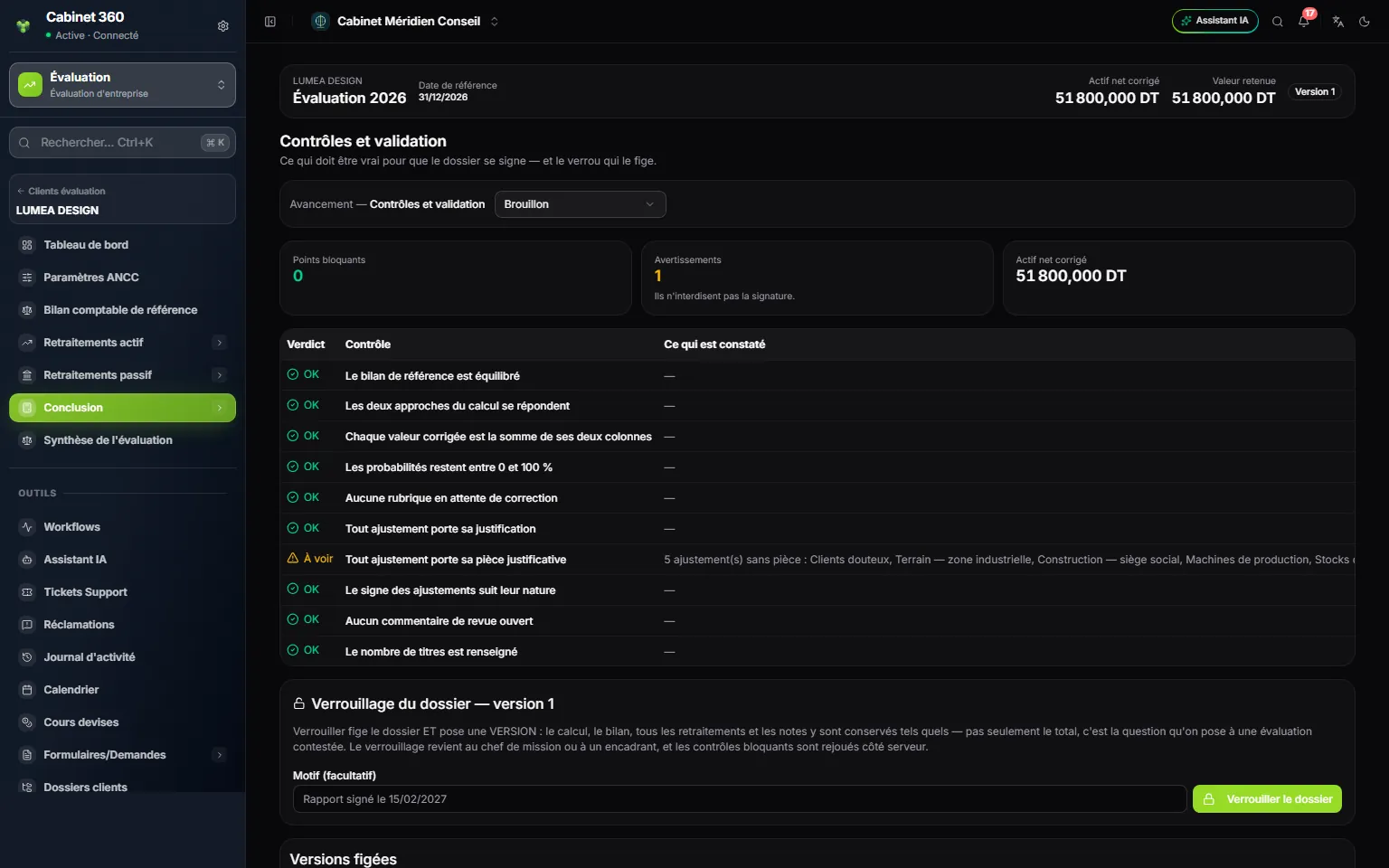
- 1. 0 point bloquant (0 blocking points): the file can be locked.
- 2. 1 avertissement (1 warning): it is for reading, it does not forbid signing.
- 3. Ajustements sans pièce (Adjustments without a document): the finding names the items.
- 4. Verrouiller le dossier, with its reason.
| Calculation | Amount |
|---|---|
| Total book assets | 60 000 000,000 |
| + Asset adjustments (9 000 000 − 1 600 000 − 1 600 000) | 5 800 000,000 |
| = Total adjusted assets | 65 800 000,000 |
| − Adjusted liabilities | 14 000 000,000 |
| = Adjusted net assets | 51 800 000,000 |
By equity: 46 000 000,000 + 5 800 000,000 = 51 800 000,000. The two approaches agree.
The DCF and the multiples on the same engagement
The partner wants to cross-check the net assets against future profitability and against the market. On the client's page, he clicks Edit and switches the engagement's method to DCF — Discounted Cash Flows. The ANCC file, locked, keeps its value for the summary, but no longer opens while the engagement carries another method; the DCF file is created the first time it opens.
- DCF: settings (2026 last historical year, four years of history, five of forecast), history, business plan, cost of capital, terminal value, net debt. Valider le WACC (Validate the WACC) last, checks, Verrouiller le dossier.
- Engagement's method switched to Multiples: settings, normalised target, universe, selection, market data and aggregates, retained multiples with their weights at 100%, net debt. Checks, Verrouiller le dossier.
The summary
In the menu, Valuation summary. The three files are opened and locked; the partner retains all three and chooses Moyenne pondérée des méthodes (Weighted average of the methods).
| Method | File value | Weight | Contribution |
|---|---|---|---|
| ANCC | 51 800 000,000 | 20% | 10 360 000,000 |
| DCF | 313 177 790,000 | 50% | 156 588 895,000 |
| Multiples | 202 049 440,000 | 30% | 60 614 832,000 |
| Weighted average | 100% | 227 563 727,000 |
The Dispersion entre méthodes (Spread between methods) badge shows 504,6%: the warning flags it without blocking. The Justification de la valeur retenue (Justification of the retained value) must say why the net assets stay so far from the two other methods; if this cannot be explained, it is an assumption of the DCF or of the multiples that needs reviewing before concluding.
Justification, conclusion and reservations written, no blocking point: Karim Jaziri clicks Conclure l'évaluation (Conclude the valuation). « Évaluation conclue » (Valuation concluded): the summary is frozen, in his name.
The report
The engagement carries the Multiples method: its Valuation report is printed first (Imprimer (PDF), Print, PDF). For the two others, the partner switches the engagement's method back to ANCC, then to DCF (Edit), just long enough to print each report: a report only opens under its own method, and the locked files are not changed by it. Three A4 reports with LUMEA DESIGN's logo, signed on the « Validation » line. The firm hands over the reports and the value set.
One-page memo
Memo
Before anything
The Business Plan module in the firm's subscription. A client created in Operations, Valuation ticked in its Active services, logo uploaded. An Engagement manager appointed.
The engagement
Valuation clients › the client › New engagement. Title, reference date, method, context, currency, start date. Double-click: the file opens.
The three files
ANCC: reference balance sheet, twelve retreatment sections, two approaches. DCF: history, business plan, FCFF, WACC, terminal value. Multiples: normalised target, sorted comparables, retained multiples at 100%.
The review
Each section: Brouillon (Draft) › En cours (In progress) › Révisé (Reviewed) › Validé (Validated; engagement manager or management). Comments and documents in the panels at the bottom.
The lock
Blocking checks cleared › Verrouiller le dossier (Lock the file) › frozen version. Rouvrir pour correction (Reopen for correction) requires a reason and opens the next version.
The summary
One per engagement. Retained methods, weights at 100%, approach, mandatory justification. Conclure l'évaluation (Conclude the valuation): engagement manager or management.
The report
Each file's Valuation report: Imprimer (PDF) (Print, PDF) or Word. Print after the lock: the report reads the file again every time it opens.
The traps
The adjustment type does not set the sign. Net debt is counted only once. Weights do not complete themselves. Deleting an engagement erases all its files.