
The multiples file
Twenty-three sections: the Dashboard and the Settings, then six groups, Target company, Comparables, Multiples, Valuation, Analyses and Completion. This chapter goes as far as the comparables; chapter 10 goes from the multiples to the report.
The file's dashboard
Four cards: Comparables retenus (Retained comparables; retained out of identified), the headline multiple (EV / EBITDA if it is retained), Enterprise Value and Equity Value. The Prochaine action (Next action) card names the first point to deal with, then lists each check that is not met; Ouvrir les contrôles (Open the checks) leads there. Avancement du dossier (File progress) shows each section and its status, group by group. On a new file, the next action is: « Aucun agrégat de la société cible n'est saisi : les multiples n'ont rien à quoi s'appliquer. » (No aggregate of the target company is entered: the multiples have nothing to apply to.)
Settings
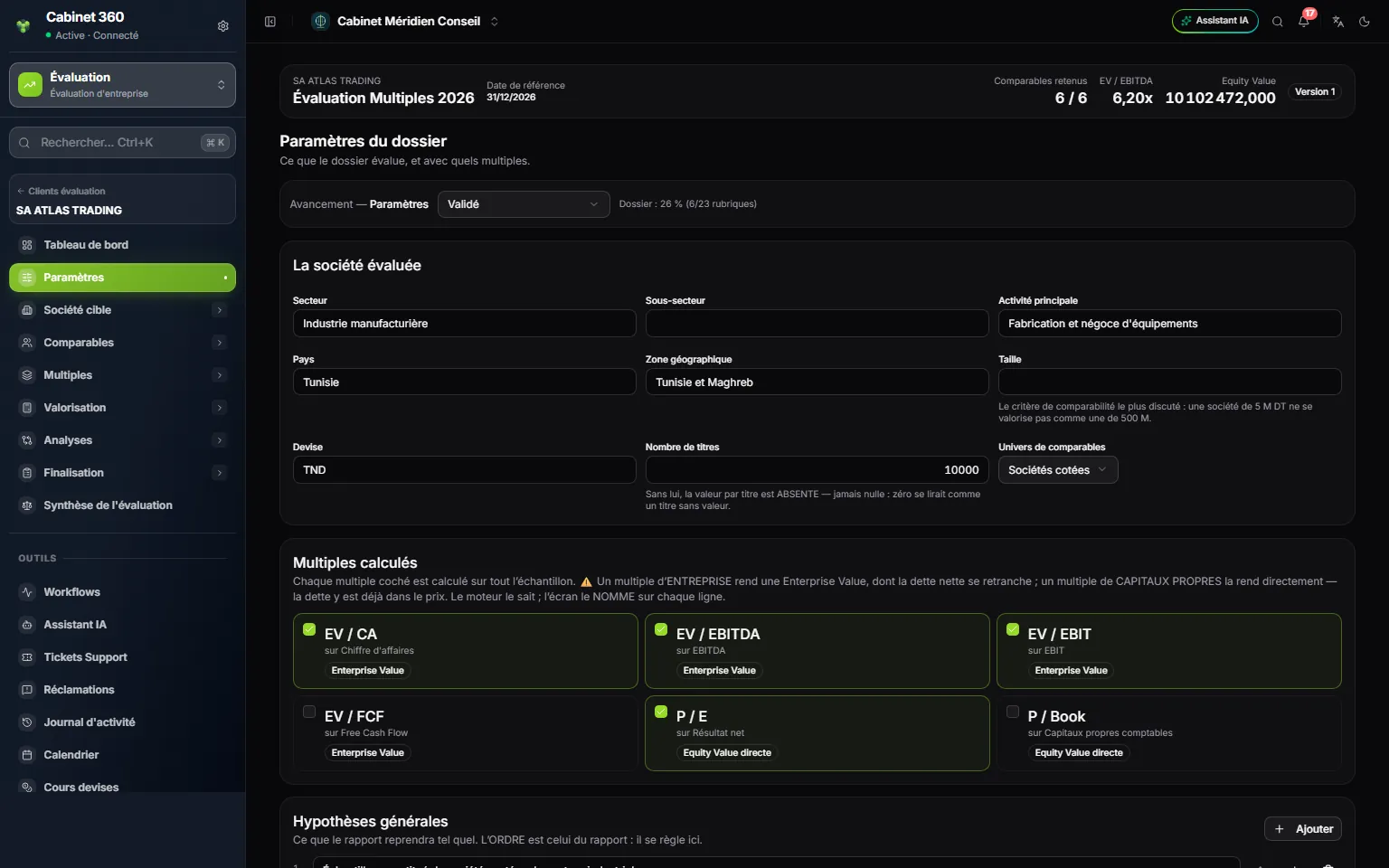
- 1. The file bar: retained comparables, headline multiple, Equity Value.
- 2. La société évaluée (The company being valued): sector, activity, country, size.
- 3. Nombre de titres (Number of shares), without a space.
- 4. Univers de comparables (Comparables universe): listed companies, transactions or both.
- 5. Multiples calculés (Multiples computed): each says whether it gives an Enterprise Value or an Equity Value.
Under La société évaluée, everything is optional: Secteur (Sector), Sous-secteur (Sub-sector), Activité principale (Main activity), Pays (Country), Zone géographique (Geographical area), Taille (Size), Devise (Currency; the engagement's), Nombre de titres and Univers de comparables (Sociétés cotées, Listed companies, Transactions comparables, Comparable transactions, or Les deux, Both). The universe names the sample in the report; it filters nothing.
The six multiples
| Multiple | On | Gives | Net debt |
|---|---|---|---|
| EV / CA | Revenue | Enterprise Value | Is deducted |
| EV / EBITDA | EBITDA | Enterprise Value | Is deducted |
| EV / EBIT | EBIT | Enterprise Value | Is deducted |
| EV / FCF | Free Cash Flow | Enterprise Value | Is deducted |
| P / E | Net income | Equity Value directly | Already in the price |
| P / Book | Book equity | Equity Value directly | Already in the price |
Tick the Multiples calculés: EV / CA (EV / revenue), EV / EBITDA and EV / EBIT are ticked by default. Add your Hypothèses générales (General assumptions), in the report's order, then click Enregistrer les paramètres (Save settings). The page switches to reading mode; Modifier (Edit) reopens it.
Target company
Financial data
- In Ajouter un exercice (Add a year), type the heading as it will be printed (« 2026A », « LTM 06/2026 »), then Ajouter (Add).
- Choose the column's Période de l'agrégat (Aggregate period): Exercice clos (FY) (closed year), Douze derniers mois (LTM) (last twelve months), Douze prochains mois (NTM) (next twelve months), Exercice estimé (estimated year), Moyenne historique (historical average) or Donnée normalisée (normalised figure).
- Fill in the items: Chiffre d'affaires (revenue), EBITDA, EBIT, Résultat net (net income), Free Cash Flow, Capitaux propres comptables (book equity), Dette financière (financial debt), Trésorerie (cash). Each box is saved when you leave it.
- Under Exercice de référence (Reference year), click the year whose figures will be multiplied.
« 2026A » and « 2026 » would make two columns: the heading is not corrected. Emptying a box deletes the figure; it is not a zero. The target's debt and cash are used in no calculation: net debt is entered in Valuation › Net debt.
Normalising the aggregates
Take out what does not recur. The Agrégats de l'exercice … (Aggregates for year …) table gives, for each item, the Publié (Published), the sum of the restatements and the Normalisé (Normalised).
- Choose the Poste retraité (Restated item; EBITDA by default) and the Nature (Type): Charges exceptionnelles (exceptional costs), Produits exceptionnels (exceptional income), Rémunérations non normatives (non-standard pay), Charges personnelles du dirigeant (manager's personal expenses), Loyers non représentatifs (unrepresentative rents), Coûts de restructuration (restructuring costs), Litiges (litigation), Provisions exceptionnelles (exceptional provisions), Subventions non récurrentes (non-recurring grants), Gains non récurrents (non-recurring gains), Coûts non récurrents (non-recurring costs), Autres éléments (other items).
- Enter the Libellé (Label; mandatory), the Montant (avec son signe) (Amount, with its sign) and the justification.
- Click Ajouter.
Comparables
Comparables universe
Everything that was looked at, retained or not. For each company or transaction examined:
- Enter the Nom / raison sociale (Name / company name; mandatory) and choose the Type: Société cotée (Listed company) or Transaction comparable (Comparable transaction).
- Complete Ticker, Pays, Place de cotation (Stock exchange), Secteur, Taille, Activité (Activity), the Source, its Date de la source (Source date), the Lien (Link) and the description.
- Click Ajouter au dossier (Add to the file). The comparable comes in as « À analyser » (To analyse).
To remove a comparable from the sample, do not delete it: exclude it in the selection. Deleting takes its criteria, its market data and its aggregates with it; it only serves to correct an entry error.
Comparables selection
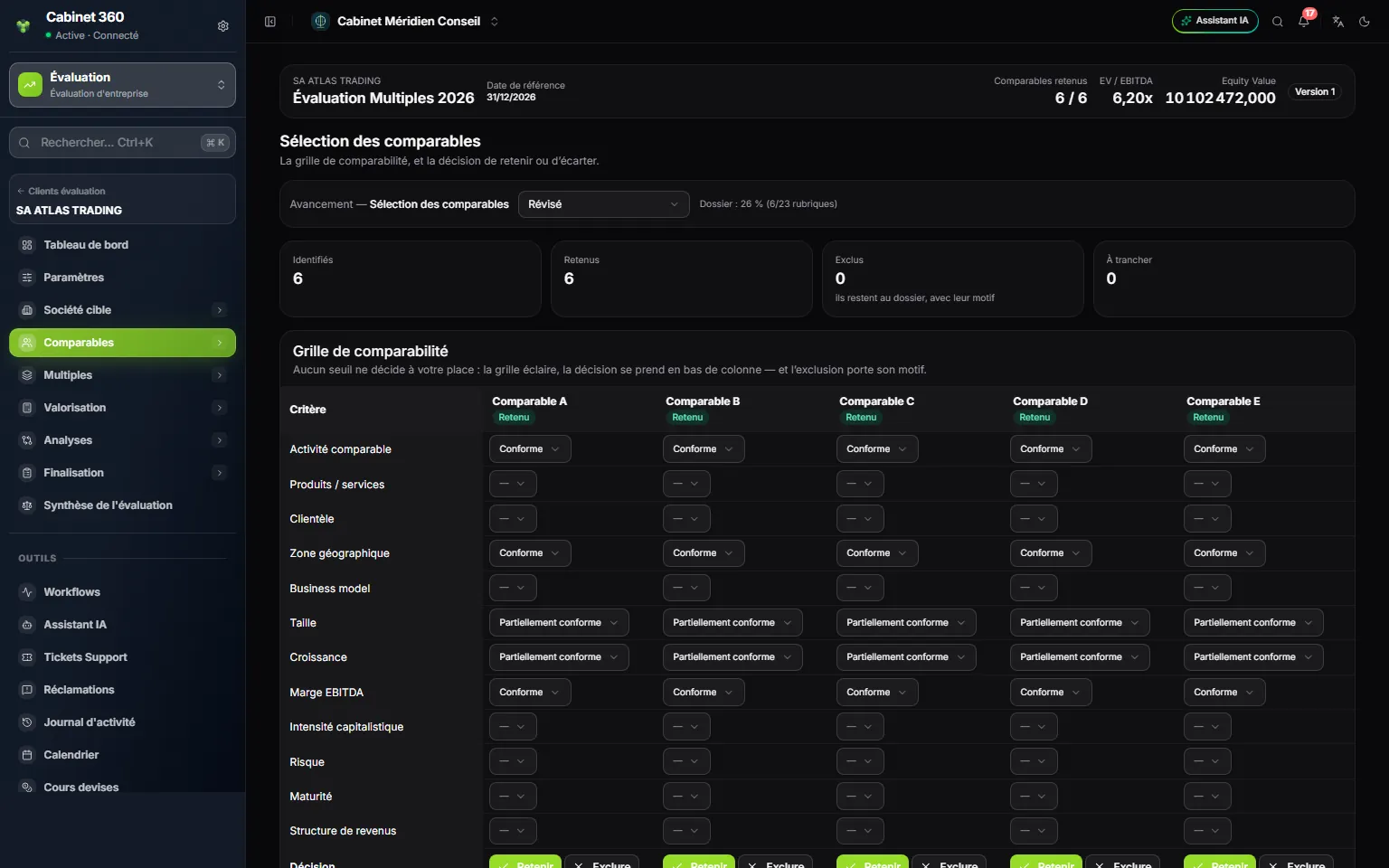
- 1. Identifiés (Identified), Retenus (Retained), Exclus (Excluded), À trancher (To decide).
- 2. The twelve comparability criteria, in rows.
- 3. One comparable per column, with its status.
- 4. The verdict of each cell: Conforme (Compliant), Partiellement conforme (Partly compliant), Non conforme (Not compliant).
- 5. Retenir (Retain) or Exclure (Exclude), at the foot of the column.
The twelve criteria: Activité comparable (comparable activity), Produits / services (products / services), Clientèle (customer base), Zone géographique (geographical area), Business model, Taille (size), Croissance (growth), Marge EBITDA (EBITDA margin), Intensité capitalistique (capital intensity), Risque (risk), Maturité (maturity), Structure de revenus (revenue structure). Each cell gets Conforme, Partiellement conforme or Non conforme.
No threshold decides for you: the grid sheds light, the decision is taken at the foot of the column.
- Retenir brings the comparable into the statistics.
- Exclure opens a window that requires the reason: the comparable stays in the file, and the report prints its reason under « Comparables écartés, et pourquoi » (Comparables set aside, and why).
- Réintégrer (Bring back) puts an excluded comparable back to « Potentiellement comparable » (Potentially comparable); then click Retenir.
Comparable fact sheets
Choose a comparable in the row of buttons. Its identity card is corrected in place (sector, sub-sector, activity, size, website, source, description).
- Société cotée: click Saisir les données de marché (Enter the market data), then fill in Prix de l'action (Share price), Nombre d'actions (Number of shares), Dette financière (Financial debt), Trésorerie (Cash), Actions préférentielles (Preferred shares), Intérêts minoritaires (Minority interests), EV saisie (facultative) (EV entered, optional) and Date de marché (Market date). The D'où vient l'Enterprise Value (Where the Enterprise Value comes from) block details: market capitalisation (price × shares) + debt + preferred shares + minority interests − cash. An EV you enter takes precedence over the calculation, which stays on screen so you can cross-check it.
- Transaction: click Saisir la transaction (Enter the transaction), then fill in Acquéreur (Acquirer), Date de la transaction (Transaction date), Participation acquise (%) (Stake acquired, %), Valeur de la transaction (Transaction value), Enterprise Value and Valeur des capitaux propres (Equity value). Enterprise multiples divide the Enterprise Value; P / E and P / Book, the equity value. The Ajustements de la transaction (Transaction adjustments; control premium, synergies…) are documented; they are never applied automatically.
Comparables financial data
One column per comparable, the same eight items as the target: the denominator of the multiples. A comparable carries only one amount per item: the Exercice affiché (Year shown) is only a label, keep a single year per comparable. Choose the Période de l'agrégat of each comparable (LTM by default). Emptying a box deletes the figure.