MODULE GUIDE
Business valuation
ANCC, DCF and multiples: from the engagement to the signed value
Start reading13 chapters
 IntegraSys ERP2026 edition
MODULE GUIDEBusiness valuationANCC, DCF and multiples: from the engagement to the signed value
Contents
- Chapter 1 — Before you startA company is sold, opens its capital or passes to the next generation: someone must say what it is worth, and why. The Valuation module takes you from the balance sheet to a value that is argued, checked, signed and printed.What the module does, on one pageThe three methods and what each one measuresWhat you need before the first engagementThe module's words
- Chapter 2 — The menu and the dashboardTwo entries are enough for the whole module: the dashboard, which tells where the engagements stand, and the client list, where every engagement starts. As soon as a file opens, the menu becomes the file's menu.The Valuation workspace and its two entriesThe menu of a working fileThe dashboard: periods, eight figures, three tiersThe points of attention and where they lead
- Chapter 3 — Clients and engagementsEverything starts from a client in Operations. You open an engagement for it, give it its method, and the engagement opens its working file.Finding a client in Valuation clientsCreating an engagement: the eleven fieldsOpening the working fileEditing, changing the method, deleting
- Chapter 4 — What the three files shareANCC, DCF or multiples: the calculations change, the way of working does not. Each section is reviewed, each file is checked, locked in a version and feeds a report. This chapter describes this common base once and for all.The file bar and the progress of each sectionReview comments and supporting documentsChecks, locking and versionsThe log and the notes for the report
- Chapter 5 — ANCC: the settings and the reference balance sheetThe adjusted net assets start from a balance sheet: the company's, at the reference date. You first set the tax rate and the number of shares, then you lay down this balance sheet, line by line or from financial statements entered or imported from Excel.The ANCC file's dashboardThe settings: tax rate, shares, rounding, assumptionsEntering or importing a fiscal year's financial statementsTaking over a fiscal year as the reference balance sheet
- Chapter 6 — ANCC: retreat, calculate, concludeA plot of land bought twenty years ago is worth more than its cost; dormant stock is worth less. The retreatments bring each item back to its real value. The calculation draws the net assets from them, twice, and the premiums and discounts give the retained value.The twelve retreatment sectionsDeferred tax and off-balance-sheet commitmentsThe calculation by two approaches and its control differencePremiums, discounts, checks and ANCC summary
- Chapter 7 — DCF: from past accounts to free cash flowA DCF values the company by what it will bring in. Before talking about rates, you need a plan: the history it rests on, then revenue, costs, capital expenditure and working capital, year by year, up to free cash flow.The file's dashboard and settingsEntering the history and drawing the analysis from itBuilding the business plan, section by sectionReading free cash flow (FCFF)
- Chapter 8 — DCF: from the cost of capital to the value of the sharesThe cash flows are ready. What remains is to set the rate that brings them back to today, to say what the company is worth beyond the plan, then to go from the value of the business to the value of its shares. Finally, sensitivity and scenarios show how much this value depends on your assumptions.The cost of equity, the beta, the debt and the WACCThe terminal value and discountingFrom the Enterprise Value to the Equity ValueSensitivity, scenarios, controls and locking
- Chapter 9 — Multiples: the target and its comparablesHow much does the market pay for companies that look like this one? Before answering, you need the figures of the company being valued, cleared of what does not recur, then a sample of comparables sorted criterion by criterion, each one with its source.The file's dashboard and settingsThe target's aggregates and their normalisationThe universe, the selection grid and reasoned exclusionsThe comparables' fact sheets and financial data
- Chapter 10 — Multiples: from the selected multiple to the value of the sharesThe sample is ready. Each comparable gives its multiple; you retain one or more, with their base and their weight. The file applies them to the target's aggregates, goes from the value of the business to the value of the equity, then to the value of one share.Computing the multiples and reading the statisticsRetaining a multiple: base, weight, aggregate, justificationFrom the Enterprise Value to the Equity Value and the value per shareSensitivity, comparison, controls and locking
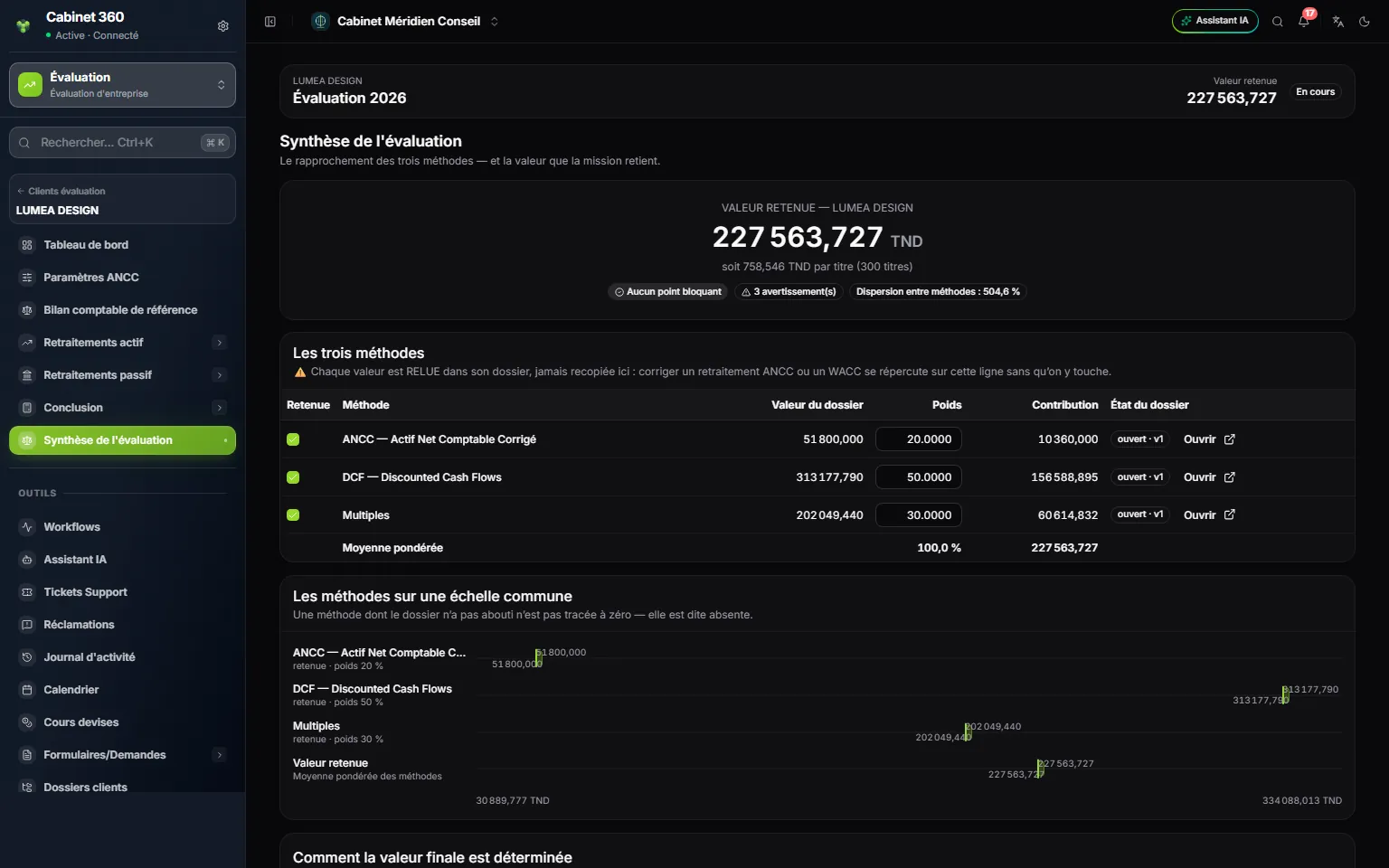
- Chapter 11 — The valuation summaryEach file gives its value. The summary sets them side by side, lets you decide how to set the final value, requires you to say why, then freezes the conclusion in the name of the person who signs it.The three values, read again in their filesRetaining, weighting and choosing the approachJustifying, concluding, reopeningThe ten checks of the summary
- Chapter 12 — What comes out of the moduleA valuation is handed over: to the client, to the buyer, sometimes to the judge. Each file composes its valuation report, A4 pages with the client's logo, to print as a PDF or to take up in Word. The ANCC also produces its financial statements as PDF and Excel.The valuation report, page by pagePrinting as PDF, exporting to WordThe financial statements entered: PDF and Excel templateWhat is not printed
- Chapter 13 — An example from start to finishThe firm Méridien Conseil values the shares of LUMEA DESIGN before a disposal. One engagement, three methods, one concluded value and one signed report: here is the path, screen by screen, with the figures of this book's screens.Preparing the client and opening the engagementCarrying the ANCC file through to the lockAdding the DCF and the multiples on the same engagementConcluding, printing, and the one-page memo