
The retreatment sections
| Asset retreatments | Liability retreatments |
|---|---|
| Intangible assets | Equity |
| Tangible assets | Provisions and risks |
| Financial assets | Financial debt |
| Inventory and work in progress | Operating liabilities |
| Receivables and other assets | Deferred tax |
| Cash and investments | Off-balance-sheet commitments |
The twelve sections share the same page. The subtitle recalls the rule for the section's side: on the assets side, the adjustment increases the adjusted net assets; on the liabilities side, it decreases them. Equity counts on the liabilities side.
Adding a retreatment
- Open the section, then click Ajouter un retraitement (Add a retreatment).
- Type the Poste (Item), for example « Land — industrial zone », and, if needed, the Sous-poste (Sub-item).
- Choose the Type d'ajustement (Adjustment type): Plus-value (Gain in value), Moins-value (Loss in value), Reclassement (Reclassification), Provision complémentaire (Additional provision), Reprise de provision (Provision reversal), Actif non comptabilisé (Unrecorded asset) or Passif non comptabilisé (Unrecorded liability).
- Type the Valeur comptable (Book value) and the Ajustement (Adjustment). The Valeur corrigée (Adjusted value) appears: book value + adjustment.
- Choose the Méthode d'estimation (Estimation method): Expertise indépendante (Independent appraisal), Valeur de marché (Market value), Transactions comparables (Comparable transactions), Coût de remplacement (Replacement cost), Valeur d'usage (Value in use), Actualisation des flux (Discounted cash flows), Valeur nominale (Nominal value) or Autre (Other).
- Write the Justification, the Source and its Référence de la source (Source reference), then click Enregistrer (Save).
As soon as the adjustment is not zero, the Justification becomes mandatory: Enregistrer stays greyed out and « À compléter : … » (Still to fill in: …) names it. The Taux d'impôt propre (%) (Own tax rate, %) is optional: left empty, the line takes the engagement's rate; zero is a value (a tax-exempt gain).
The section's table lists the lines: item, nature, book value, adjustment, adjusted value, justification (« À justifier », To be justified, if it is missing), status, documents and comments. Its icons: Marquer révisée (Mark as reviewed), Modifier (Edit), Supprimer (Delete). Whoever created a line cannot mark it as reviewed, unless they are the engagement manager or part of the management.
Deferred tax
A gain in value on an asset gives rise to a deferred tax; a charge on the liabilities side, to a tax saving. In the Deferred tax section, click Engendrer depuis les retraitements (Generate from the retreatments): a line « Impôt latent — (poste) » (Deferred tax — item) is created for each retreatment that carries an adjustment, off-balance-sheet commitments included, at the retreatment's rate, otherwise at the engagement's rate; a retreatment at a zero rate gets none.
- The generation replaces the lines it had generated: a retreatment that has fallen back to zero loses its line.
- Lines entered by hand are not touched.
- A positive deferred tax line decreases the adjusted net assets.
Run the generation again after each change to the retreatments.
Off-balance-sheet commitments
A guarantee given, a probable dispute: type the Montant nominal (Nominal amount) and the Probabilité (%) (Probability, %). The adjustment retained is nominal × probability. Tick Saisir le montant à la main (Enter the amount by hand) to impose it: a guarantee you know has been called is not weighted. A positive commitment decreases the adjusted net assets.
ANCC calculation
Nothing is entered here. The net assets are worked out twice, from the same balance sheet and the same retreatments:
| 1 — Par l'actif et le passif (By assets and liabilities) | 2 — Par les capitaux propres (By equity) |
|---|---|
| Total book assets + asset adjustments | Book equity + asset adjustments |
| − book liabilities − liability adjustments | − liability adjustments |
| − deferred tax − off-balance-sheet commitments | − deferred tax − off-balance-sheet commitments |
| = Actif net comptable corrigé (Adjusted net book value) | = Actif net comptable corrigé |
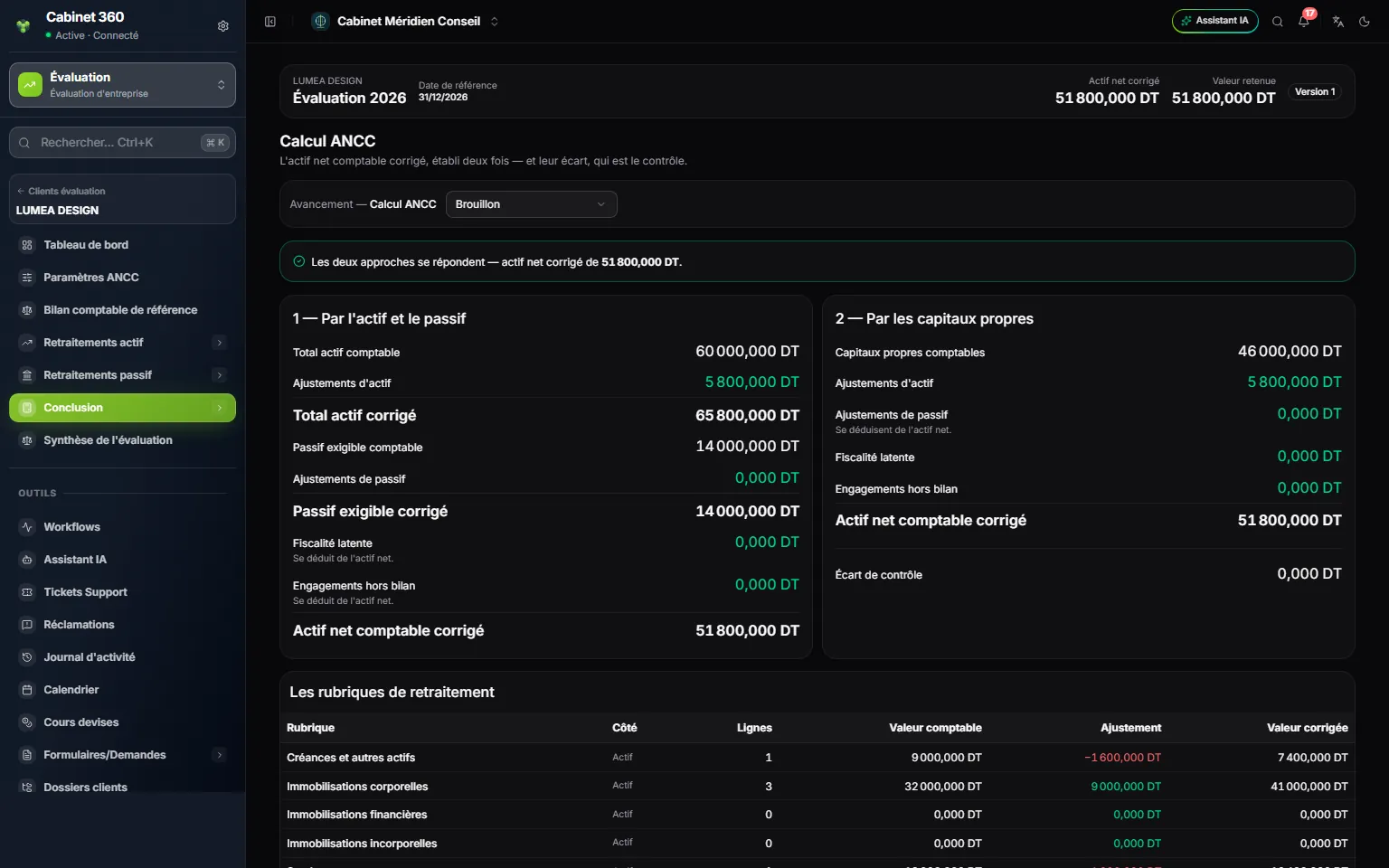
- 1. The verdict: the two approaches agree, or their difference.
- 2. 1 — Par l'actif et le passif.
- 3. 2 — Par les capitaux propres.
- 4. Écart de contrôle (Control difference): it equals the imbalance of the reference balance sheet.
- 5. Les rubriques de retraitement (The retreatment sections), all twelve, even the empty ones.
The Les rubriques de retraitement table totals each section (side, lines, book value, adjustment, adjusted value), down to the Valeur retenue, après primes et décotes (Retained value, after premiums and discounts).
Additional adjustments
Premiums and discounts take you from the adjusted net assets to the retained value. None is applied by default.
- Choose the nature: Prime de contrôle (Control premium), Décote de minorité (Minority discount; the default choice), Décote d'illiquidité (Illiquidity discount) or Autre ajustement (Other adjustment).
- Choose Pourcentage (Percentage) or Montant (Amount).
- Type the value: a percentage is in points and signed, -20 for a 20% discount, 15 for a 15% premium.
- Add the Justification, then click Ajouter (Add).
The adjustments apply in cascade, in order: each one bears on the result of the previous one. Two 20% discounts give 64% of the value, not 60%. The table shows for each one its Base, its Montant and its Résultat (Result), down to the Valeur retenue (Retained value) and the Valeur par titre (Value per share). Untick Appliqué (Applied) to take an adjustment out of the calculation without losing it. An adjustment cannot be edited: delete it and enter it again.
Checks and validation
| Blocking | Warnings |
|---|---|
| The reference balance sheet is balanced | Every adjustment carries its justification |
| The calculation's two approaches agree | Every adjustment carries its supporting document |
| Each adjusted value is the sum of its two columns | The sign of the adjustments follows their nature |
| Probabilities stay between 0 and 100% | No open review comment |
| No section awaiting correction | The number of shares is filled in |
A reference balance sheet with no line at all makes the first check fail: « Le bilan de référence n'a aucune ligne — il reste à saisir. » (The reference balance sheet has no line — it remains to be entered.) The documents warning counts the documents attached to a retreatment line; those uploaded in a section's panel do not clear it. It does not prevent locking. Locking and reopening follow the common rule (chapter 4). The ANCC version freezes the calculation, the balance sheet, the retreatments, the adjustments, the notes and the saved financial statements.
ANCC summary
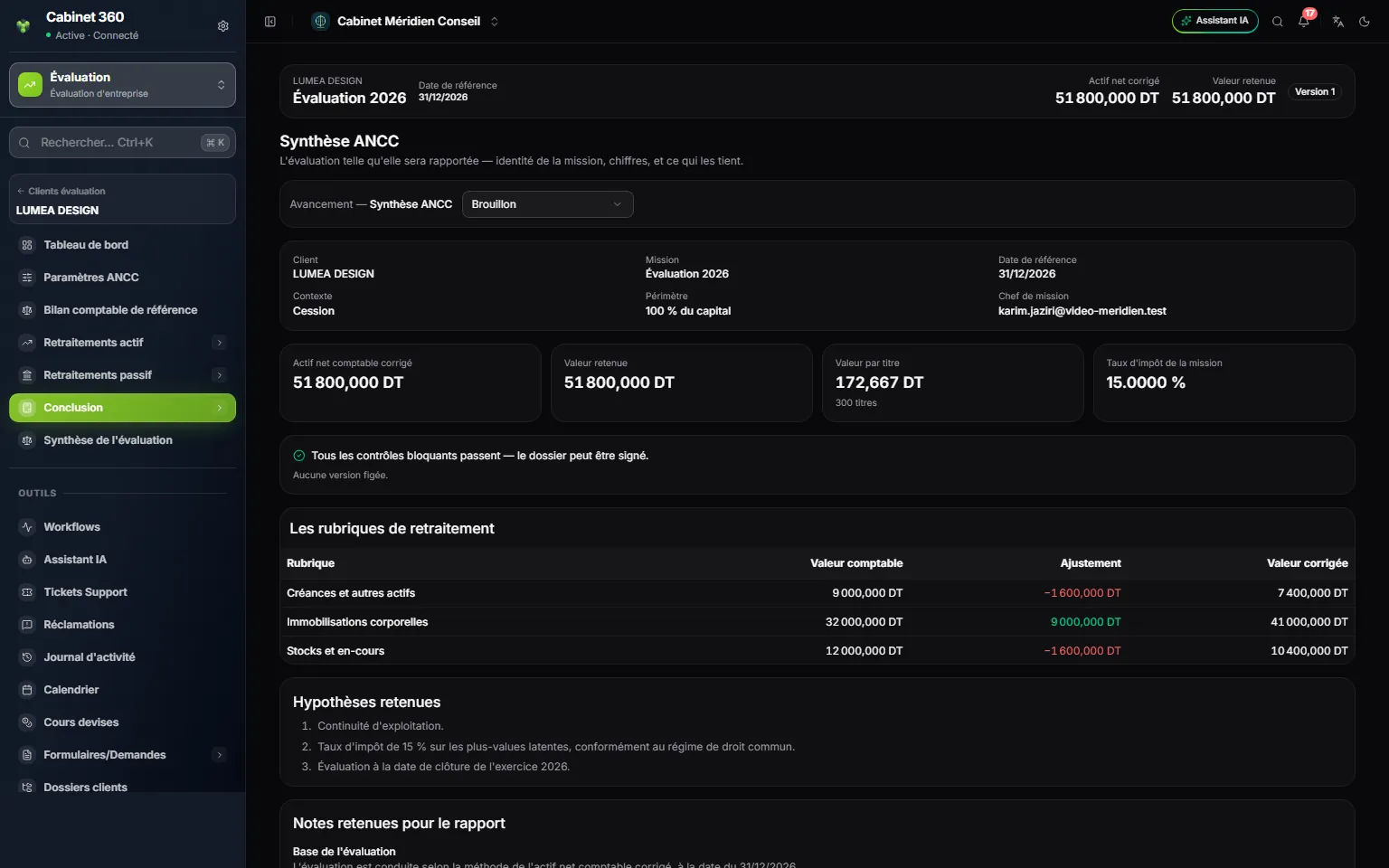
- 1. The engagement's identity: client, engagement, date, context, scope, engagement manager.
- 2. The key figures: adjusted net assets, retained value, value per share, tax rate.
- 3. The verdict of the blocking checks and the last frozen version.
- 4. The retreated sections, with their adjustments.
- 5. Hypothèses (Assumptions) and notes retenues (Retained notes) for the report.
Nothing is entered here: it is the valuation as it will be reported. It ends with the assumptions from the settings and the retained notes. The notes and the report follow the common rule (chapter 4 and chapter 12).