
The Valuation workspace
At the top of the menu, the workspace selector offers Valuation, with the subtitle « Business valuation ». The module's menu has two entries:
| Entry | What it opens |
|---|---|
| Dashboard | The engagements' activity, the files' progress and what awaits review |
| Valuation clients | The list of clients to value, then each one's engagements |
The dashboard has no button to the client list: the Valuation clients menu entry is the only way, and the empty dashboard says so.
The menu of a working file
When you open the engagement, the menu changes: it becomes the menu of its method's file. At the top, the Valuation clients link and the client's name take you back to the client list. The groups unfold with a click; they follow the order of the work.
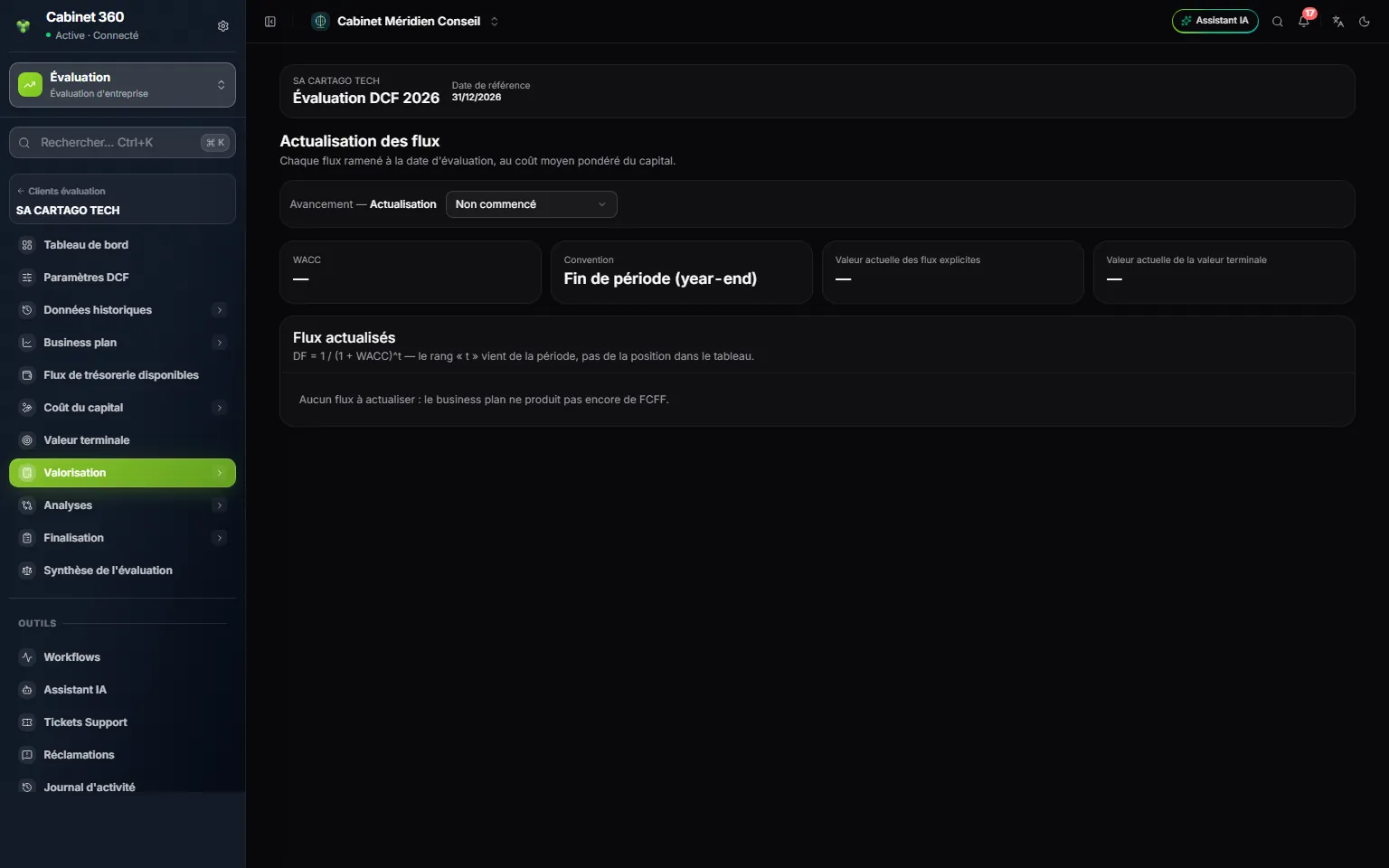
- 1. Back: « Valuation clients » and the client's name take you back to the list.
- 2. The file's dashboard, then its settings.
- 3. The file's groups, in working order: here the DCF, from historical data to completion.
- 4. Valuation summary, the last entry of each file.
- 5. The file bar: the client, the engagement and its reference date.
| File | Menu groups, in order |
|---|---|
| ANCC | Dashboard, ANCC settings, Reference balance sheet, Asset retreatments, Liability retreatments, Conclusion |
| DCF | Dashboard, DCF settings, Historical data, Business plan, Free cash flow, Cost of capital, Terminal value, Valuation, Analyses, Completion |
| Multiples | Dashboard, Settings, Target company, Comparables, Multiples, Valuation, Analyses, Completion |
All three menus end with Valuation summary, in the same place.
The dashboard
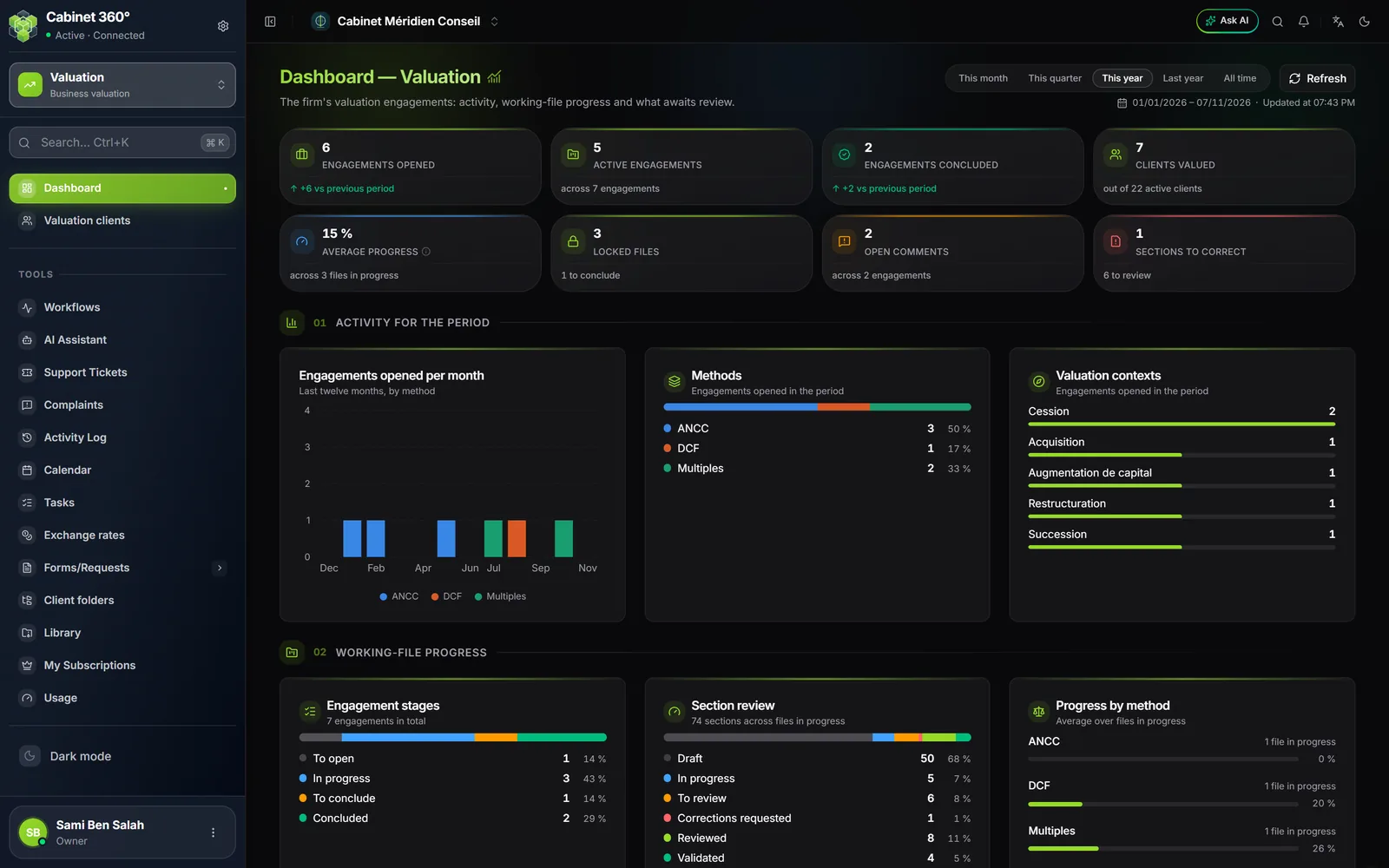
Choosing the period
At the top right, choose the period: This month, This quarter, This year (the default choice), Last year or All time. The dates covered appear below, with the time of the last update. Refresh reads the figures again.
The comparison is made to date: this year up to today against last year up to the same day. The difference is written as a number of engagements, « +2 vs previous period ». All time has no comparison period: the card says so.
The eight figures
| Figure | What it counts |
|---|---|
| Engagements opened | The engagements whose start date falls in the period |
| Active engagements | The engagements not concluded, out of all engagements |
| Engagements concluded | The summaries concluded in the period |
| Clients valued | The clients that have at least one engagement, out of all the firm's active clients |
| Average progress | Sections reviewed or validated out of all sections, averaged over the files in progress |
| Locked files | The frozen files, including those awaiting their conclusion |
| Open comments | The open or reopened review comments of engagements not concluded |
| Sections to correct | The sections in « Corrections requested », and those « To review » |
Click a figure: the page scrolls down to the tier that details it.
Tier 01 — Activity for the period
- Engagements opened per month: the last twelve months, by method (January to December of last year for Last year).
- Methods and Valuation contexts: how the engagements opened in the period are spread.
Tier 02 — Working-file progress
- Engagement stages: To open (file never opened), In progress, To conclude (file locked, summary to validate), Concluded, No working file (retired method).
- Section review: how many sections of the files in progress are at each review status.
- Progress by method: the average of the files in progress, method by method.
- Active engagements: the ten most recent, with method, stage, progress, review, engagement manager and start. The title opens the file.
Tier 03 — Team and review
- Points of attention: the eight most urgent points, from the most blocking to the mildest, then « + n other points ».
- Workload by engagement manager: each one's active engagements, and those with no engagement manager.
- Most followed clients: the five clients with the most engagements; the name leads to their engagements.
- Latest conclusions: the last five concluded summaries; each line leads to its summary.
| Point of attention | Where it leads |
|---|---|
| Working file never opened | The engagement's file |
| Sections to review, sections with corrections requested, open review comments | The engagement's file |
| Locked file — synthesis to validate | The engagement's summary |
| No engagement manager | The client's engagements |
| Retired method — choose a method | The client's engagements |