
The reports page
The page shows one tile per report. A click opens its criteria window, which ends with three buttons: Close, Export Excel and Print PDF. Print PDF downloads the file: open it to print it.
Each report reads the documents of its module. A tile whose module you are not allowed to read is greyed out.
The seven reports
| Report | What it shows |
|---|---|
| Item statistics | Per article: the quantity, the average unit price, the amount excl. tax and its share. On sales, purchases or disbursements. |
| Client statistics | Per client: the number of documents, the revenue excl. tax and its share. |
| Supplier statistics | Per supplier: the number of documents, the purchases excl. tax and their share. |
| Client comparison | Per client: the revenue of fiscal year N against N-1, the difference and the change. |
| Supplier comparison | The same comparison, for your purchases. |
| Agreements comparison | Per convention: the pre-invoiced amount excl. tax of N against N-1, and whether it was invoiced in N. |
| Domiciliations comparison | The same, for domiciliations. |
The criteria
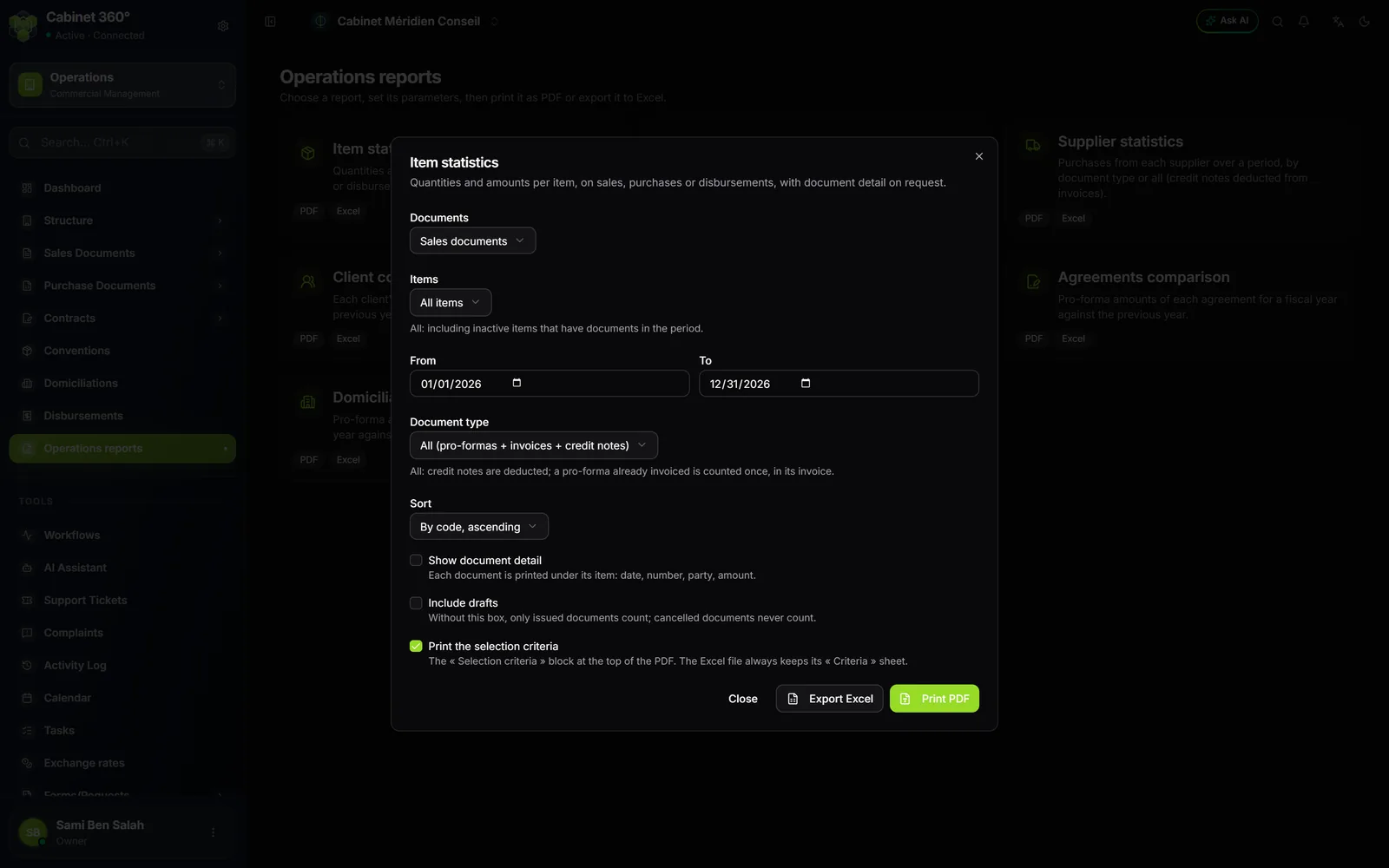
The windows look alike. For Item statistics:
- Documents: Sales documents, Purchase documents or Disbursements.
- The selection: All items, A single item or A range of items (from code… to code…).
- Document type: the pre-invoices (or, for purchases, the purchase orders and the receipts), Invoices + credit notes, or All (…).
- From and To: the period.
- Sort: By code, ascending, or by amount, ascending or descending.
- Three boxes: Show document detail, Include drafts, Print the selection criteria.
The client and supplier reports likewise offer all codes, a single one or a range (All clients, A single client, A range of clients, and the same for suppliers). The comparison reports ask for a Fiscal year instead of two dates: N is the chosen year, N-1 the year before, as calendar years.
How they count
- Invoices + credit notes: credit notes are deducted, in quantity as well as in amount. The revenue is net.
- Cancelled documents never count. Drafts only count if you tick Include drafts; only the convention and domiciliation comparison reports always count their draft pre-invoices (their due dates are created as drafts).
- A document in a foreign currency is converted into dinars at its exchange rate.
- A line with no figure is not printed, for example an invoice fully taken back by its credit note.
- For purchases and disbursements, the amount column is headed Achats HT or Débours HT (purchases or disbursements excl. tax; the reports print in French): it is not revenue.
- The share (% CA) relates each line to the total of your selection: a single article makes 100 %.
- The total only adds up what can be added: the amount, the share and, depending on the report, the number of documents, the difference and the change. Hours and units are not added up.
- A change computed on a zero N-1 stays empty: nothing is invented.
The header and footer of the PDFs
The seven reports, the sales journal and the disbursement journal share the same layout:
- At the top: a band with your company's logo on the left, the report title in bold and the period. The disbursement journal adds the company name and its tax ID.
- At the bottom, on each page: a rule; on the left, the title, preceded by your company name on the seven reports and the sales journal; in the centre, “Imprimé le dd/mm/yyyy à hh:mm” (printed on … at …), in Tunis time; on the right, the page number “1/3”.
- The Critères de sélection block (selection criteria) recalls your choices, unless you untick Print the selection criteria. The Excel file always keeps a “Critères” tab.
The paper is portrait, and switches to landscape when the report has many columns, such as the compared contracts.