
A campaign sends nothing
A campaign does not publish ads and does not send emails. It is a tracking record. To write to your leads, see chapter 9; to receive the leads from your ads, chapter 4.
What it is for: counting the leads an action brought in, the deals they became, and comparing them with what it cost.
Creating a campaign
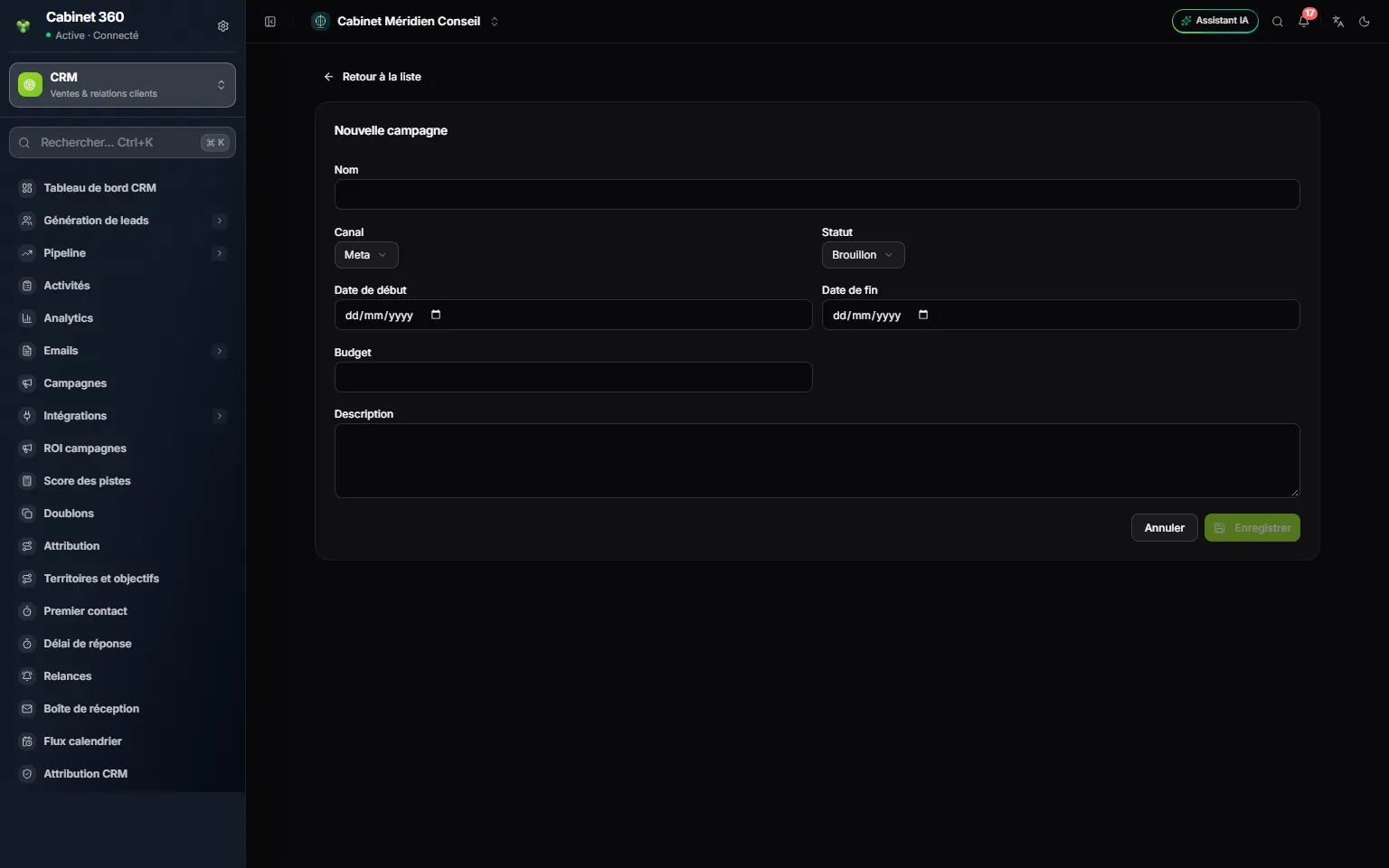
- 1. Name: remember it exactly, it is used to link the leads.
- 2. Channel: Meta, Google, Email, SMS, Event or Other.
- 3. Status: Draft at the start.
- 4. Start date and End date.
- 5. Budget: what the campaign costs.
- 6. Description: its purpose, in a few words.
- 7. Save.
- Click New campaign.
- Enter the Name. For a Meta ad campaign, give it exactly the name of the campaign at Meta. Give each campaign a different name: two names that differ only by capital letters or spaces compete for the same leads.
- Choose the Channel: Meta, Google, Email, SMS, Event or Other.
- Choose the Status: Draft, Active, Paused, Completed or Archived.
- Fill in the Start date, the End date and the Budget, entered like every amount in IntegraSys.
- Add a Description if needed, then click Save.
The status is just a marker: it starts nothing and stops nothing.
The Campaigns list shows the Name, the Channel, the Status, the Period and the number of linked Leads. Click the name to open the record, correct it and click Save.
To delete a campaign, open its record, click the bin at the top right, then confirm. It leaves the list at once and is erased for good 30 days later.
Linking leads to their campaign
A lead is linked to a campaign in two ways:
- Through Meta: a lead that came from your Meta ads is linked to the campaign tied to its Meta campaign, when that link exists.
- Through its UTM campaign field: the lead's « UTM campaign » field (Attribution block of its record) must repeat the campaign's name exactly. Capital letters and spaces do not count.
Meta leads arrive with the name of their ad campaign in « UTM campaign ». So give your IntegraSys campaign the same name as at Meta.
The linking does not happen by itself: you start it from Campaign ROI. A deal is counted for a campaign only if its lead was already linked to it at the moment the deal was won: run the attribution regularly, as soon as the leads arrive, and not a month after the signatures.
Reading the return on spend
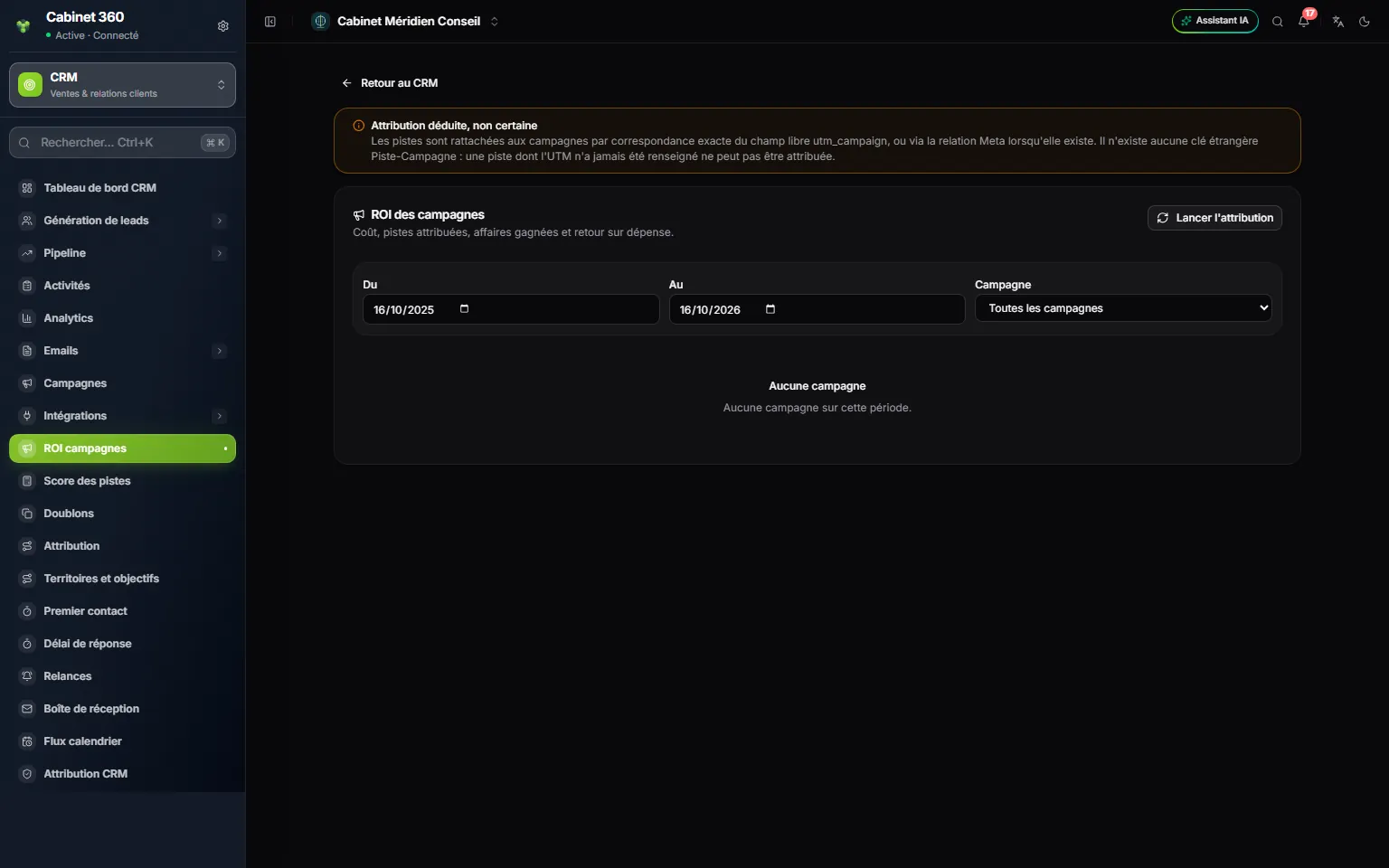
- 1. « Attribution is inferred, not certain »: the linking is done by name, with no guarantee.
- 2. Run attribution: link the leads that are not linked yet.
- 3. From and To: the period of the won deals counted.
- 4. Campaign: all, or just one.
- Click Run attribution. The outcome shows, for example « 3 linked of 9 examined. ». Each click examines the first 1,000 leads still without a campaign; those that match no campaign stay at the top, so beyond 1,000 leads with no match, starting again no longer moves forward.
- Set From and To. At the start, the period covers the last 365 days. It only filters the won deals, by their close date: Leads and Cost cover the campaign's whole life.
- Choose a Campaign, or keep All campaigns.
- Read the table.
| Column | What it says |
|---|---|
| Cost | The campaign's budget. |
| Leads | The linked leads. |
| Won | The won deals that came from these leads. |
| Conversion | The share of leads that became won deals. |
| Attributed revenue | The amount of these won deals. |
| Cost per lead | The cost divided by the number of leads. |
| Cost per won deal | The cost divided by the number of won deals. |
| Return on spend | (attributed revenue − cost) ÷ cost, as a percentage. At 0%, the campaign just covered its cost; above that, it brought in more than it cost. |
A cell can say « No cost recorded » (the campaign has no budget), « Zero cost », « No leads » or « No revenue ». Without a budget, the return on spend is not calculated: enter the budget to get it.
Frequently asked questions
Why does the number of leads stay at 0?
Either the attribution has not been run, or no lead has the campaign's name in « UTM campaign ». Check it in the Attribution block of a lead's record, then click Run attribution again.
How do I track an email campaign?
Create the campaign with the Email channel and its budget. The emails themselves go out from the lists (chapter 9); their sends are tracked in Emails › Send log.