
Where your emails are sent from, at the start
All CRM emails are sent by the IntegraSys mail service. You have no mail server to set up.
- The sender is an IntegraSys address as long as your domain is not verified.
- Replies come back to the user who sent the email: the recipient who clicks « Reply » writes to your staff member, not to IntegraSys.
The domain is the part of your address after the @ sign: in contact@yourfirm.tn, the domain is yourfirm.tn. An email that carries your own domain inspires more trust and reaches the inbox more often.
Adding and verifying your domain
To prove the domain is yours, you publish two records with the company that manages it (the one where you bought it, or your host). If you have no access to its settings, send it the values shown.
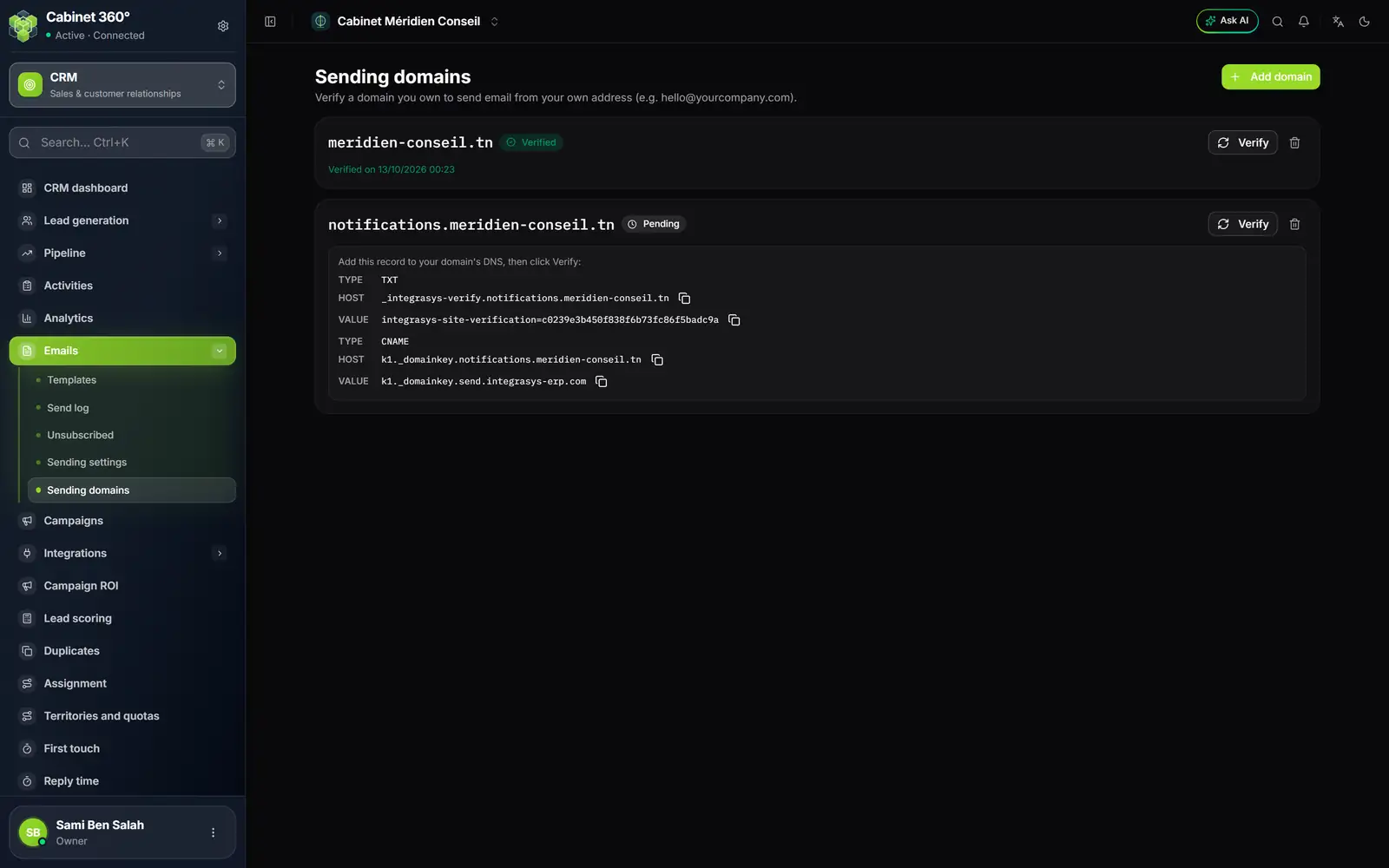
- 1. Add domain: enter the domain, without the @ sign.
- 2. Verified: the domain is proven; the date of the check is shown below.
- 3. Pending: the records are not seen yet.
- 4. The TXT record proves that the domain is yours.
- 5. The CNAME record lets your emails be signed.
- 6. Verify runs the check once your records are published.
- 7. The bin removes the domain.
- Open Emails › Sending domains, then click Add domain.
- In the Add a sending domain window, enter your domain, for example
yourfirm.tn, then confirm. The domain appears with the Pending badge. - Under the domain, the box « Add this record to your domain's DNS, then click Verify: » gives two records, each with its Type, its Host and its Value.
- With the company that manages your domain, create the two records exactly as they are shown. Copy them with the icons rather than typing them again.
- Wait: publishing takes a few minutes, sometimes a few hours.
- Click Verify. If everything is in place, the message « Domain verified » appears, the badge changes to Verified and the words « Verified on » give the date. The records disappear from the card.
If the badge shows Not verified, the reason appears in red under the domain, in English: the TXT record is missing, or the CNAME value differs from the one shown. Correct it with your host, then click Verify.
The domain is checked again every night
Verification is not won forever. Every night, IntegraSys checks the Verified and Not verified domains again:
- a verified domain whose records have disappeared goes back to Not verified after three missed checks in a row (at night, or by a click on Verify), that is about three days;
- a Not verified domain whose records you have corrected becomes Verified again on its own, at the next check.
As long as a domain is not verified, your emails are sent from the IntegraSys address again. Nothing is lost: they are sent, under the default address.
Removing a domain
Click the domain's bin, then Remove in the « Remove this domain? » window. You will no longer be able to send from this domain until you have added it again and verified it.
Choosing the from address
Once the domain is verified, you still have to say which address should sign your emails.
The Sending settings page only appears to the roles that have the right to edit emails. It shows two cards:
- Default sender reminds you of the IntegraSys address your emails are sent from, and that replies come back to the user who sent them.
- Your sender address (optional) lets you write under your address.
- In the Your sender address (optional) card, tick Send from my address.
- Enter the From address, an address of your verified domain, for example
contact@yourfirm.tn. - Enter the From name, the one your recipients will read, for example the firm's name. Left empty, your recipients will read « IntegraSys ».
- Click Save.
- Read the box under the fields. « Your emails are currently sent from » followed by your address confirms the setting.
Under your address, your recipients' replies arrive at this address, and no longer at the user who sent the email: make sure someone reads it.
If the box says « The domain of … is not verified: your emails are sent from the default address », your address is saved but not used yet. The Verify a domain link takes you back to the domains page.
The warm-up of a new address
The big mail services (Gmail, Outlook…) are wary of an address that suddenly starts sending a lot of emails. To protect your reputation, IntegraSys caps the number of emails your firm sends each day from a new domain, then raises this cap day after day. The count starts with the first email sent from this domain for your firm. It also applies to the IntegraSys address: in the first days your firm sends, even without a domain of its own, the cap applies.
| Day since the first send | Emails sent at most that day |
|---|---|
| 1st day | 50 |
| 2nd day | 100 |
| 3rd day | 150 |
| 4th day | 250 |
| 5th day | 400 |
| 6th day | 600 |
| 7th day | 1,000 |
| from the 8th to the 13th day | 1,500 |
| from the 14th to the 20th day | 5,000 |
| from the 21st to the 27th day | 15,000 |
| from the 28th to the 35th day | 30,000 |
| from the 36th day | no more daily cap |
Days are counted on the calendar from the first email sent, whether you send or not. Beyond the day's cap, the email stays Queued and IntegraSys tries it again every hour; if it still has not been sent after about two days, it changes to Failed and is not sent.
The count is kept domain by domain. If you move from the IntegraSys address to your own verified domain, the warm-up starts again at 50 emails on the first day for this domain.
Another limit is added, at any time: as soon as the firm has queued 500 emails in the past hour, any new send is refused. It is explained in the next chapter, with the send window.
Frequently asked questions
Why does the badge stay Pending?
IntegraSys does not see your records yet. Check that they are published as shown, wait, then click Verify again.
Can I verify a subdomain?
Yes. Add it as it is, for example notifications.yourfirm.tn, then publish its two records with the hosts shown. Your emails can then be sent from an address of this subdomain.
I removed the records by mistake.
Publish them again. As long as three checks (at night or through Verify) have not failed in a row, the domain stays Verified; if it has changed to Not verified, it becomes Verified again at the next night check, or straight away with Verify.