
The works page
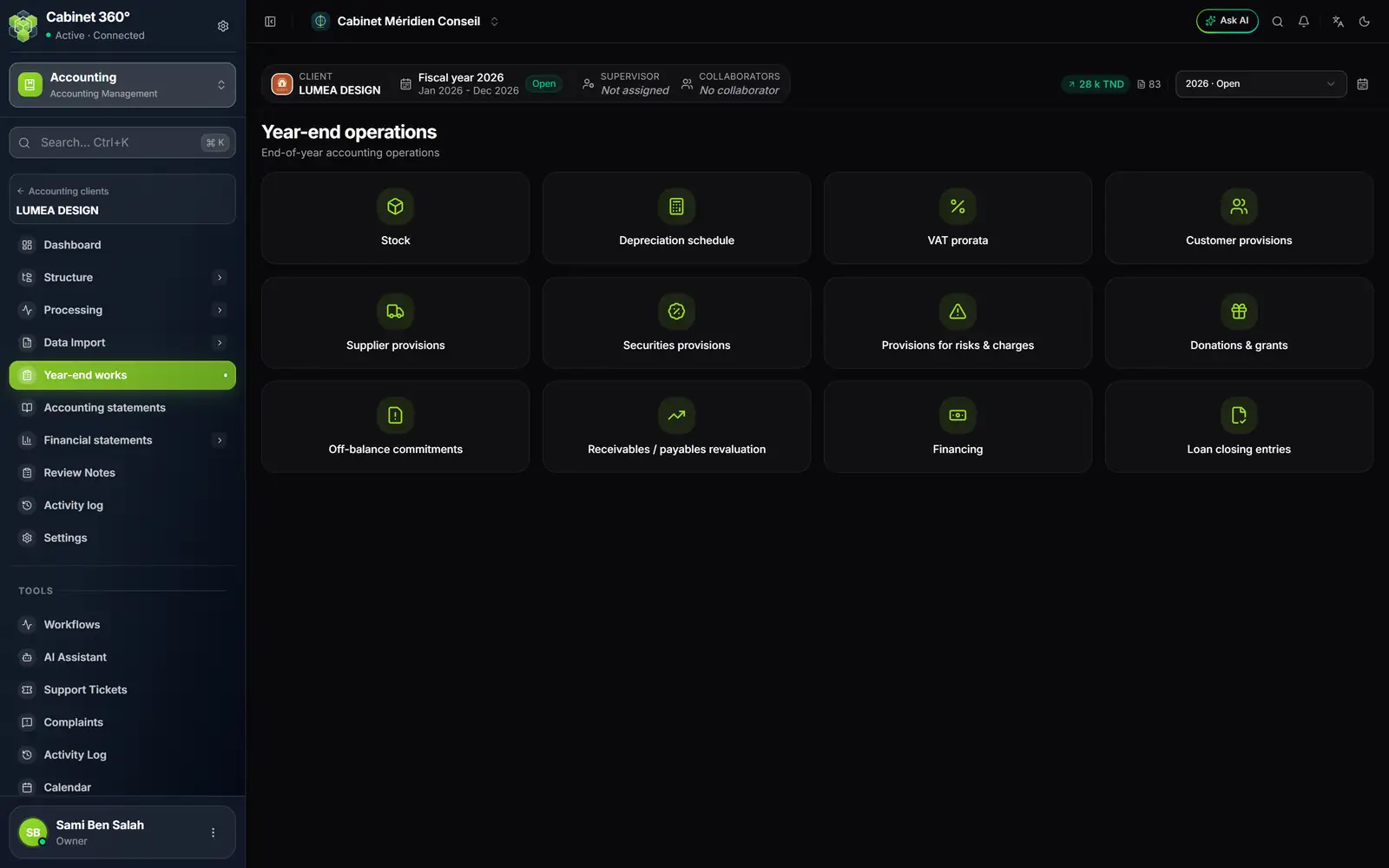
- 1. Stock: the inventories and the closing-stock entry.
- 2. Depreciation schedule: the fiscal year's depreciation charges, by asset and by family.
- 3. VAT prorata: the adjustment of the fixed assets' VAT.
- 4. The provisions: customers, suppliers, securities, risks and charges.
- 5. Donations & grants.
- 6. Off-balance commitments: the list, with no entry.
- 7. Receivables / payables revaluation: the balances in currency at the closing rate.
- 8. Financing and Loan closing entries: the client's loans.
All the works follow the same rules:
- they cover the fiscal year chosen in the file's bar;
- Generate entry proposes a general-operations journal (“Auto (GL)”: the file's first journal of type General, not dormant). A date left empty means the end of the fiscal year, except for stock, dated on the inventory day; the VAT prorata and the loan closing entries are always dated on the last day;
- the entry generated is validated at once, with the checks of any entry;
- each work line generates its entry only once: a second generation is refused, and the message names the entry already posted;
- each report prints in PDF or Excel, with a total line.
Stock
The Stock - Inventories screen records the fiscal year's counts, warehouse by warehouse.
- Click New inventory. Choose the Warehouse and the Inventory date.
- For each item: Reference, Name, Nature (raw materials, finished goods, goods for resale…), Quantity and WAC. The Value is calculated (quantity × WAC). If needed, the Provision and the Reversal: the NBV is the value minus the provision. Import takes an inventory from the template.
- In the line's menu, Generate entry: choose the Variation account (credit) and the Default stock account (debit), and if needed a stock account per nature.
Stock is grouped by nature: one debit line per nature, a single credit line on the variation account, dated on the inventory day. The provision and the reversal each make their own entry.
Fixed assets and their depreciation
Families and records
Two Structure screens prepare the depreciation:
- Asset families: each family has its Depreciation rate (%), its Calculation mode (straight-line or declining), its Category and its two accounts (Asset account, Depreciation account). Default families loads the platform's reference list; Duplicate copies those of another file.
- Fixed assets: one record per asset, with Code, Family (which proposes rate and mode), Description, Acquisition date, Gross value, Prior depreciation, accounts, VAT and, when the day comes, Disposal date and Disposal price. Depreciation plan shows its plan over its whole life.
Most records are born when the invoice is entered: see chapter 4, “Fixed assets created at entry”.
The fiscal year's depreciation schedule
A record's plan counts in full years; the fiscal year's schedule counts to the day: an asset bought on 15/12 does not carry twelve months of depreciation. The opening depreciation comes from last year's validated schedule, or from the record.
- Click Generate: the schedule is calculated as a draft.
- Check it: per asset, Gross values (N-1, additions, disposals, N), Amortization (N-1, charge, N) and Net book values; then the summary table by family.
- Click Validate: the schedule is frozen. Reopen puts it back to draft as long as it is not posted.
- Click Post: one pair of lines per family, the Expense account (debit) against the family's Amortization account (credit).
- Print, once the schedule is validated: Summary by family, Detail by asset or Everything, in PDF, Word or Excel.
For an asset disposed of, depreciation stops at the disposal date, and the Disposal result (price minus net book value) shows in green or in red. Import an amortization schedule takes over another software's schedule: each line becomes a record, after two series of checks, and the schedule is regenerated as a draft for checking.
VAT prorata
For a client Partially liable to VAT (set on their tax record), the screen compares the fiscal year's deduction percentage with the previous fiscal year's. The percentages come from the Tax module; failing that, the screen calculates them from the file's sales and says so. If the gap reaches 5 points, the VAT of the fixed assets bought during the year is adjusted: Adjust posts an entry, dated at the end of the fiscal year, that adjusts each asset and its VAT account. Below 5 points: “Variation below 5 points: no adjustment.”
Provisions
Four tiles, one same screen: Customer provisions (per customer, on the receivable), Supplier provisions (per supplier, on the payable), Securities provisions (per security, on its cost) and Provisions for risks & charges (by nature).
- Each line carries the base, the Provision N, the Provision N-1 (taken from last year) and the Reversal.
- Carry over N-1 copies last year's lines that are still missing, without overwriting anything.
- Generate entry, direction Charge (debit 68x, credit provision) or Reversal (debit provision, credit 78x). The amount proposed is the year's change.
Donations and grants, commitments, revaluations
- Donations & grants: one line per organisation, with its amount. The entry chooses its two accounts: a grant received on the credit of a 74x, a donation paid on the debit of a 6x. It is dated at the end of the fiscal year.
- Off-balance commitments: guarantees, sureties, endorsements, pledges, mortgages, with the third party, the document no., the amount and the due date. A list for the notes: no entry.
- Receivables / payables revaluation: for a receivable or a payable in currency, the FX amount, the Original rate and the Closing rate. The Difference (computed) shows in green or in red; the entry posts it to the two accounts you choose.
Financing and loan closing entries
Financing is the management of the client's loans: each loan, its lender (a supplier in the third-party chart), its bank, its repayment schedule and the follow-up of its instalments. Each loan carries its borrowing accounts (more than one year 16…, less than one year 505…); the file's record, section Financings, gives the financial-expense accounts (65…) and the accrued-interest accounts (508…), required from the first loan.
- New Financing: choose the lender among the suppliers of the third-party chart (the + creates one), the bank among the file's bank journals, then the amount, the dates and the repayment schedule.
- Activate puts the loan in service; the schedule must repay exactly the amount borrowed.
- Instalment tracking marks each instalment as paid, unpaid or partly paid.
- Print (PDF) or Print (Excel) prints the loan's report; Close, Cancel and Archive follow the end of its life.
It is the same screen as the financing management of the Finance module (book “Finance & Cash Register”); the client finds their loans on their portal, in My financing.
Loan closing entries prepares, for each active loan, the two year-end entries, dated on the last day of the fiscal year:
- the reclassification within one year: debit 16…, credit 505…, for the principal of the instalments of the following twelve months;
- the accrued interest: debit 65…, credit 508…, for the share of the instalment that straddles the closing, in proportion to the days.
Reversal in N+1
On stock, provisions (charge), donations, revaluations and loan closing entries, the box Generate the reversing entry in the next fiscal year prepares the reverse entry: same accounts and amounts, debit and credit swapped, label “Annulation écriture …”, on the Reversal date (the first day of N+1 by default).