
The file's template
The template decides the lines of the statements and the accounts that feed them. It is chosen on the file's record, section Accounting configuration: Standards applied (Tunisian standards or IFRS), FS template (Commercial, Industrial, Service) and Template type (Reference model or Authorized model). The generation page recalls it: “Model: Industriel (référence)”. Without a template, each screen says so and offers Configurer le dossier (secteur & type) (configure the file: sector and type).
Several of these screens are shown largely in French in every language for now: the balance mappings, the notes and the Tax reconciliation tab. Their labels are given here in French, with their meaning.
The order of the work, each step saving what the next one reads:
- General balance mapping, then Enregistrer (save).
- Sub-ledger balance mapping, then Enregistrer (save).
- FS notes: Enregistrer l'affectation (save the mapping), then Enregistrer les notes (save the notes). Validate the depreciation schedule too (chapter 11).
- Generate financial statements, Tax reconciliation tab: Enregistrer le décompte (save the reconciliation).
- The checks, then Save the financial statements.
- Print the bundle.
Mapping the balance
The grid lists each general account whose balance is not zero. For each one, the États financiers column (financial statements) gives the statement (Actifs, Capitaux propres et passifs, État de résultat, État de flux de trésorerie, Soldes intermédiaires de gestion: assets, equity and liabilities, income statement, cash-flow statement, intermediate management balances), and Affectation EF (FS mapping) its line. The pencil changes them. Nothing is written before Enregistrer (save): the lines changed carry “à enregistrer” (to save), and the header counts the changes.
The prior-year column shows when a comparison exists: last year's entries, otherwise an imported prior-year balance (chapter 6). Sub-ledger balance mapping shows the reclassification of the balances of customers (41) and suppliers (40), deduced from the collective account and the direction of the balance. SIG mapping shows, read-only, the cascade of intermediate management balances calculated from the template.
Detailing the notes
The notes detail the lines of the balance sheet and of the income statement into sub-lines: intangible fixed assets into software and other lines, for example. A note's total is the statement's.
- Affectation balance tab (balance mapping): for each account, the Affectation notes list (notes mapping) proposes the sub-lines of its line. IntegraSys proposes a line from the account's number or name (proposée badge, proposed); Aucune — laisser non détaillé (none, leave not detailed) refuses it.
- Notes tab: read-only, each note with its N and N-1 lines and its total. What is not detailed closes the total on a Non détaillé line (not detailed), with the reason.
Enregistrer les notes (save the notes) freezes the fiscal year's notes: this is the version the bundle prints. When no account is waiting for a mapping any more, the screen announces “Notes 100% assigned — cash-flow assignment is open.”
Entering the cash flows
Cash-flow mapping and Cash-flow notes stay greyed as long as the notes are not 100 % assigned. After that, Cash-flow notes shows the template's cash-flow statement: the lines the general ledger feeds are calculated, the others are To fill in (gains or losses on disposals, investing and financing flows…). Save (n boxes) saves all the boxes changed in one go.
Generating and checking
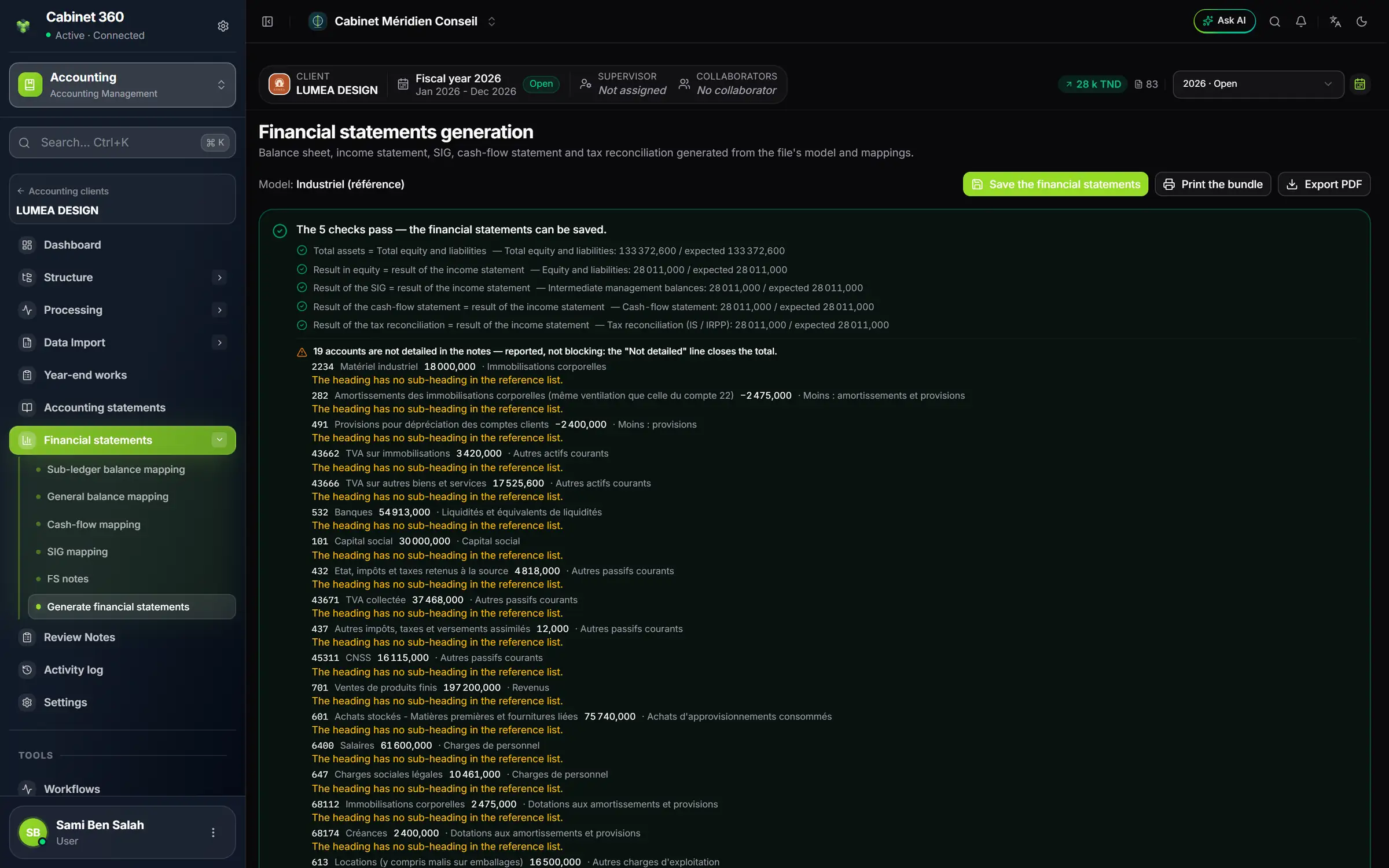
- 1. The template of the file's statements.
- 2. Save the financial statements: active when every check passes.
- 3. Print the bundle: the bundle that was saved.
- 4. Export PDF: the statements as they are now, for a review.
- 5. The checks: each with what is obtained and what is expected.
- 6. The accounts not detailed in the notes: flagged, not blocking.
- 7. The financial statements menu.
The page has six tabs: Assets, Equity and liabilities, Income statement, Cash-flow statement, Intermediate management balances and Tax reconciliation. Each statement shows the fiscal year, N-1 and the Change; the three statements filed have a Note column, which refers to the note that details the line.
The prior-year column comes from the previous fiscal year's entries, otherwise from an imported prior-year balance, otherwise from typing here: Enter the prior-year column opens only the lines to type, the totals are calculated.
The checks must all pass before saving, to exact equality:
| Check | What it compares |
|---|---|
| Total assets = Total equity and liabilities | The balance sheet balanced |
| Result in equity = result of the income statement | The result carried to liabilities |
| Result of the SIG = result of the income statement | The cascade of balances |
| Result of the cash-flow statement = result of the income statement | The starting point of the flows |
| Result of the tax reconciliation = result of the income statement | The reconciliation saved |
Depending on the template, one check is added for the cash-flow test (FL30 + FL31 - FL32 = 0), and two more when the prior-year column is typed. The header counts them: “The 5 checks pass — the financial statements can be saved.”, or “n checks to clear before saving the bundle.”
Saving and printing the bundle
Save the financial statements freezes the bundle: “Bundle saved: printing renders this one, not the figures of the moment”. It keeps the five statements with their N-1, the tax reconciliation saved, the notes saved and the validated depreciation schedule; failing that, the notes and the schedule are calculated at saving, and the screen says so. Print the bundle renders it as many times as needed, as long as nothing changes. The button turns grey, with its reason, if the tax reconciliation has changed, if the prior-year column has changed, or if entries have been posted since saving: save again.
The printed bundle follows this order: a cover (client's logo, company name, closing date, legal form, tax ID, contents), the balance sheet assets, the balance sheet liabilities, the income statement, the cash-flow statement, the intermediate management balances, the notes to the financial statements (A the company presentation, B the reference framework, C the accounting conventions and methods, then the numbered notes), the tax reconciliation and the fixed asset tables.
The Tax reconciliation tab
The tab goes from the accounting result to the taxable result: corporate tax for a legal entity, personal income tax for an individual. A saved reconciliation opens read-only, with its date. Modifier (edit) reopens the entry; nothing is written before Enregistrer le décompte (save the reconciliation). Imprimer le décompte (print the reconciliation) prints the saved reconciliation in PDF.
The direction and the amount of the result come from the income statement. The corporate tax rate comes, in this order, from the file's record (Data import settings › Taxation), then from the client's tax record; an association is at 0 %. Without a rate, a red banner “Corporate tax rate not set for this client” blocks saving and printing, with a link to each of the two records.