
The chart of accounts
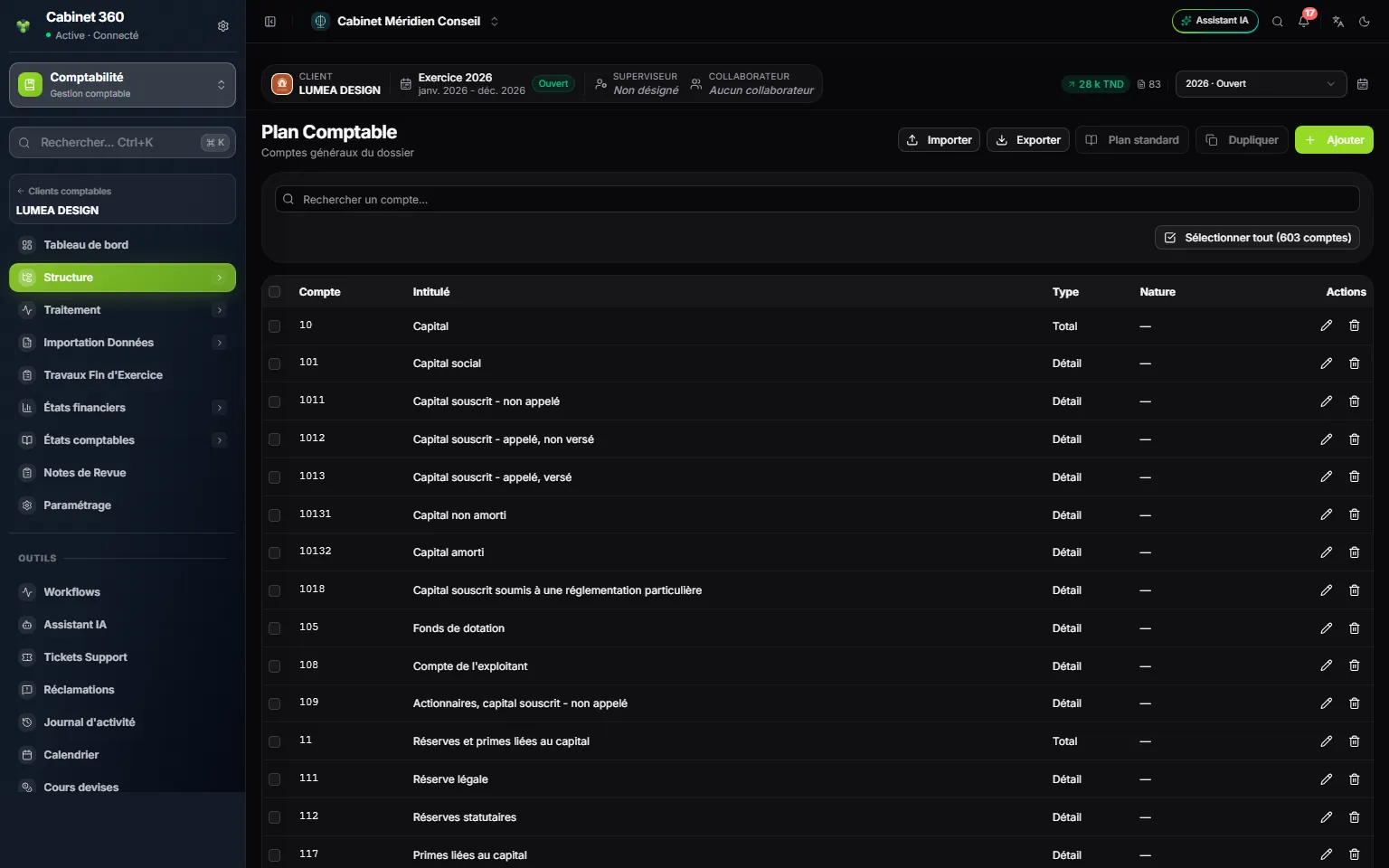
- 1. Import and Export: the chart as a workbook, and the Blank template.
- 2. Standard chart and Duplicate: to start a file that has no account.
- 3. Add an account.
- 4. Select all ticks the whole list, every page included.
- 5. Type and Nature: total or detail account, and its nature (Banque, Caisse, Charge…).
- 6. Edit or Delete the account.
A new file has no account. Two buttons start it:
- Standard chart, then Initialize: creates the accounts of the standard chart, with your firm's customizations;
- Duplicate: copies the accounts of another file. Choose the Source dossier (all its accounts are ticked), then click Duplicate.
In both cases, detail accounts take the file's General account digits: with 6 digits, 4111 becomes 411100. With Standard chart, an account that has sub-accounts becomes a total account and keeps its number (411); Duplicate keeps the source account's type. The closing message names the accounts not created, with their reason. Both buttons are greyed as soon as the file has an account.
Adding an account
Click Add: Account and Name are required. The record recalls the file's format (“6 digits (file settings), e.g. 411000.”). A number that is too short is flagged: click Use 411000 to pad it with zeros. A total account (Type: Total) can be shorter. The Type and Nature choices are shown in French in every language for now: Total or Détail (detail), Banque (bank), Caisse (cash), Charge (expense), Produit (income)…
The account's Nature matters twice:
- for journals: a bank journal relies on an account of nature Banque, a cash journal on a Caisse account;
- for the Carry forward: an account of nature Charge or Produit gets Do not carry forward, greyed; the others are carried forward (Carry forward the balance or Carry forward the unmatched entries). A Banque or Caisse account gets Carry forward the balance, which can be changed.
A row's eye (View) opens the record read-only: all its fields, its creation and its last change. Under the list, Rows per page shows 20, 50, 100 or 200 accounts.
The third-party chart
The third-party chart lists the file's customers and suppliers, each attached to a collective account (411…, 401…).
- Click Add, then choose the Type first: Client (customer), Fournisseur (supplier) or Autre (other), shown in French for now. The Third-party account fills in with the next number.
- Enter the Name and choose the Collective account.
- Click Save.
A third party's number is a prefix followed by a counter, specific to each type: CL for customers, FR for suppliers, DI for the others, 6 characters in all by default (CL0001). A number typed by hand must start with the type's prefix and have the file's length: the record proposes the right number (Use CL0012). These settings are on the file's record and apply to every account created in IntegraSys: record, entry, wizards.
Importing third parties
- Click Export, then Blank template.
- Fill in Code, Intitulé, Nature (Client, Fournisseur or Autre) and Compte général (code, name, type: customer, supplier or other, and general account, which must exist in the chart of accounts). The template's headers and values are in French in every language.
- Click Import and choose the file. IntegraSys analyses it without writing anything: the lines in error are listed (Line, Code, Reason), and as long as any remain, nothing is imported.
- For a code already present, answer “Do you want to replace the existing account …?” (Yes, No, Yes to all), then click Import.
Journal codes
A journal groups the entries of one family: purchases, sales, bank, cash, general operations. It gives each entry its number.
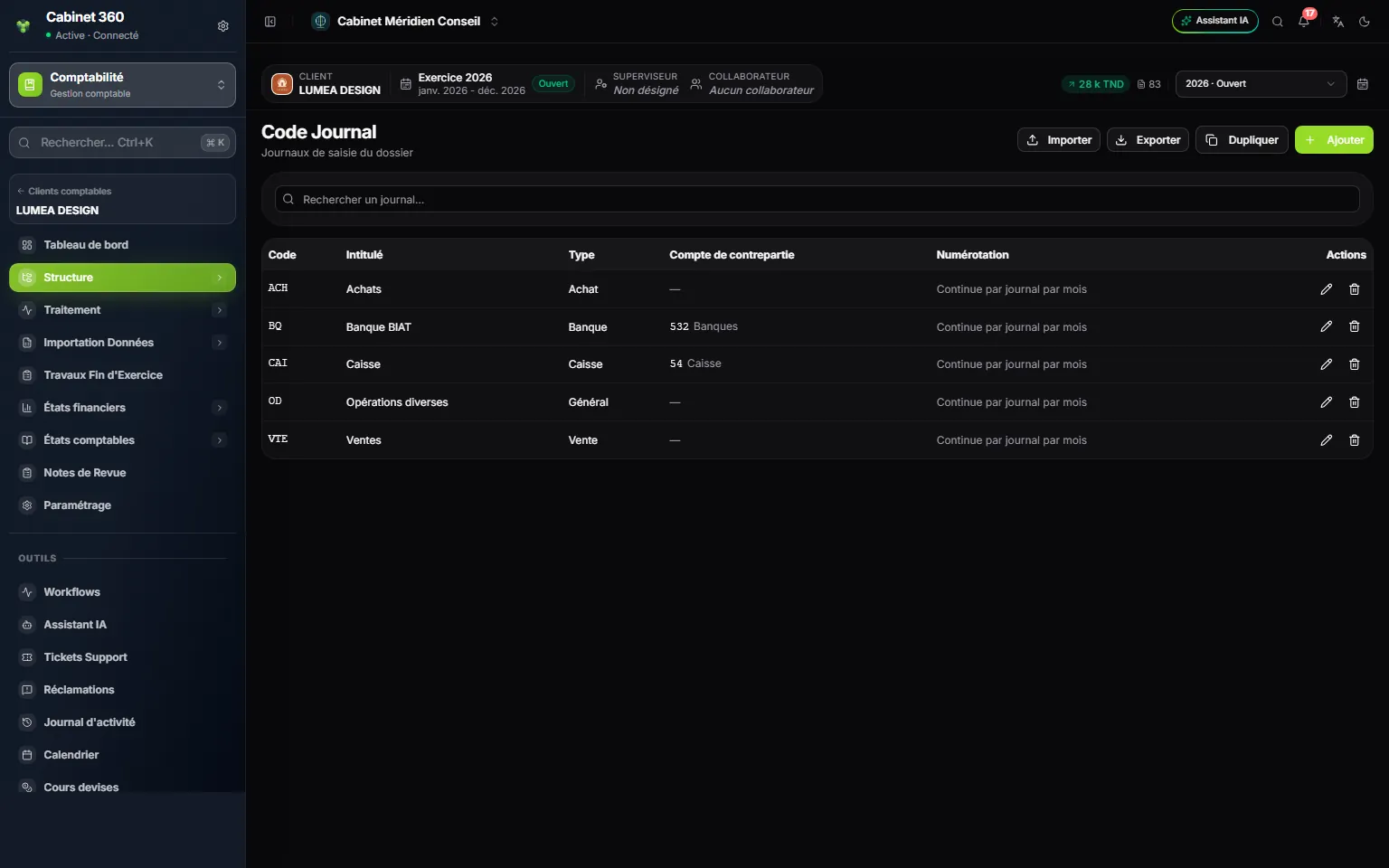
- 1. Import, Export, Duplicate from another file, Add.
- 2. The type: Achat, Vente, Caisse, Banque or Général.
- 3. The counterpart account of a bank or cash journal.
- 4. The numbering of the journal's entries.
- Click Add. In the New journal code window, enter the Code (10 characters at most, in capitals: ACH, VTE, BQ1…), the Name and the Type: Achat (purchases), Vente (sales), Caisse (cash), Banque (bank) or Général (general), shown in French for now.
- For a Banque or Caisse journal, choose the Counterpart account, for example 5321000 Banque BIAT. If it is missing, the + creates it without leaving the record. An account already taken by another active journal is greyed (“offset of BQ1”): two active journals never share their counterpart.
- Choose the Numbering (in French on screen): “Continue par journal par mois” (proposed: the sequence restarts from 1 each month), Continue par journal (one sequence over the fiscal year) or Continue par client (one sequence for all the file's journals). Click OK.
To create several journals at once, start from the Blank template: each header of the workbook carries a note that says what to enter. A journal that must no longer receive entries (account closed, code replaced) is set to Dormant on its record: its entries stay readable, but entry, imports and wizards refuse it (“Journal … en veille”, journal … dormant).
Entry templates
An entry template prepares an entry that comes back: an electricity invoice, rent, payroll. It pre-fills the journal and the lines; the cursor only stops where something is left to type.
In the Entry template editor, give the Name, the Type, the Journal code and the Day of the entry. Each line has its fields (General account, Third-party account, Entry label, Debit, Credit…), and each field a mode:
| Mode | What the field does |
|---|---|
| To enter | The cursor stops there; a value in the template is only a suggestion |
| Repeat | Takes the value of the line above |
| Increment | The line above + 1: “FA-0099” becomes “FA-0100” |
| Function or Formula | A composed text (“"Invoice no. " + Reference(1)”) or a calculation (“0.19*Debit(1)”) |
| Balance | The amount that balances the entry, on the side that settles it |
An account can only be To enter or Repeat. The Wizard button builds a formula step by step: totals, a rate, the net amount of a gross amount, the VAT included in a gross amount, with a test on sample amounts. An error names its line and its field, for example “Line 3 — Label: the function is empty.”
To use a template, open Document entry, then Load a template… in the Entry template frame. Calculated fields are read-only; the date follows the template's Day of the entry in the current month. The entry number stays the journal's. In Batch entry, a template is applied on request, with Apply.
Subscription templates
A subscription template schedules an entry that comes back on a fixed date: monthly rent, yearly insurance. Set the Start date, the End date, the Periodicity (shown in French: Mensuelle, Trimestrielle, Semestrielle, Annuelle), the Amount and, if needed, an Annual increase rate (%). Distribute proposes the instalments; they can be edited one by one.
On a subscription's row, Generate the entries asks for the Debit account, the Credit account and the Journal, then creates a two-line entry for each instalment of the open fiscal year not yet generated. The same instalment is never posted twice.
What can no longer be deleted
An account, a third party or a journal used in entries, in any fiscal year, can no longer be deleted. The message names the fiscal years: “Le compte 6070000 est utilisé dans des écritures (exercice 2025 : 2 lignes) : il ne peut pas être supprimé.” (account 6070000 is used in entries, fiscal year 2025: 2 lines, so it cannot be deleted). The same goes for whatever is still used elsewhere in the file: a journal's counterpart, a fixed-asset family, a loan, an entry template, the wizards' settings, a prior-year balance, the financial-statement mappings. The message names what holds it. Delete selection deletes the free accounts, and the Deletion result window names the others.