
Signing in
The client opens the usual IntegraSys sign-in page, enters the email address and password you gave them, and lands on their portal. A portal account only opens the portal: it never shows your firm's screens.
Lost password? The client clicks Forgot? on the sign-in page.
The header and the menu
At the top of every page:
- the bell counts unread notifications (« 99+ » above 99); a click shows the five latest, Mark as read on each unread one, and View all notifications (chapter 10);
- the language choice: French, English or Arabic;
- the Appearance: Light, Dark or System (that of the phone or computer).
On the left, the menu, which the button at the top left folds away (or Ctrl+B). At the bottom of the menu, the client's card gives their name; its three dots show their email and open My account and Logout. The Mode button of the menu only changes the menu's colours; the page's Appearance is set at the top.
The dashboard
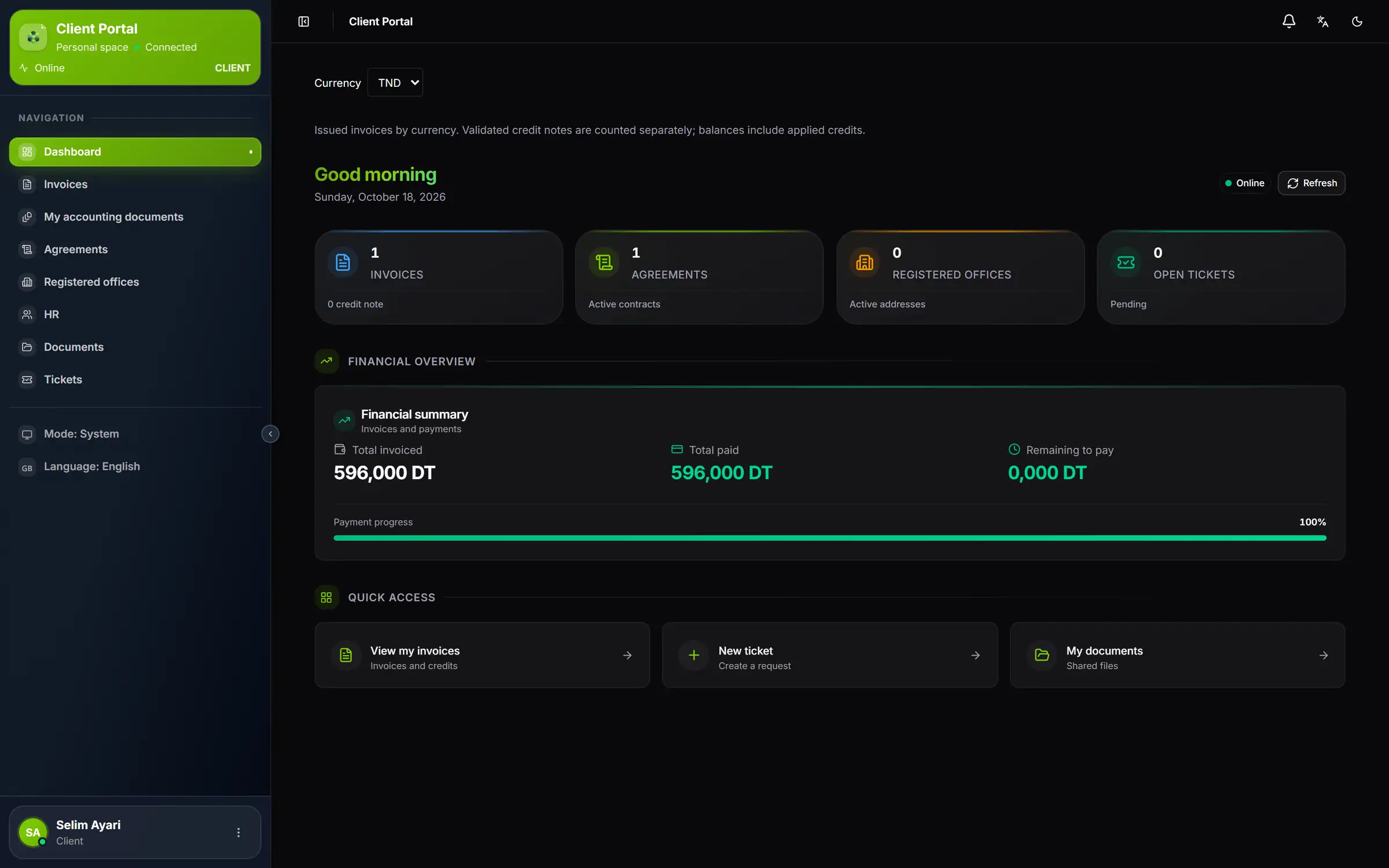
- 1. Currency: the summary reads currency by currency, TND first.
- 2. The greeting: « Good morning », « Good afternoon » or « Good evening », and today's date.
- 3. Refresh: reloads the figures.
- 4. Invoices: the invoices issued in this currency, and the number of credit notes.
- 5. Open tickets: their tickets still in progress with you.
- 6. Financial summary: total invoiced, total paid, remaining to pay and payment progress.
- 7. Quick access: their invoices, a new ticket, their documents.
| Counter | What it counts |
|---|---|
| Invoices | The invoices issued in the chosen currency; below, the number of validated credit notes |
| Agreements | The agreements in progress (Pre-invoiced included) |
| Registered offices | The registered office contracts in progress (Pre-invoiced included) |
| Open tickets | The tickets that are open, in progress, on hold or awaiting their reply |
Under Financial overview, the Financial summary gives the Total invoiced, the Total paid and the Remaining to pay, then the Payment progress as a percentage. The amount remaining to pay only turns red when something is due. The sentence under the currency says it: validated credit notes are counted separately, and the balance takes applied credit notes into account.
My account
The three dots of the client's card, at the bottom of the menu, then My account, open the My Profile page. It brings together, read only:
- Personal information: full name, email, phone, member since;
- Company: company name, trade name, Client No., legal form, email, phone and address of the company.
The client does not change this information: to change any of it, they write to you in a ticket (chapter 9). You correct the client file, and the portal picks it up.
Changing the password
- Under Security, the client clicks Change password.
- They enter the Current password, then the New password and Confirm password.
- The gauge checks five criteria: at least 8 characters, a capital, a lower-case letter, a digit, a special character. The server requires all five, and also refuses a password that is too common, close to the name or the email, or the same as the old one.
- They click Save: « Password changed successfully. »