
Why some Sage vouchers do not balance on their own
In Sage, a journal must balance over its month, not voucher by voucher. An opening-balance entry often numbers each account apart; an entry can be keyed under one number over several days; two vouchers can correct each other. In IntegraSys, each voucher must balance.
So the takeover takes every voucher, and looks in order for what balances it, always within the same journal.
Merged vouchers
| Order | What is merged | The message under the summary |
|---|---|---|
| 1 | Vouchers of the same day that only balance together, like opening balances | « … group(s) of vouchers balanced together (same journal, same date) taken over as they are — opening balances in particular. » |
| 2 | A voucher keyed under the same number over several days of the month | « … voucher(s) keyed under one number over several days of the month, each taken over as a single voucher. » |
| 3 | Within the same month, two vouchers whose gaps cancel out, then the rest of the month if it balances together | « … group(s) of vouchers that only balance together (same journal, same month), each taken over as a single voucher. » |
The merged voucher keeps the number and date of the first one. Every line is kept as it is; those of the other vouchers take that date, always within the same month. These merges ask for nothing: they are only reported.
The suspense account and the REPRISE journal
What nothing balances is still taken over, with an adjustment you will regularise:
- A voucher nothing balances within its journal and month is taken over as it is, with one more line, « Écart de reprise Sage » (Sage takeover difference), on the suspense account.
- A line with no account, or whose account the file's chart of accounts refuses, is posted to the suspense account.
- A voucher with no journal, or whose journal the file refuses, is taken over in the REPRISE journal, « Reprise Sage — journal à identifier » (journal to identify).
The suspense account is the file's own: a detail account starting with 461, preferably the one whose name contains « attente » (suspense). If there is none, the takeover creates « Compte d'attente (reprise Sage) »: 461 padded with zeros to the usual length of the file's accounts, for example 4610000.
Two cases ask for nothing:
- A negative amount moves to the other column, as a positive one: a debit of -100 becomes a credit of 100.
- A voucher whose lines are all zero has nothing to take over: « … voucher(s) whose lines are all zero: nothing to take over. ».
What is still refused
Only a voucher dated outside the fiscal year is still refused. The summary's red box names it: « Incomplete synchronisation: … voucher(s), … entry line(s) not taken over. », followed by one line per voucher, « journal · voucher · date — cause », for the first ten, then « … and … more. ». Entries with no readable date, for their part, are counted on a separate card (chapter 8) and are not in the report.
The orange box: « Taken over with … adjustment(s) to regularise »
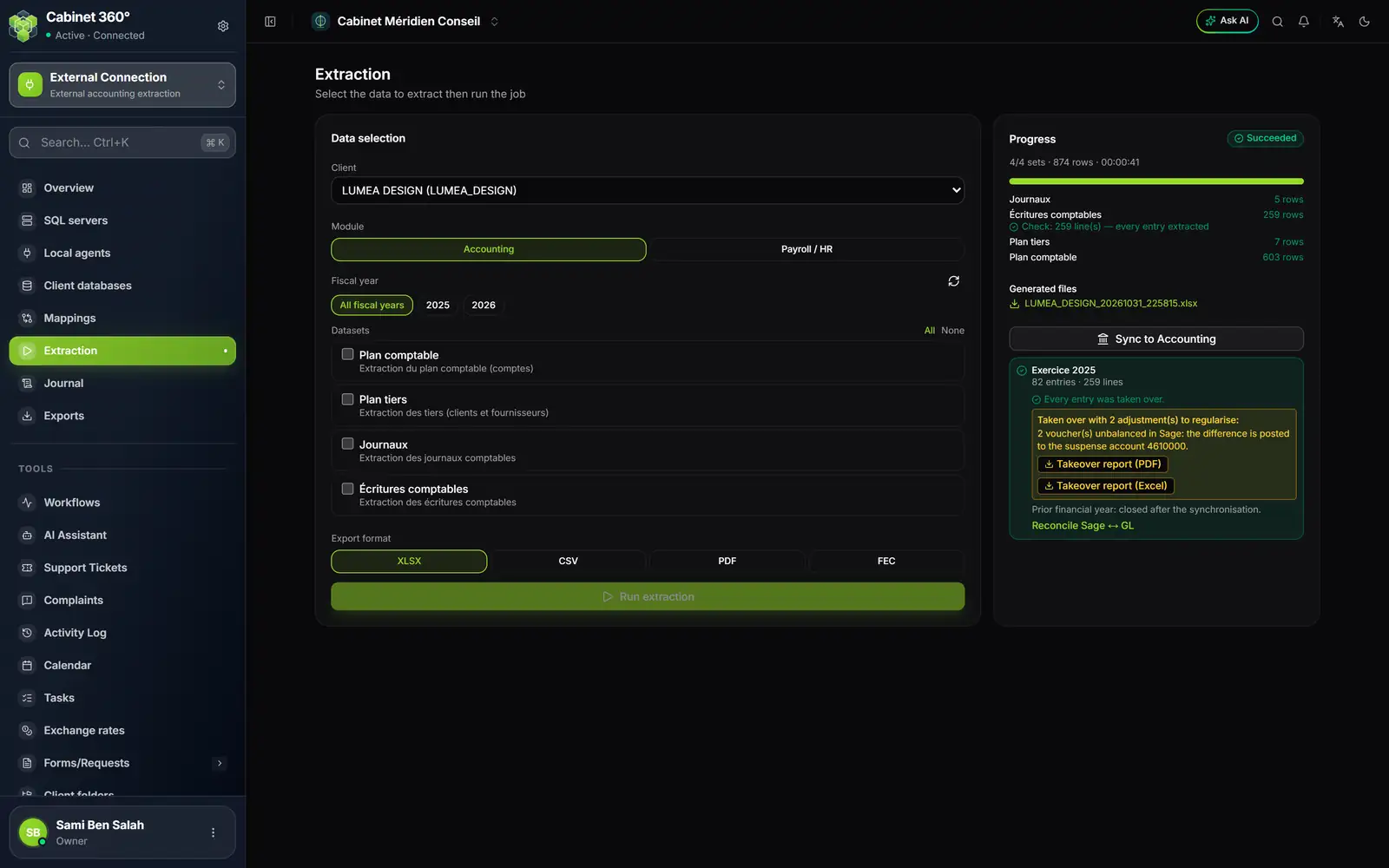
- 1. The extraction's Excel workbook, to download.
- 2. Every entry was taken over, but two vouchers with an adjustment: the difference is posted to the suspense account 4610000.
- 3. Takeover report (PDF) and Takeover report (Excel): each adjusted voucher, its lines and its cause.
- 4. The prior fiscal year is closed after the takeover; the reconciliation is one click away.
The orange box counts the adjustments, then gives one line per kind:
- « … voucher(s) unbalanced in Sage: the difference is posted to the suspense account 4610000. »;
- « … line(s) without a recognised account, posted to the suspense account 4610000. »;
- « … voucher(s) without a recognised journal, taken over in the REPRISE journal. ».
The takeover report
The Takeover report (PDF) and Takeover report (Excel) buttons show in the orange adjustments box, or in the red box of refused vouchers. They are not under Exports: a report belongs to a fiscal year taken over. The report is written in French.
The PDF, landscape, has the title « Écritures non reprises et reprises avec ajustement » (entries not taken over and taken over with an adjustment; « Écritures non reprises par la synchronisation » when there is no adjustment) and, under it, « Dossier : … — Exercice du 01/01/2025 au 31/12/2025 — Extraction n° … » (file, fiscal year, extraction number). It contains:
- Synthèse par cause (summary by cause): one line per cause, with Pièces (vouchers), Lignes (lines), Débit, Crédit, and a Total. Adjustment causes start with « Reprise avec ajustement : » (taken over with an adjustment);
- then each voucher: « Journal … · Pièce … · date — cause », its lines (Compte, Tiers, Libellé, Débit, Crédit: account, third party, label, debit, credit), and a « Cause : … » sentence explaining it.
Amounts are written 1 234 567,890 and dates dd/mm/yyyy. The PDF stops at 1,500 vouchers and refers to the Excel file for the others.
The Excel file carries everything, with no limit, on two sheets: Synthèse (the same as the PDF) and Détail, one row per entry line: Journal, Date, Pièce, Compte, Tiers, Libellé, Débit, Crédit, Cause, Explication, and Statut: « Non reprise » (not taken over) or « Reprise avec ajustement » (taken over with an adjustment).
Regularising
The report is your work list. In the file's accounting:
- Open the takeover report and take the vouchers one by one.
- For a voucher posted to the suspense account, correct the « Écart de reprise Sage » line or the line with no account by posting it to the right account.
- For a voucher in the REPRISE journal, find in Sage the journal it was keyed in, and correct it accordingly.
- Carry on until the suspense account is cleared.
The other messages under the summary
- « Journal …: … »: a journal taken over differently from Sage, with the reason (chapter 8).
- « … cash/bank voucher(s) without a line on the journal's counterpart account. »: these bank or cash vouchers are taken over as in Sage; check them.
- « … entry(ies) not updated: changed in the accounting since the last sync, they are not overwritten. »: see chapter 10.