
What is counted
When it extracts the Écritures comptables (accounting entries), the extraction makes three counts, for the same years:
- in the Sage database: the number of entry lines, the total debits and the total credits;
- in the file produced: the same three numbers;
- in the data prepared for the accounting: the same three numbers again.
All three must be equal, to the millime. Through the agent, the check needs version 1.12 or later; an extraction made before shows no check line.
The green check
Under the Écritures comptables line of Progress, a green line says: « Check: 520 line(s) — every entry extracted ». Sage's lines, debit and credit are found again in the file and in the takeover data. If every data set came through, the extraction has Succeeded.
The red check
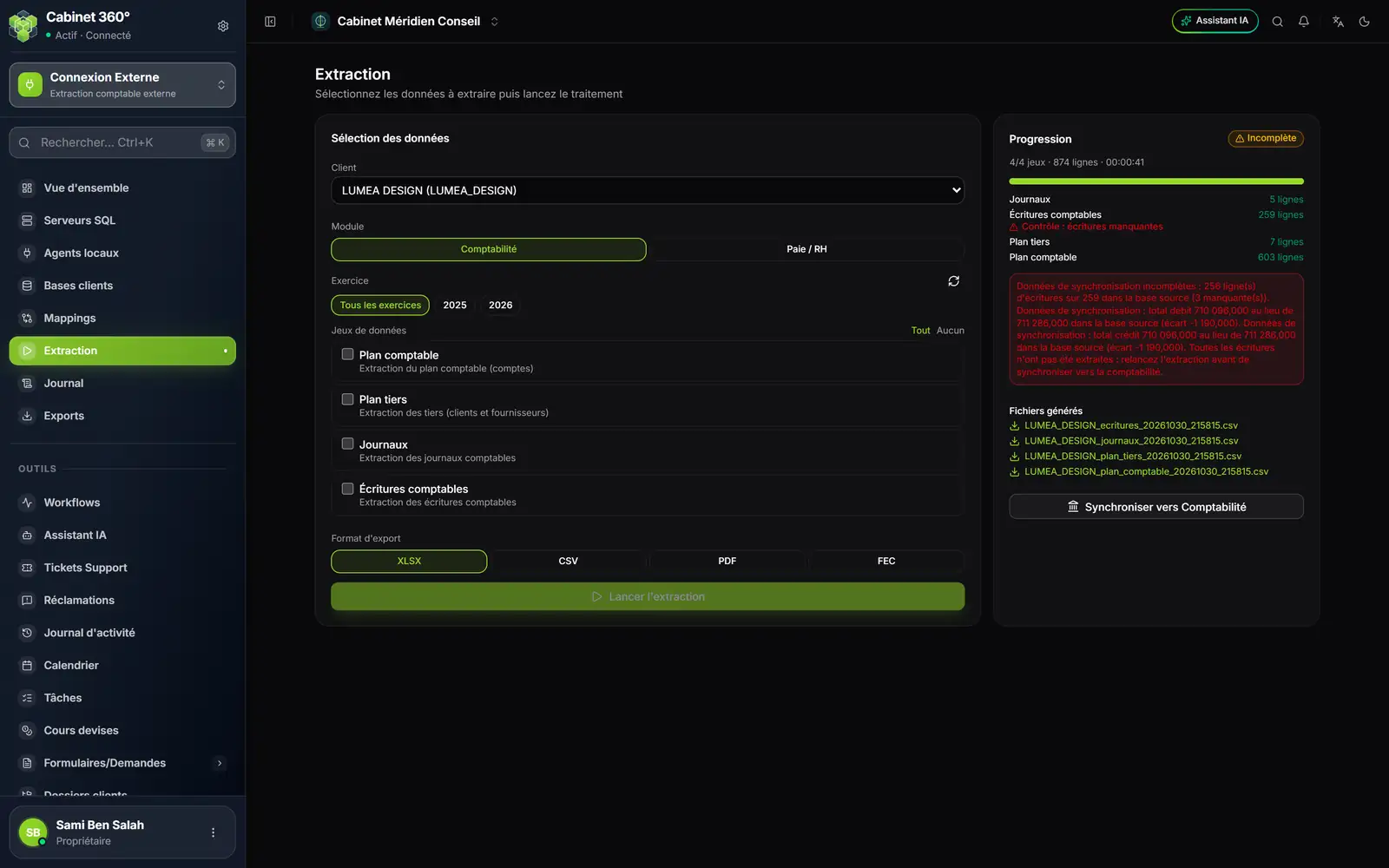
- 1. Incomplete, in orange: entries are missing, even though each data set came through.
- 2. « Check: entries missing », in red, under the entries.
- 3. The red box puts a number on each gap: missing lines, total debit, total credit.
- 4. Sync to Accounting stays on screen; here the takeover will be refused, because the gap is in the data prepared for the accounting.
The red box gives one sentence per gap, in French, on this pattern:
- « Données de synchronisation incomplètes : 256 ligne(s) d'écritures sur 259 dans la base source (3 manquante(s)). »: three lines are missing from the data prepared for the accounting;
- « Données de synchronisation : total débit 710 096,000 au lieu de 711 286,000 dans la base source (écart -1 190,000). »: the total debits do not match Sage; a similar sentence follows for the credit;
- the same sentences starting with « Extraction incomplète : » and « Extraction : » concern the file produced.
These are the sentences of the screen above. The box always ends with: « Toutes les écritures n'ont pas été extraites : relancez l'extraction avant de synchroniser vers la comptabilité. » (not every entry was extracted: run the extraction again before syncing to the accounting).
The orange check: « not performed »
« Completeness check not performed », in orange, means Sage could not count its entries. The rest of the sentence, in French, says why:
- « Contrôle d'exhaustivité non disponible pour ce logiciel source. » (check not available for this software): the software is not a known Sage, for example with SQL générique (mappings);
- « Contrôle d'exhaustivité impossible : … » (check impossible): the count failed, with its reason.
The extraction did take place, and has not failed for all that; but nothing proves all the entries are there. Compare the number of lines with Sage yourself before relying on it.
Why the sync is then refused
A takeover into accounting must never start from an extraction with holes. If the data prepared for the accounting has a gap, Sync to Accounting is refused, with the figures: the message repeats the « Données de synchronisation… » sentences and adds « Toutes les écritures n'ont pas été extraites : relancez l'extraction. ». A gap in the file alone (the sentences starting with « Extraction ») does not block the takeover: the data prepared for the accounting is complete.
The takeover also protects itself on the way: if the data received counts fewer entries than the extraction wrote, it stops on « Données de synchronisation incomplètes : … écriture(s) reçue(s) sur … extraite(s) de la base… » (entries received out of entries extracted). Here too, run the extraction again.
Succeeded, Incomplete: the rule
| What Progress shows | The state shown |
|---|---|
| Every data set came through, green check or none | Succeeded |
| Every data set came through, orange check | Succeeded (check it yourself) |
| At least one data set Failed | Incomplete |
| Red check | Incomplete |
| No data set came through | Failed |
The Journal and the Overview show the same state, and the Journal's filter follows it (chapter 12).