
Before you click
- The Accounting module and the right to create entries, the one for keying vouchers.
- An accounting file for the client. Otherwise the takeover answers: « Le client n'a pas de dossier comptable (tenue comptable). » (the client has no accounting file).
- A finished extraction that includes Écritures comptables. Without that data set, an orange box replaces the button: « Syncing requires an extraction that includes "Accounting entries". ».
- A check with no gap in the data prepared for the accounting (chapter 7): an extraction whose data has holes is refused.
The other three data sets, Plan comptable, Plan tiers and Journaux, are not required, but they give the accounts their names, create the third parties and give the journals their type.
Start the takeover
Under the extraction's Progress, click Sync to Accounting.
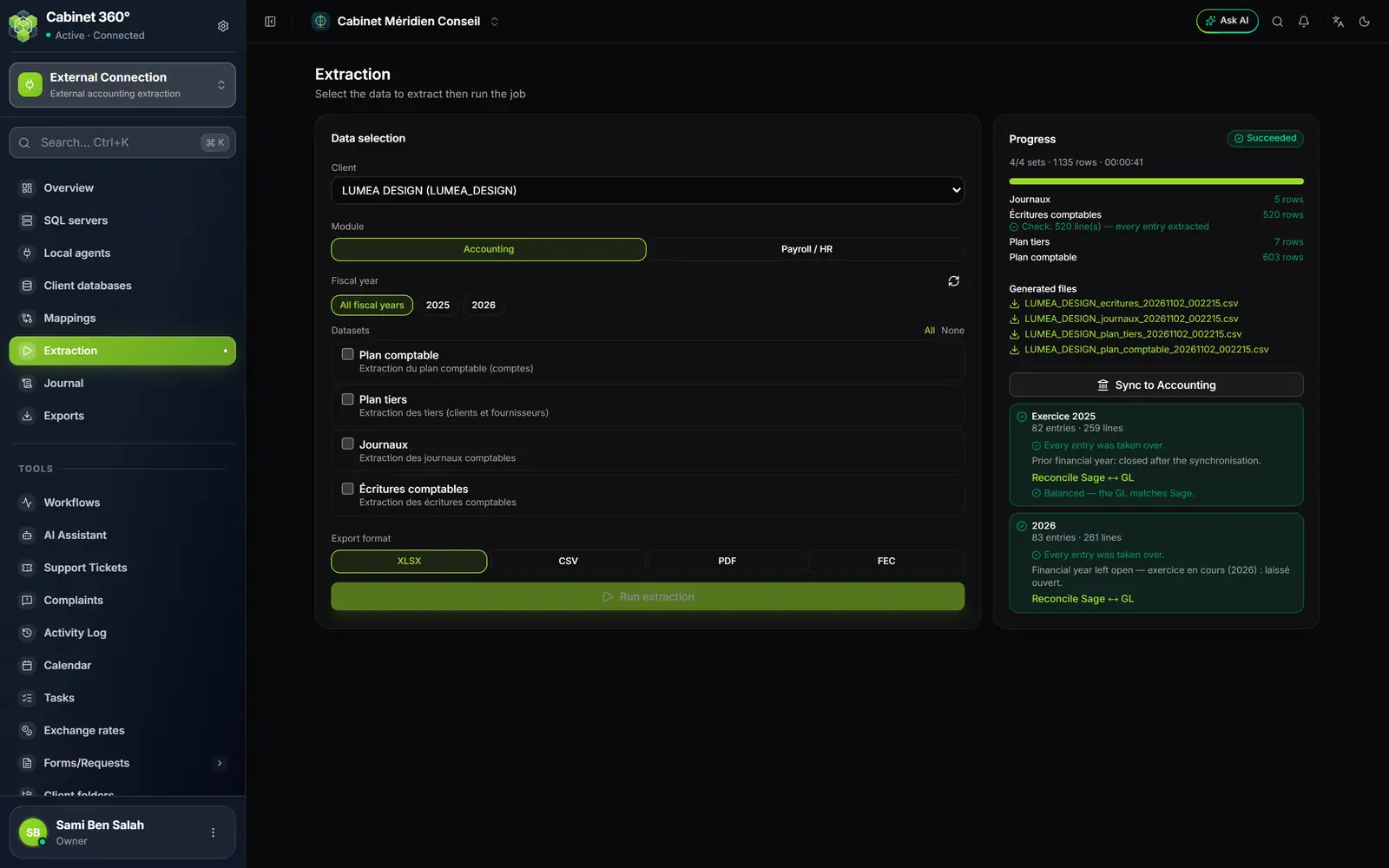
- 1. Sync to Accounting: one click starts the takeover, in the background.
- 2. The fiscal year's summary: « 82 entries · 259 lines », then « Every entry was taken over. ».
- 3. Reconcile Sage ↔ GL compares the balances: here « Balanced — the GL matches Sage. ».
- 4. The current fiscal year stays open, and the summary says why.
The takeover goes through two stages, which the screen shows:
- « Reading the extraction data… », with the number of lines read;
- « Writing to the accounting records… », with one card per fiscal year: the lines already written out of the year's total, « … / … lines synced », and its progress bar.
When a card is done, it turns green and shows its summary.
What happens in the background
- The work runs on IntegraSys's servers, not in your browser. You can leave the screen: the page address keeps the follow-up, and the Journal brings you back to it (chapter 12).
- One takeover at a time per extraction. A second click while it runs starts nothing: the screen follows the one in progress.
- In batches. Entries are written in batches of at most 5,000 lines, cut between two days of the same journal; a bigger day goes alone in its batch. A batch is written whole or not at all. While a batch is written, a colleague saving a voucher in the same fiscal year waits a brief moment, then their voucher goes through.
- An interrupted takeover (a server update, for example) loses nothing: at least a quarter of an hour after its last activity (up to 35 minutes if it was still reading the data), a new click on Sync to Accounting restarts it after the last batch written. Before that, a click only follows the stopped takeover.
One fiscal year per year
Entries are split by the calendar year of their date, and each year goes into the file's fiscal year that ends in that year.
The fiscal year is missing. The year's card shows an error: « Aucun exercice 2023 dans ce dossier — créez-le d'abord. » (no 2023 fiscal year in this file — create it first), with the Create fiscal year 2023 button. One click creates it, open, then restarts the takeover. Its dates follow the file's closing date: 01/01 to 31/12 for a file closing on 31 December; 01/07/2024 to 30/06/2025 for the 2025 fiscal year of a file closing on 30 June.
The fiscal year is closed. The card says: « Exercice 2023 clôturé, veuillez le réouvrir. » (fiscal year 2023 closed, please reopen it). Reopen it in the file's accounting (book « Accounting & Financial Statements »), then click Sync to Accounting again. The one exception: a fiscal year closed by the sync itself, which it reopens and closes again by itself (chapter 10).
Entries with no date. A card « … écriture(s) sans date valide, non synchronisée(s). » (entries with no valid date, not synced) counts them. An entry with no date cannot go into any fiscal year; it is not in the takeover report.
What the takeover writes into the accounting
- Validated vouchers. No draft to validate: each voucher arrives validated. Only the accounting's OCR inbox still waits for your validation.
- Sage's number. Each voucher keeps the number and date it had in Sage. The journal's numbering only applies to vouchers created in IntegraSys.
- Missing accounts are created, with the name from Sage's Plan comptable. An account that already exists in the file is never changed.
- Third parties from the Plan tiers are created when their control account (411, 401…) exists in the file. A line keeps its third party if it exists in the file; otherwise it is taken over without one, with no message on screen.
- Journals keep their Sage type: Achats as purchases, Ventes as sales, Général as general, Trésorerie as bank or cash, with its counterpart account: bank or cash is decided by that account's nature, else its class (54 cash, 53 bank), else the journal's name.
Each fiscal year's summary
Each finished fiscal-year card says:
- « 82 entries · 259 lines »: the vouchers created or updated, and their lines; on a new takeover, « · 82 Already synced » counts those that did not change (chapter 10);
- « Every entry was taken over. », in green; otherwise a red box « Incomplete synchronisation: … voucher(s), … entry line(s) not taken over. » names the refused vouchers, with their journal, number, date and cause (chapter 9);
- the fate of the fiscal year, in a grey sentence.
Past years closed, current year open
Once taken over, each year before the current year is closed, as the accounting's Close button would do: « Prior financial year: closed after the synchronisation. ». The current year stays open for entry: « Financial year left open — exercice en cours (2026) : laissé ouvert. » (current year, left open).
A prior year that does not balance stays open, and the sentence says why: « Financial year left open — … ».
The Sage ↔ GL reconciliation
Under each fiscal year, Reconcile Sage ↔ GL proves the entries arrived intact. The GL is the file's general ledger in IntegraSys. The reconciliation compares, account by account, the Sage balance and the file's:
- « Balanced — the GL matches Sage. », in green: everything agrees;
- otherwise, « … account(s) differ » and a table Account, Sage, GL, Difference, for the first thirty accounts.
A difference appears when the file has moved since the takeover (a voucher keyed, changed or deleted in IntegraSys), after an adjustment or a refusal by the takeover (chapter 9), or when the fiscal year already held entries before the takeover.
The trail in the Activity log
Each fiscal year taken over leaves one sync line in the accounting file's Activity log: « Synchronisation Sage 2025 : 82 pièce(s) créée(s), 0 mise(s) à jour, 0 inchangée(s)… » (vouchers created, updated, unchanged), with conflicts, refused vouchers and adjusted takeovers when there are any. A failed year says so too: « — EN ÉCHEC ». A prior year closed by the takeover adds its own closing line.