
One card per data set
First choose your software in the list at the top right: Sage 100 (SQL Server), Sage Paie (SQL Server) or SQL générique (mappings). The page then shows one card per data set.
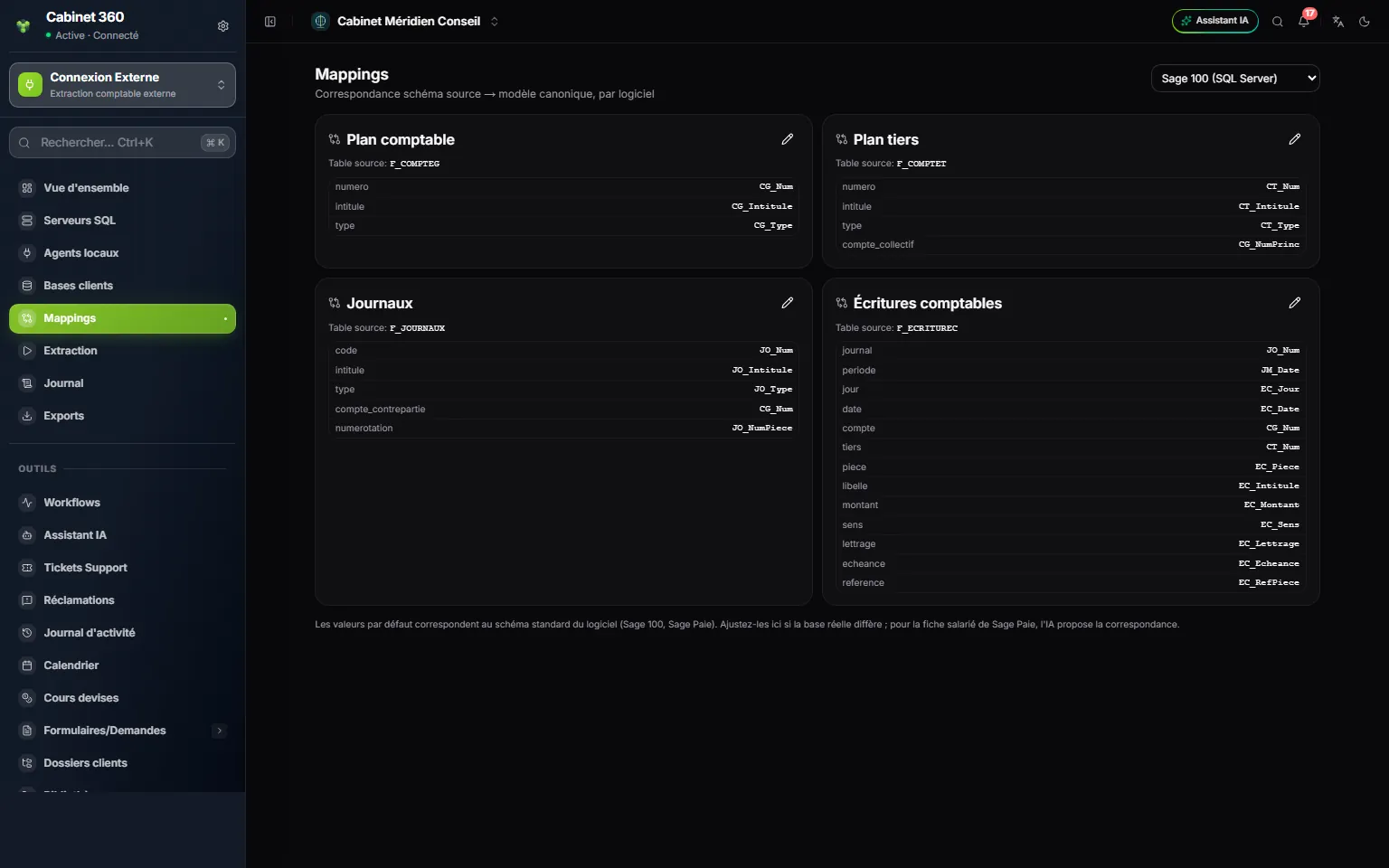
- 1. The software whose mappings you are reading.
- 2. One card per data set, with its Source table in the Sage database, here F_COMPTEG for the chart of accounts.
- 3. The pencil opens the card to correct it.
- 4. On the left, the IntegraSys field; on the right, the Sage column that feeds it.
- 5. An entry's date is read from periode and jour.
- 6. The reminder: the starting values are those of the software's standard schema.
For Sage 100, there are four cards: Plan comptable (chart of accounts), Plan tiers (third parties), Journaux (journals) and Écritures comptables (accounting entries). On each, the Source table line gives the Sage table (F_COMPTEG, F_COMPTET, F_JOURNAUX, F_ECRITUREC), then each line links an IntegraSys field, on the left, to a Sage column, on the right.
A few fields worth knowing:
- Journaux: type (purchases, sales, cash/bank, general) and compte_contrepartie (the bank or cash account of a cash/bank journal) give the journals their type in IntegraSys (chapter 8).
- Écritures comptables: IntegraSys dates an entry with periode (the journal's month) and jour (day). The date column, the keying date in Sage, is only a fallback.
- montant and sens: Sage keeps an amount and a direction (debit or credit); IntegraSys turns them back into a debit and a credit.
Correct a mapping
Compare the cards with the real names of the client's database, which their IT person or Sage reseller can read out. If a name differs:
- Click the card's pencil.
- In the window, correct the Source table, or a field's column.
- Click Save. « Mapping saved » appears and the card shows custom.
A wrong table, or a required column (number, name, amount, direction…), makes its data set end as Failed at the extraction, with its reason; the other data sets carry on (chapter 6). An optional column that cannot be found, for its part, is ignored without a message, and its field stays empty; a periode or jour column that cannot be found makes the entry be dated by date. To test a correction, run an extraction of that data set alone and look at the file.
With SQL générique (mappings), for software other than Sage, the four accounting cards start empty: fill in their table and columns.
The case of Sage Paie
Choose Sage Paie (SQL Server): one card appears for each payroll data set, including Salaries, the employee records.
Let the AI propose the employee form
The employee form has many fields: payroll number, title, surname, first name, family status, date of birth, social security number, bank, base salary… Rather than linking each column by hand, the AI can propose the mapping.
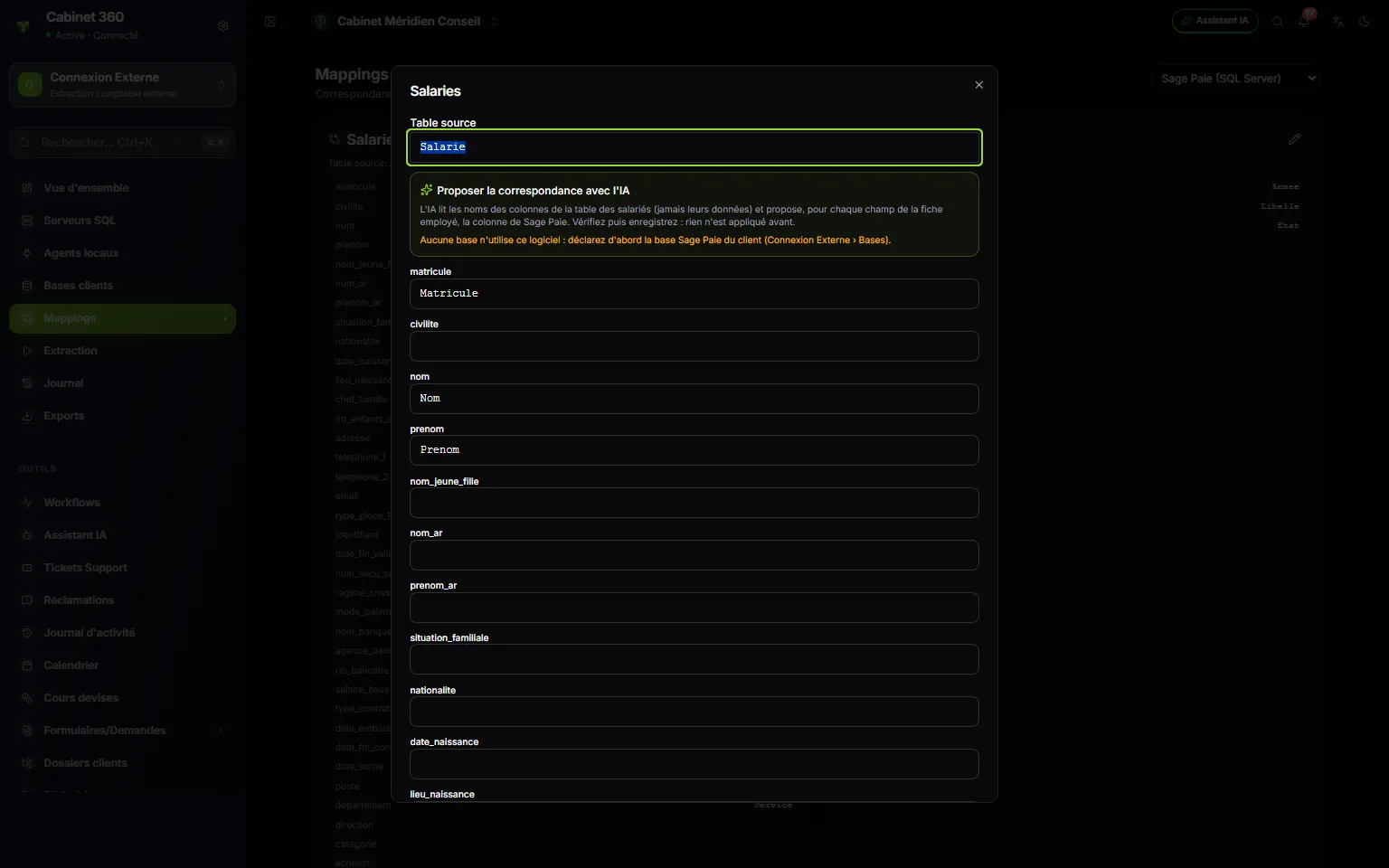
- 1. Source table: the employees table in Sage Paie.
- 2. Propose the mapping with AI: it reads the column names, never the data.
- 3. With no Sage Paie database declared, this orange message replaces the button.
- 4. A field of the employee form, and the Sage column that fills it.
- On the Salaries card, click the pencil.
- In the Propose the mapping with AI block, choose the Sage Paie database to read. Its agent must be Online.
- Click List columns and propose. IntegraSys reads the table's real columns, through the agent, then the AI proposes a column for each field.
- Read the result: the number of fields mapped, out of the table's number of columns, then « Review each mapping before saving. ».
- Check each field. A badge gives the AI's confidence: high confidence, to check or uncertain, with its reason in italics under the field. Each box offers the list of the table's real columns.
- Click Save. Nothing is applied before.
- What leaves your network: only the table's name and its column names. No row, no salary, no employee name.
- AI credits: the proposal uses the firm's AI credits.
- If the AI does not answer (AI credits used up, AI refused by the firm's policy, service unavailable), an orange message says so, with the reason, in French: « L'IA n'a pas pu proposer la correspondance (crédits IA épuisés) : la proposition ci-dessous rapproche seulement les noms des colonnes. Vérifiez-la. » (the AI could not propose the mapping: the proposal below only matches the column names; check it). A proposal based on the names alone then replaces the AI's.
- If the table does not exist in the database: « Table “Salarie” has no column in this database: check the source table name. ».