
Two sources, one rule
The Processing › Data import menu only exists in a Financial audit mission. It brings together eight screens, which do not all read the same thing.
| Source | Screens | Who uses it next |
|---|---|---|
| The client's accounting file, kept in the Accounting module | Dashboard, Chart of accounts, Third-party accounts, Journal codes, and Pre-audit entries | The consistency tests, the financial statements before and after audit, the entries memo |
| Files imported into the mission | Accounting entries, General ledgers, Trial balance, Third-party balance | Nobody: they stay in the mission, as documents of the file |
The import dashboard
This dashboard counts what the client's accounting file holds for the mission's fiscal year. Its words are shown in French, whatever the language of your screen. « Actualiser » (refresh) re-reads all the counters.
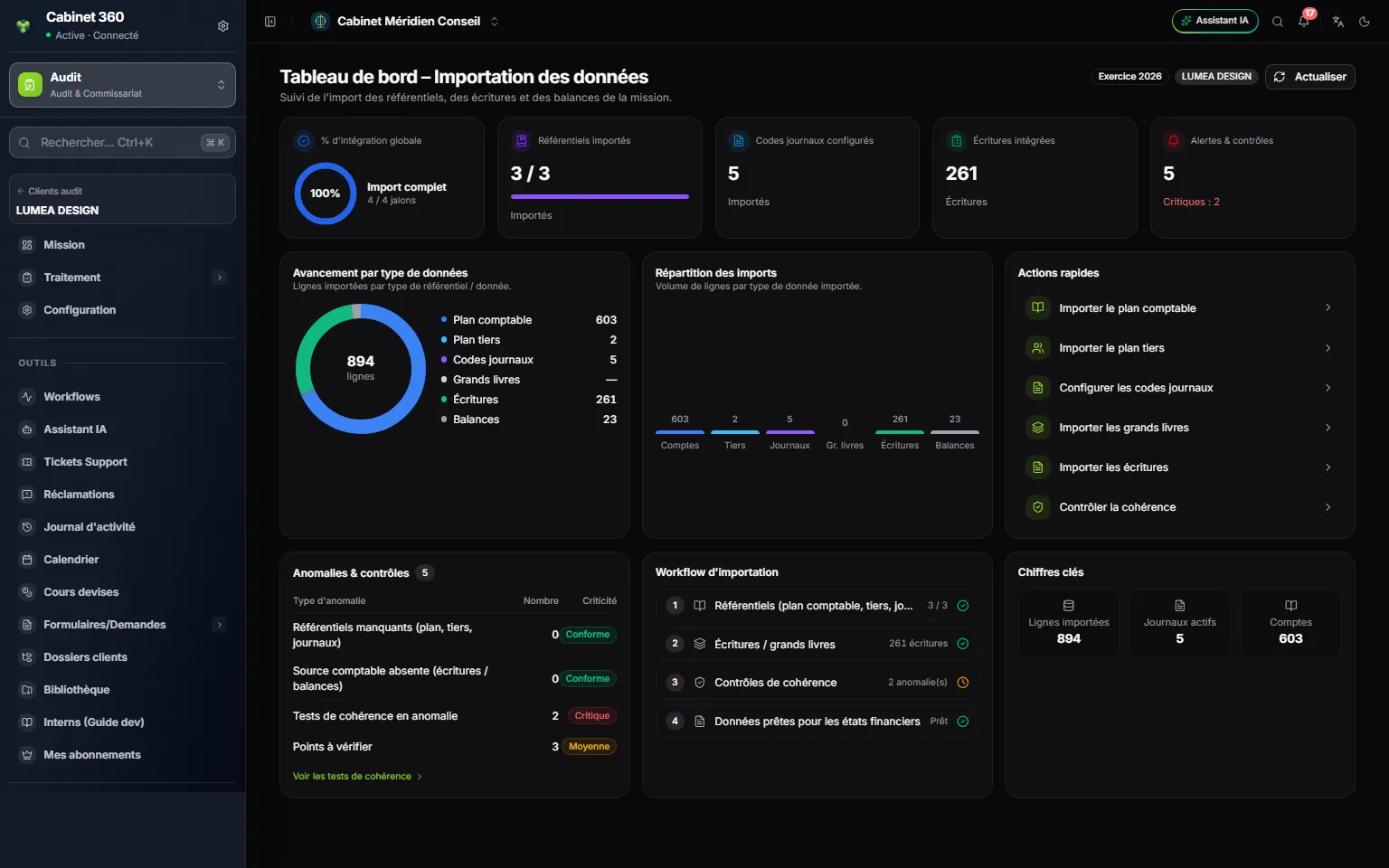
- 1. « Actualiser » (refresh) re-reads the counters.
- 2. The five indicators: progress, reference lists, journals, entries, alerts.
- 3. « Avancement par type de données » (progress by data type): the number of lines of the chart of accounts, of the third parties, of the journals, of the entries and of the trial balance.
- 4. « Actions rapides » (quick actions): links to the charts, the journals, the general ledgers, the entries and the consistency tests.
- 5. « Anomalies & contrôles » (anomalies and checks): what is missing or wrong, with its severity.
- 6. « Workflow d'importation » (import workflow): the four steps, ticked one by one.
| Block | What it counts |
|---|---|
| « % d'intégration globale » (overall integration) | Four milestones: the three reference lists filled in, entries present, the consistency tests computed (this milestone is reached as soon as the screen opens), the fiscal year found. |
| « Référentiels importés » (reference lists imported) | Chart of accounts, third-party accounts and journal codes: how many out of three are filled in. |
| « Codes journaux configurés » (journal codes set up) | The number of journals in the file. |
| « Écritures intégrées » (entries integrated) | The number of entry lines of the fiscal year. |
| « Alertes & contrôles » (alerts and checks) | The anomalies and the points to verify of the consistency tests, including the critical ones. |
The « Anomalies & contrôles » table sorts four kinds of problem: « Référentiels manquants » (missing reference lists, severity « Moyenne », medium), « Source comptable absente » (no accounting source, « Critique », critical), « Tests de cohérence en anomalie » (consistency tests in anomaly, « Critique ») and « Points à vérifier » (points to verify, « Moyenne »). A row at zero reads « Conforme » (compliant). The « Voir les tests de cohérence » link opens the tests (chapter 6).
The « Grands livres » (general ledgers) row stays at « — »: the general ledgers imported into the mission are not counted.
Chart of accounts, third-party accounts and journal codes
These three screens are those of the Accounting module, opened on the client's file. They show what it holds, and their import buttons complete it. A change made here changes the accounting file itself.
If the client does not have an accounting file yet, the screen says so, for example « No chart of accounts for this client », and offers Create the accounting file & import a file. This button:
- ticks the Bookkeeping service on the client's record, if it was not ticked;
- creates its accounting file, without requiring a team as long as the client has an audit mission that is not archived in your firm.
The button is reserved for the administrator, the mission leads, the managers and the supervisors, with the right to edit the client's record.
The message « Accounting file created » appears. The button does not create a fiscal year: create the one for the audited year in the Accounting module. The financial statements also need a model, chosen from the client's sector and type.
The mission's files
Four screens keep, inside the mission, the files the client hands you. They share the same grid, whose words are shown in French whatever the language of your screen.
| Screen | Fiscal year | Template columns (as written in the file) |
|---|---|---|
| Accounting entries | N, the mission's fiscal year | Journal, Date, N° pièce, Référence, Compte, Compte tiers, Libellé, Débit, Crédit |
| General ledgers | N | Compte général, Code tiers, Date, Code journal, N° pièce, Référence, Libellé, Débit, Crédit, Lettrage |
| Trial balance | N-1 | Compte général, Intitulé, MVTS débit, MVTS crédit, Solde débiteur, Solde créditeur |
| Third-party balance | N-1 | Compte général, Code tiers, Intitulé, Type, MVTS débit, MVTS crédit, Solde débiteur, Solde créditeur |
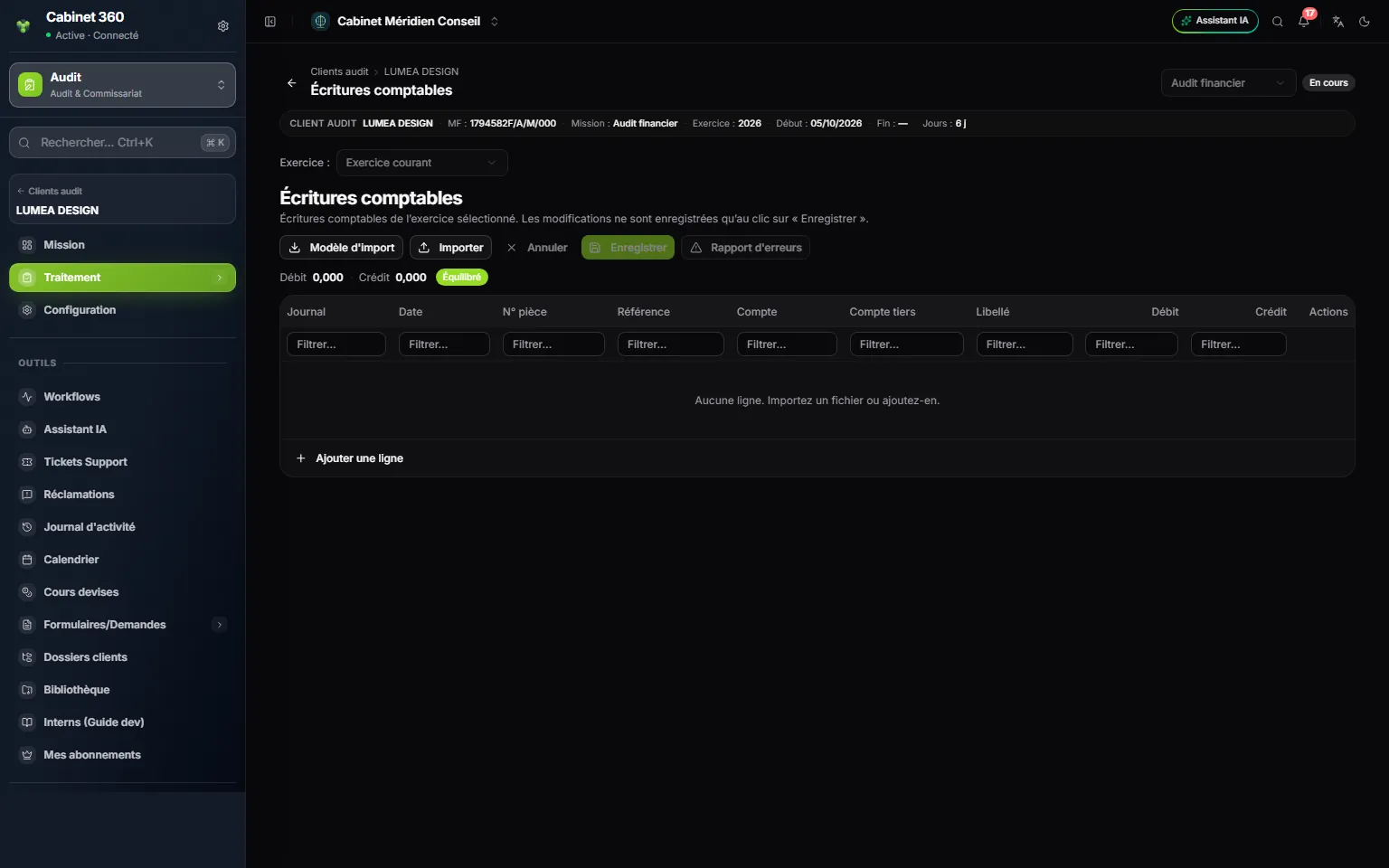
- 1. The toolbar: « Modèle d'import » (import template), the workbook with the right titles; « Importer » (import), which loads a file without saving it; « Annuler » (cancel); « Enregistrer » (save); « Rapport d'erreurs » (error report), the lines the import could not read.
- 2. The totals « Débit » and « Crédit », and the « Équilibré » (balanced) or « Déséquilibré » (unbalanced) badge.
- 3. One filter per column to find a line.
- 4. « Ajouter une ligne » (add a line) by hand.
- Click « Modèle d'import »: an Excel workbook is downloaded, with only the row of titles.
- Fill it in without changing the titles. Dates are written dd/mm/yyyy; an amount accepts the comma or the point.
- Click « Importer » and choose the file: Excel, OpenDocument or CSV. The grid fills up. With no error, « … ligne(s) importée(s) » (lines imported) appears; otherwise « … anomalie(s) d'import » (import anomalies) appears and the « Rapport d'erreurs » opens by itself.
- Check the grid: the totals, the badge, the « Rapport d'erreurs ». Correct a line with its pencil, remove it with its bin.
- Click « Enregistrer »: « Enregistré » (saved) appears. Until you do, nothing is kept; « Annuler » (cancel) goes back to the saved version.
The import reads the active sheet of the workbook, the one shown when the file was saved, and takes its first row for the titles. Titles are recognised regardless of capitals, accents and extra spaces; a word stuck to another is not recognised. In a CSV, the separator is the semicolon or the comma. The « Rapport d'erreurs » lists the unreadable amounts, set to zero, in the form « L7 … »: L7 is the seventh line of the file.
Pre-audit entries
This screen shows, read only, the entries of the client's books for the audited fiscal year, as the firm recorded them. Your audit entries are not there: they are in the Entries memo (chapter 8).
The entry only appears in the menu when four conditions are met:
- The mission carries a Fiscal year.
- The client's record has both the Audit and Bookkeeping services.
- The client has an accounting file, with a fiscal year that ends or starts in the audited year.
- This fiscal year carries at least one entry recorded in the accounting; audit entries do not count.
If a condition is missing, the entry is not in the menu. The screen, opened from a link, then shows « No pre-audit entries for this engagement » and the reason, for example « The client has no accounting file. »
At the top, a card recalls the Accounting year, its dates, its state (Open or Closed) and the number of lines. Three filters help you search:
- the search, on the label, the account, the third party, the voucher or the reference;
- All journals, to keep only one;
- Account (prefix): type 411 for all the accounts that start with 411.
An old voucher left in draft carries the Draft badge; entry no longer creates any. The Totals line follows the filters and reads Balanced, or shows the gap between debit and credit. The screen shows 100 lines per page.