
What the module does
The Audit module keeps your firm's statutory audit and audit missions. Each mission is linked to a client and to a fiscal year. It holds:
- its team: the statutory auditor, a co-auditor if there is one, the manager, the mission lead and the collaborators, with the budget in days of the manager, of the mission lead and, in internal control and tax audit, of the collaborators;
- the client's accounting data: read from its accounting file if your firm keeps its books, or imported from an Excel or CSV file;
- the working papers: leads and sub-leads, materiality threshold, analytical review, circularization, related parties, tax and payroll review;
- the internal control or tax audit questionnaire, with the review by the mission lead and by the manager;
- the audit entries, recorded in the client's books and marked « Audit »;
- the financial statements before and after audit;
- the end-of-mission documents: letter of representation, general report, special report, management letter;
- the fee invoice, computed on the scale of the Order of Chartered Accountants of Tunisia (OECT).
The three levels of the menu
The menu of the Audit space grows as you move forward.
| Level | What you see in the menu |
|---|---|
| The Audit space | Dashboard, Audit clients and Structure: Sections, Sub-sections, Questions, Statutory auditors. |
| A chosen client | Dashboard, Audit clients and Missions: this client's missions. |
| An open mission | Mission, Processing and Configuration. At the top, the client's name takes you back to Audit clients. |
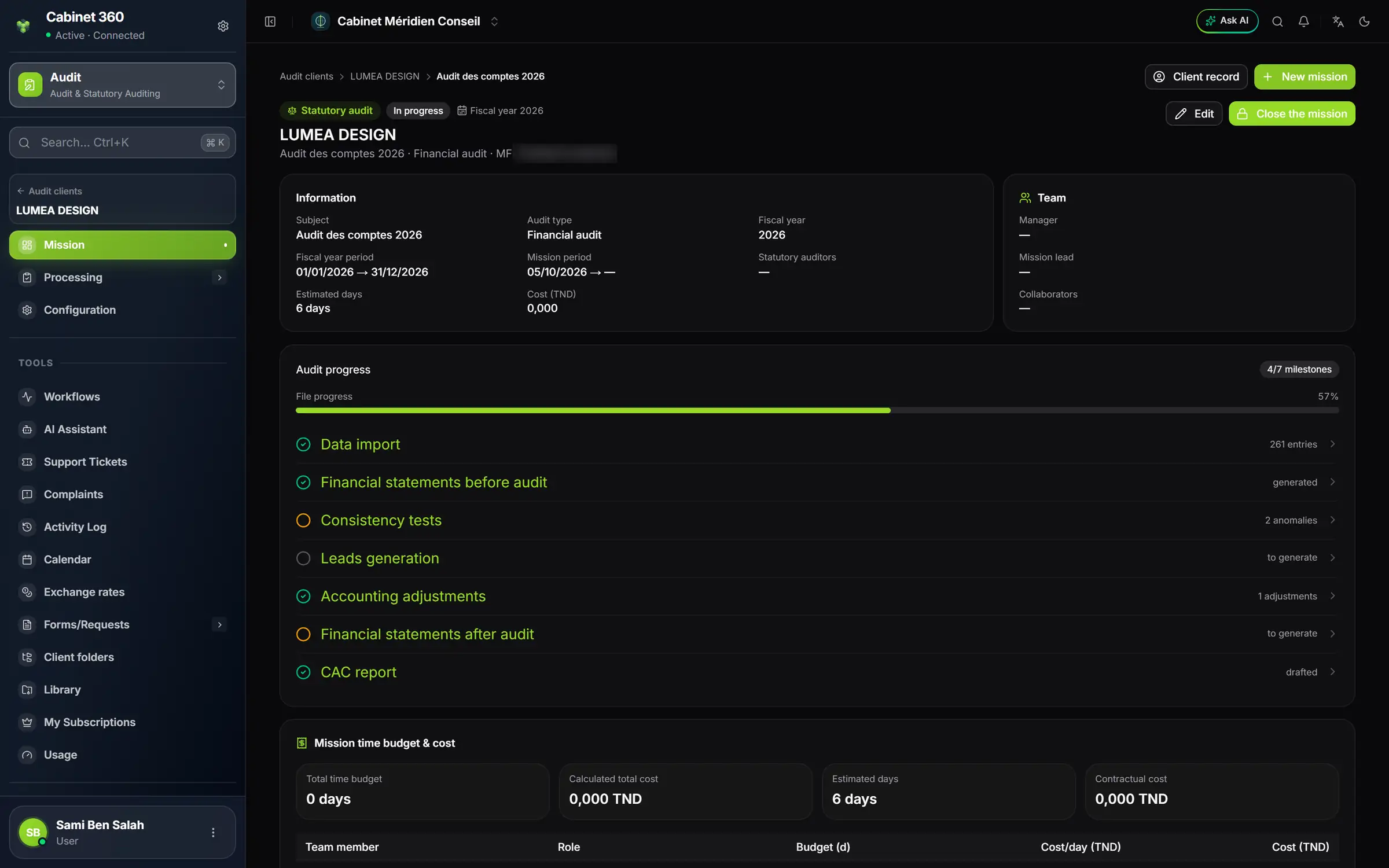
- 1. The client: one click takes you back to the Audit clients list.
- 2. Mission, the home page open here; Processing, all the working screens; Configuration, the mission's record.
- 3. Audit progress: one milestone per main step, clickable.
- 4. Edit the mission, or Close the mission when the file is finished.
Four mission types, four menus
The Audit type, chosen at creation among Internal control, Tax audit and Financial audit, decides the mission's menu. The Other type cannot be chosen in the form.
| Audit type | What Processing contains |
|---|---|
| Financial audit | The full audit of the accounts: data import, financial statements before audit, consistency tests, leads, adjustments, entries memo, reviews, threshold, circularization, financial statements after audit, letter of representation, CAC report and invoicing. |
| Internal control | The team, the Internal control tests (the questionnaire, section by section), the document request, the management letter and invoicing. |
| Tax audit | The same menu as internal control, with the tax audit questionnaire. |
| Other | A flat menu with most of the working screens, including Profitability, but without the data import, the financial statements before and after audit or the entries memo. |
In the first three types, Pre-audit entries is added to the menu when the client has the Audit and Bookkeeping services and its books hold entries for the audited fiscal year (chapter 5).
The path of a financial audit
A financial audit follows, in Processing, the order of the work:
- Data import: you bring in the client's chart of accounts, third parties, journals and entries.
- Team assignment: you name the manager, the mission lead and the collaborators. Today, this team is not saved (chapter 4).
- Pre-audit statements and Consistency tests: you read the client's financial statements as the client kept them, and you spot the anomalies.
- Leads generation and Sub-leads generation: you split the audit into cycles and hand them to the team.
- Accounting adjustments and Entries memo: you propose your corrections, then you post them in the client's books.
- Tax & payroll review, Analytical review, Materiality threshold, Circularization: you carry out your checks.
- Post-audit statements: you read the corrected financial statements.
- Letter of representation and CAC report: you draft and print the end-of-mission documents.
- Invoicing: you generate the fee invoice on the OECT scale.
The Mission page tracks this progress in seven milestones, from the data import to the CAC report (chapter 4).
What you will find in other books
| Topic | Book |
|---|---|
| The client's accounting: file, fiscal years, entries, closing | Accounting & Financial Statements |
| The invoice, sending it and collecting it | Operations and Finance & Cash Register |
| Numbering sequences, the team and rights | Firm setup |